Interpolation (n-D) Using PreLookup (Obsolete)
Perform high-performance constant or linear interpolation, mapping N input values to sampled representation of function in N variables via output from PreLookup Index Search block
Library
Lookup Tables (until R2006a)

Description
Note
The Interpolation (n-D) Using PreLookup block is obsolete. This block was removed from the Lookup Tables library in R2006b and replaced with the Interpolation Using Prelookup block. However, existing models that contain the Interpolation (n-D) Using PreLookup block continue to work for backward compatibility.
Use the Interpolation Using Prelookup block in new
models. Consider using the upgradeadvisor function to replace
Interpolation (n-D) Using PreLookup with Interpolation Using Prelookup in existing models.
See Programmatically Analyze and Upgrade Model.
Among other enhancements, the Interpolation Using Prelookup block provides support for fixed-point data types, consistency checking, and more efficient code generation.
The Interpolation (n-D) Using PreLookup block is intended for use with the PreLookup Index Search (Obsolete) block. The PreLookup Index Search block calculates the index and interval fraction that specifies how its input value relates to the breakpoint data set. You feed the resulting (index, fraction) pair into an Interpolation (n-D) Using PreLookup block to interpolate an n-dimensional table. This combination of blocks performs the equivalent operation that a single instance of the n-D Lookup Table block performs. But by using these blocks instead, you can potentially increase the simulation performance of models that use many interpolation blocks.
This block supports two interpolation methods: flat (constant) interval lookup and linear interpolation. You can apply these operations to 1-D, 2-D, 3-D, 4-D and higher-dimensional tables.
You define a set of output values as the Table data parameter. These table values must correspond to the breakpoint data sets specified in the PreLookup Index Search blocks. For example, the following model illustrates the use of an Interpolation (n-D) Using PreLookup block with two PreLookup Index Search blocks:
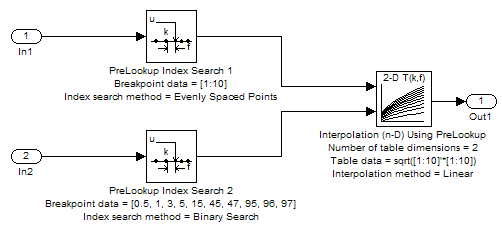
The breakpoint data sets in both PreLookup Index Search blocks contain 10 breakpoints. Consequently, the Interpolation (n-D) Using PreLookup block contains table data of size 10-by-10.
The block generates output by interpolating the table values based on the (index, fraction) pairs fed into the block by each PreLookup Index Search block:
If the inputs match breakpoint parameter values, the output is the table value at the intersection of the row, column, and higher dimension breakpoints.
If the inputs do not match row and column parameter values, the block generates output by interpolating between the appropriate table values. If either or both block inputs are less than the first or greater than the last row or column parameter values, the block extrapolates from the first two or last two points in each corresponding dimension.
The block can perform interpolation on a portion of the table. For more information, see Using the Prelookup and Interpolation Blocks.
Data Type Support
The Interpolation (n-D) Using PreLookup block accepts signals
of types double or single, but
for any given block, the inputs must all be of the same type. The Table
data parameter must be of the same type as the inputs.
The output has the same data type as the Table data.
Parameters
- Number of table dimensions
The number of dimensions that the Table data parameter must have. This value defines the number of independent variables for the table and the number of inputs to the block. If the number of table dimensions exceeds four, select the
More...option to access the Explicit number of table dimensions field. In this field, enter a number between 1 and 30.- Table data
The table of output values. During simulation, the matrix size must match the dimensions of the Number of table dimensions parameter, or the Explicit number of table dimensions parameter when the number of dimensions exceeds four. During block diagram editing, you can leave the Table data field empty, but for running the simulation, you must match the number of dimensions in the Table data parameter to the Number of table dimensions or Explicit number of table dimensions. For information about how to construct multidimensional arrays, see Multidimensional Arrays.
- Interpolation method
None - FlatorLinear. See Interpolation Methods for more information.- Extrapolation method
None - CliporLinear. See Extrapolation Methods for more information.- Action for out of range input
Specifies whether to produce a warning or error message if the input is out of range. Options include:
NoneWarningErrorError - No index checking in generated codeWarning - No index checking in generated codeNone - No index checking in generated code
- Number of sub-table selection dimensions
Specifies the number of dimensions of the subtable that the block uses to compute the output. Follow these rules:
To enable subtable selection, enter a positive integer.
This integer must be less than or equal to the Number of table dimensions.
To disable subtable selection, enter
0(the default) to interpolate the entire table.
Characteristics
Direct Feedthrough | Yes |
Sample Time | Inherited from driving blocks |
Scalar Expansion | Yes |
Zero-Crossing Detection | No |

