write
R2026bDescription
Examples
Extract the ZIP file that contains the ROS 2 bag log file and specify the full path to the log folder.
unzip("ros2_netwrk_bag.zip");
folderPath = fullfile(pwd,"ros2_netwrk_bag");
Get all the information from the ROS 2 bag log file.
bag2info = ros2("bag","info",folderPath);
Create a ros2bagreader object that contains all messages in the log file.
bag = ros2bagreader(folderPath);
bag.AvailableTopics
ans = 4×3 table
    160697    rosgraph_msgs/Clock    '%
% For more information, see https://design.ros2.org/articles/clock_and_time.html.
builtin_interfaces/Time clock'
    3    geometry_msgs/Twist    '
Vector3  linear
Vector3  angular'
    5275    nav_msgs/Odometry    '% The pose in this message should be specified in the coordinate frame given by header.frame_id
% The twist in this message should be specified in the coordinate frame given by the child_frame_id

% Includes the frame id of the pose parent.
std_msgs/Header header

% Frame id the pose points to. The twist is in this coordinate frame.
char child_frame_id

% Estimated pose that is typically relative to a fixed world frame.
geometry_msgs/PoseWithCovariance pose

% Estimated linear and angular velocity relative to child_frame_id.
geometry_msgs/TwistWithCovariance twist'
    892    sensor_msgs/LaserScan    '%
% If you have another ranging device with different behavior (e.g. a sonar
% array), please find or create a different message, since applications
% will make fairly laser-specific assumptions about this data

std_msgs/Header header       % timestamp in the header is the acquisition Time of
                             % the first ray in the scan.
                             %
                             % in frame frame_id, angles are measured around
                             % the positive Z axis (counterclockwise, if Z is up)
                             % with zero angle being forward along the x axis

single angle_min             % start angle of the scan [rad]
single angle_max             % end angle of the scan [rad]
single angle_increment       % angular distance between measurements [rad]

single time_increment        % Time between measurements [seconds] - if your scanner
                             % is moving, this will be used in interpolating position
                             % of 3d points
single scan_time             % Time between scans [seconds]

single range_min             % minimum range value [m]
single range_max             % maximum range value [m]

single[] ranges              % range data [m]
                             % (Note: values < range_min or > range_max should be discarded)
single[] intensities         % intensity data [device-specific units].  If your
                             % device does not provide intensities, please leave
                             % the array empty.'
Select a subset of the messages by applying filters to the topic and timestamp.
start = bag.StartTime;
odomBagSel = select(bag,"Time",[start start+30],"Topic","/odom")
odomBagSel =
  ros2bagreader with properties:

           FilePath: 'C:\Users\user\OneDrive - MathWorks\Documents\MATLAB\ExampleManager\user.Bdoc23a.ROS2transform\ros-ex95368813\ros2_netwrk_bag\ros2_netwrk_bag.db3'
          StartTime: 1.6020e+09
            EndTime: 1.6020e+09
    AvailableTopics: [1×3 table]
        MessageList: [801×3 table]
        NumMessages: 801
Get the messages in the selection.
odomMsgs = readMessages(odomBagSel);
Retrieve the list of timestamps from the topic.
timestamps = odomBagSel.MessageList.Time;
Create a ros2bagwriter object and a ROS 2 bag file in the specified folder.
bagWriter = ros2bagwriter("myRos2bag");Write the messages related to the "/odom" topic to the ROS 2 bag file.
write(bagWriter,"/odom",timestamps,odomMsgs)Close the bag file, remove the ros2bagwriter object from memory, and clear the associated object.
delete(bagWriter)
clear bagWriter
Load the new ROS 2 bag log file.
bagOdom = ros2bagreader("myRos2bag");Retrieve messages from the ROS 2 bag log file.
msgs = readMessages(bagOdom);
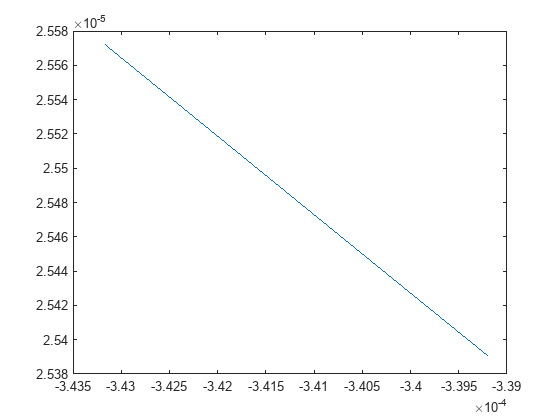
Plot the coordinates for the messages in the ROS 2 bag log file.
To run the example again, remove the myRos2bag file and the ros2_netwrk_bag file from memory.
plot(cellfun(@(msg) msg.pose.pose.position.x,msgs),cellfun(@(msg) msg.twist.twist.angular.z,msgs))
Create a ros2bagwriter object and a ROS 2 bag file in the specified folder.
bagWriter = ros2bagwriter("myRos2bag");Write a single log to the ROS 2 bag file.
topic = "/odom";
message = ros2message("nav_msgs/Odometry");
timestamp = ros2time(1.6170e+09);
write(bagWriter,topic,timestamp,message)
Close the bag file, remove the ros2bagwriter object from memory, and clear the associated object.
delete(bagWriter)
clear bagWriter
Create a ros2bagwriter object and a ROS 2 bag file in the specified folder. Specify the cache size for each message.
bagWriter = ros2bagwriter("bag_files/my_bag_file",CacheSize=1500);Write multiple logs to the ROS 2 bag file.
message1 = ros2message("nav_msgs/Odometry");
message2 = ros2message("geometry_msgs/Twist");
message3 = ros2message("sensor_msgs/Image");
write(bagWriter, ...
      ["/odom","cmd_vel","/camera/rgb/image_raw"], ...
      {ros2time(1.6160e+09),ros2time(1.6170e+09),ros2time(1.6180e+09)}, ...
      {message1,message2,message3})
Close the bag file, remove the ros2bagwriter object from memory, and clear the associated object.
delete(bagWriter)
clear bagWriter
Create a ros2bagwriter object and a ROS 2 bag file in the specified folder.
bagWriter = ros2bagwriter("myBag");Write multiple logs for the same topic to the ROS 2 bag file.
pointMsg1 = ros2message("geometry_msgs/Point");
pointMsg2 = pointMsg1;
pointMsg3 = pointMsg1;
pointMsg1.x = 1;
pointMsg2.x = 2;
pointMsg3.x = 3;
write(bagWriter, ...
      "/point", ...
      {1.6190e+09,1.6200e+09,1.6210e+09}, ...
      {pointMsg1,pointMsg2,pointMsg3})
Close the bag file, remove the ros2bagwriter object from memory, and clear the associated object.
delete(bagWriter)
clear bagWriter
