plot
Description
plot( plots normalized bistatic radar
cross section (NBRCS) values from the input brefl)bistaticSurfaceReflectivityLand object brefl as a function
of geometry at a single frequency .
plot(___, specifies
additional options using one or more name-value arguments.Name=Value)
Examples
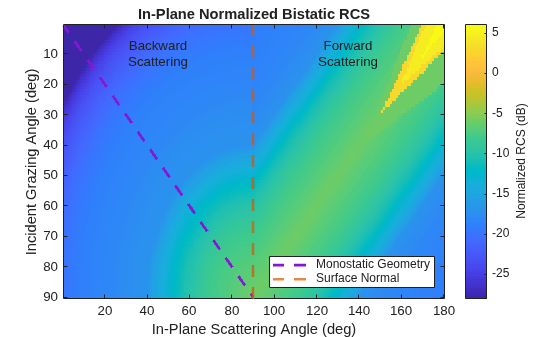
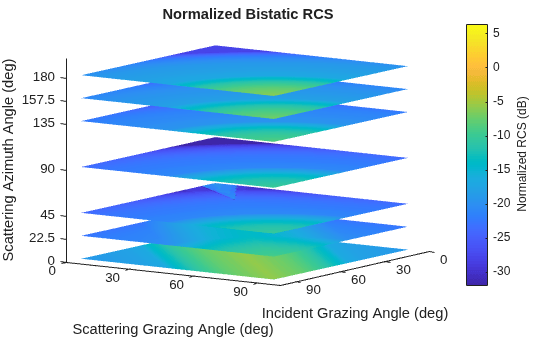
Create a bistatic reflectivity object using the Domville model for rural land and plot in-plane and out-of-plane normalized bistatic radar cross section (NBRCS) model values.
brefl = bistaticSurfaceReflectivityLand(InPlaneModel="Domville",... InPlaneLandType="Rural",OutOfPlaneModel="RuralInterpolation");
Plot the in-plane and out-of-plane models. For the out-of-plane model, display azimuths of 0, 22.5, 45, 90, 135, 157.5, and 180 degrees.
plot(brefl,"InPlane")
plot(brefl,Azimuth=[0 22.5 45 90 135 157.5 180])
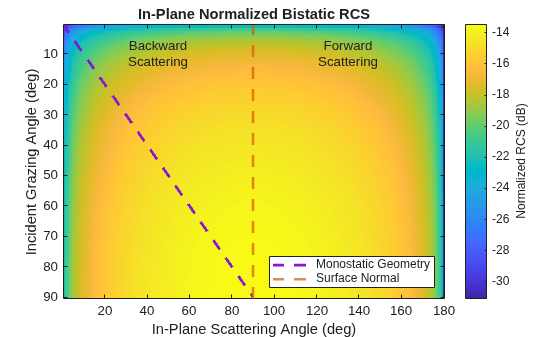
Define a custom function called in_plane_bartonFarm and use a gamma value of -15 dB at 10 GHz for reference. This value is taken from the surfaceReflectivityLand "Barton" Model "Farm" LandType. The custom function converts the gamma value to linear units and adds a frequency dependence. Then it uses bsxfun to modify the gamma value based on the bistatic geometry. [1] suggests that you can use the geometric mean of the monostatic normalized radar cross section (RCS) to generate a custom in-plane normalized bistatic RCS model for backscattering bistatic geometries.
function nbrcs = in_plane_bartonFarm(angIn,angScat,freq) inOutAngles = [angIn, angScat]; gammaCdB = -15; gammaCdB = gammaCdB + 5*log10(freq./10e9); gammaC = db2pow(gammaCdB); nbrcs = bsxfun(@times,gammaC,sqrt(prod(sind(inOutAngles),2))); end
Create a bistaticSurfaceReflectiivityLand object and set the custom in-plane function handle to @in_plane_bartonFarm.
bref = bistaticSurfaceReflectivityLand(InPlaneModel="Custom",... CustomInPlaneFcn=@in_plane_bartonFarm)
bref =
bistaticSurfaceReflectivityLand with properties:
InPlaneModel: 'Custom'
CustomInPlaneFcn: @in_plane_bartonFarm
OutOfPlaneModel: 'RuralInterpolation'
Speckle: 'None'
Plot in-plane NBRCS values at 20 GHz.
bref.plot("InPlane",Frequency=20e9)
Return NBRCS values at specified bistatic configurations and frequencies.
nbrcs=bref([45;40],45,180,[20e9 21e9])
nbrcs = 2×2
0.0319 0.0327
0.0304 0.0311
[1] Barton, David K. "Land Clutter Models for Radar Design and Analysis." Proceedings of the IEEE 73, no. 2 (1985): 198-204.
Input Arguments
Normalized bistatic reflectivity, specified as a bistaticSurfaceReflectivityLand
System object™.
Type of land reflectivity model to plot, specified as one of
"OutOfPlane" or "InPlane". The default value is
"OutOfPlane".
"OutOfPlane" refers to bistatic configurations in which the
transmitter and receiver positions are non-coplanar (see Out-of-Plane Geometry for more
information).
"InPlane" refers to bistatic configurations in which the
transmitter and receiver lie in the same plane (see In-Plane Geometry for more
information).
Plots dimensions are determined by the mode:
"OutOfPlane"— Plots NBRCS values in dB as a function of incident grazing angle (0 – 90°) and scattering grazing angle (0 – 90°) at default scattering azimuth angles (0,45,90,135, and180°). You can specify scattering azimuth angles at which to evaluatebreflusing theAzimuthname-value argument."InPlane"— Plots NBRCS values in dB as a function of incident grazing angle (0 – 90°) and in-plane scattering angle (0 – 180°). The in-plane scattering angle is defined as the angle between the projection of the incident ray onto the surface and the scattered ray. Bistatic configurations are considered to be backscattering for in-plane scattering angles of 0 to 90° and forward scattering for in-plane scattering angles of 90 to 180° (see θ description in In-Plane Geometry for more information).
Data Types: char | string
Name-Value Arguments
Specify optional pairs of arguments as
Name1=Value1,...,NameN=ValueN, where Name is
the argument name and Value is the corresponding value.
Name-value arguments must appear after other arguments, but the order of the
pairs does not matter.
Example: plot(brefl,"OutOfPlane",Azimuth=[0 45 90 135
180])
Frequency at which to evaluate brefl, specified as a positive
scalar. When the InPlaneLandModel property is set to
"Domville", valid frequencies are in the X-band, and changing the
frequency does not impact returned NBRCS values. In other words,
specifying a frequency is only relevant if the brefl
InPlaneModel or OutofPlaneModel property is
set to "Custom". The default value is 9.4 GHz.
Data Types: double
Scattering azimuth angles at which to evaluate and plot brefl
for the "OutOfPlane"
mode, specified as a scalar or row vector, with values between
–180° and 180°. The scattering azimuth angle is the angle between the projection of
the incident ray onto the surface and the projection of the scattered ray onto the
surface. See Out-of-Plane Geometry for more
information. This name-value argument is only available when the input
mode is set to "OutOfPlane". Default values
are 0, 45, 90,
135, and 180°. Units are in degrees.
Data Types: double
Handle to the plot axes, specified as an Axes object. Use the
gca function to get and set properties
of the current axes.
More About
The plots below provide example in-plane bistatic configurations in which transmitted
(black) and received (blue) signals lie in the same plane. The incident grazing angle
AngIn and the scattering grazing angle AngScat
are input arguments that are measured relative to the surface plane, with values that can
vary between 0 and 90°. The in-plane scattering angle θ
(Theta) is relevant to the CustomInPlaneFcn and
plot method
and is shown in green. θ is measured from the same surface as
AngIn and is defined as the angle between the projection of the
incident ray onto the surface and the scattered ray, with values that can vary between 0 and
180°. For backscattering configurations, θ is equivalent to
AngScat and for forward scattering configurations,
θ is equal to 180 - AngScat. The surface normal is shown for reference. Note: plots are shown with
flat ground surfaces for simplicity. Tilted surfaces will modify AngIn
and AngScat, similar to the effect illustrated for the monostatic Grazing Angle.
Backscattering geometries occur when the receiver is positioned to receive surface
reflections that are scattered back towards the direction of the transmitter and forward
scattering geometries occur when reflections that continue to travel away from the
transmitter are received. Bistatic configurations are considered to be backscattering for
AngAz values of 180 or –180° (left and right plots) and forward
scattering when the AngAz value is 0° (middle plot). The backscattering
azimuths correspond to θ values between 0 and 90° and the forward
scattering azimuth of 0° corresponds to θ values between 90 and
180°.
The 3-D plots below provide example out-of-plane bistatic configurations for transmitter
positions shown in black and receiver positions in blue. The incident grazing angle
AngIn and the scattering grazing angle AngScat
are input arguments that are measured relative to the surface plane, with values that can
vary between 0 and 90°. The scattering azimuth AngAz, shown in orange,
is the angle between the projection of the incident ray onto the surface and the projection
of the scattered ray onto the surface. Following the right-hand rule convention, positive
AngAz angles are measured counterclockwise from the projection of
the incident ray onto the surface. The surface normal is shown for reference. Note: plots
are shown with flat ground surfaces for simplicity. Tilted surfaces will modify
AngIn and AngScat, similar to the effect
illustrated for the monostatic Grazing Angle.
Backscattering geometries occur when the receiver is positioned to receive surface
reflections that are scattered back towards the direction of the transmitter and forward
scattering geometries occur when reflections that continue to travel away from the
transmitter are received. Bistatic configurations are considered to be backscattering for
AngAz values of 90 to 180° and –90 to –180° and forward scattering
for AngAz values of 0 to 90° and 0 to –90°.
Version History
Introduced in R2026a
MATLAB Command
You clicked a link that corresponds to this MATLAB command:
Run the command by entering it in the MATLAB Command Window. Web browsers do not support MATLAB commands.
Web サイトの選択
Web サイトを選択すると、翻訳されたコンテンツにアクセスし、地域のイベントやサービスを確認できます。現在の位置情報に基づき、次のサイトの選択を推奨します:
また、以下のリストから Web サイトを選択することもできます。
最適なサイトパフォーマンスの取得方法
中国のサイト (中国語または英語) を選択することで、最適なサイトパフォーマンスが得られます。その他の国の MathWorks のサイトは、お客様の地域からのアクセスが最適化されていません。
南北アメリカ
- América Latina (Español)
- Canada (English)
- United States (English)
ヨーロッパ
- Belgium (English)
- Denmark (English)
- Deutschland (Deutsch)
- España (Español)
- Finland (English)
- France (Français)
- Ireland (English)
- Italia (Italiano)
- Luxembourg (English)
- Netherlands (English)
- Norway (English)
- Österreich (Deutsch)
- Portugal (English)
- Sweden (English)
- Switzerland
- United Kingdom (English)