メインコンテンツ

syntheticAnomaly

Define the parameters of an anomaly model that can be injected into a time series

Since R2026a

Description

Add-On Required: This feature requires the Time Series Anomaly Detection for MATLAB add-on.

synthAnom = syntheticAnomaly(AnomalyType) defines an anomaly model of type AnomalyType that you can be introduce to a time series, such as noise or outliers, using the injectAnomaly function.

Use syntheticAnomaly to create a model that augments measured or simulated data with specific anomaly characteristics. You can then use this anomalous data to validate trained anomaly detection models.

synthAnom = syntheticAnomaly(AnomalyType,Name=Value) specifies additional options using name-value arguments. Each anomaly type has its own unique set of name-value arguments.

example

Examples

collapse all

Create a NoiseAnomaly model that models white noise that has a standard deviation and a mean of 3.0.

noiseanom = syntheticAnomaly("Noise",Type="White",Std=3,Mean = 3.0);

Create a "StuckAtConstant" model that sticks at a custom constant of 1.5.

sacanom = syntheticAnomaly("StuckAtConstant",Type="Custom",Value=1.5);

Combine the anomalies into a vector so that they can be injected together into a time series.

anomvec = [noiseanom sacanom]
anomvec = 
1×2 AnomalyTypes:

 NoiseAnomaly, StuckAtConstantAnomaly

Load and plot the healthy single-variable time series channel1, which serves as the injection target.

load HealthySineWaveU channel1

Plot the time series.

plot(channel1)
title("Healthy Time Series")
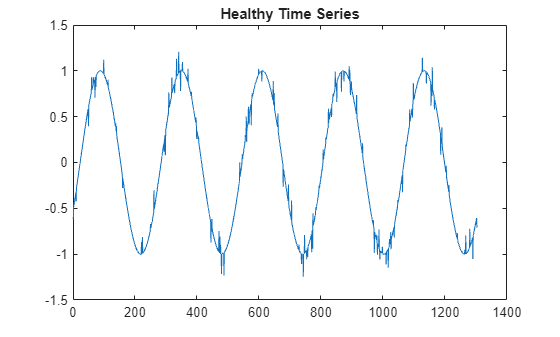
Figure contains an axes object. The axes object with title Healthy Time Series contains an object of type line.

Inject the anomalies into channel1. For example repeatability, specify starting positions for the two anomalies.

[channel1_anom,labels] = injectAnomaly(anomvec,channel1,WindowStart=[185 1080]);

The resulting signal is channel1_anom. The labels output identifies where the anomalies are injected.

ianom = find(labels==1);
ianom(1:8)
ans = 8×1

   185
   186
   187
   188
   189
   190
   191
   192

plot(channel1_anom)
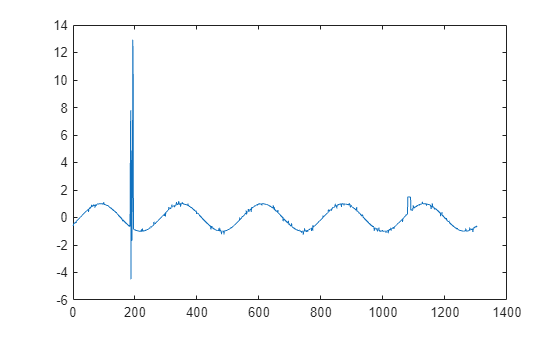
Figure contains an axes object. The axes object contains an object of type line.

The anomalies appear where WindowStart specifies.

Input Arguments

collapse all

Type of anomaly, specified as one of the following values:

  • "Noise" — Noise anomaly, with white or burst type options.

  • "Bias" — Bias anomaly, with constant or proportional type options

  • "Drift" — Drift anomaly, with linear, quadratic, and exponential type options

  • "PointOutliers" — Anomaly consisting of one or more outlying points

Each anomaly type provides additional options that you specify with name-value arguments. For more detailed information about the anomaly types and name-value arguments, see the corresponding anomaly reference page that is linked from the synthAnom argument description.

Example: noiseanom = syntheticAnomaly("Noise",Type="White",Std=3,Mean = 3.1); creates an anomaly consisting of white noise with a standard deviation of 3 and a mean of 3.1.

Name-Value Arguments

expand all

Specify optional pairs of arguments as Name1=Value1,...,NameN=ValueN, where Name is the argument name and Value is the corresponding value. Name-value arguments must appear after other arguments, but the order of the pairs does not matter.

Example: noise = syntheticAnomaly(Noise,Type="Burst",Mean=2.1,NumBursts=5) creates a noise anomaly object that defines a burst noise model that consists of 5 bursts that have a mean of 2.1.

Noise

expand all

Noise type, specified as "White" or "Burst".

Mean for the Gaussian noise, specified as 0 or a scalar.

Standard deviation for the Gaussian noise, specified as 0 or a scalar.

Number of noise bursts to inject when Type is set to "Burst", specified as an integer.

Duration of noise bursts in number of samples when Type is set to "Burst".

Bias

expand all

Bias type, specified as "Constant" or "Proportional".

Offset value for each sample, based on the setting of Type, and specified as a scalar.

Drift

expand all

Drift type, specified as "Linear", "Quadratic", or "Exponential".

Drift scale value used to control the level of drift for the specified Type, specified as a scalar.

Point Outliers

expand all

Number of point outliers to inject into the time series window, specified as an integer.

Outlier scale used to control the magnitude of outliers at each injection point, specified as a scalar.

Output Arguments

collapse all

Anomaly model that can be injected into a time series, specified as one of the following objects:

Version History

Introduced in R2026a