Target board name (Testing)
R2026bSpecify the target board that you run your test executable on
Description
Specify the hardware board on which to execute tests.
Set Option
Set the option using one of these methods:
Polyspace Platform user interface (desktop products only): In your project configuration, on the Build tab, select the Target and Compiler node and then select a value for this option.
Command line and : Use the option
-manage-target-packageas an input topolyspace-test. See Command-Line Information.Python® API: Set the
Boardproperty in the build configuration. Seepolyspace.project.BuildConfiguration.TOML configuration file (
.toml.pscfg) — Use the keyBoard. For example:Board = "Host Computer"
Why Use This Option
By default, tests in a Polyspace® Platform project are executed on your host computer. Use this option to specify a target board for dynamic testing. If your target board is not listed, register the target using a registration file that describes your target including processor, toolchain, and communication interface.
A custom target registration file is a MATLAB® code file that defines a target using classes from the Target Framework MATLAB API. Though the file uses MATLAB code, you do not need an installation of MATLAB to author this file or use the file later for target registration in Polyspace Test™. However, the editors in MATLAB or MATLAB Online provide better support for authoring the file with features such as syntax highlighting and code completions.
For more information on creating this file, see:
Create Target Registration Packages for C/C++ Test Execution on Targets for a brief overview of a custom target registration file.
Set Up PIL Connectivity by Using Target Framework (Embedded Coder) for the full description of a custom target registration file.
target.create(Embedded Coder) to get started with creating a target.
For an example file and more information on the target registration workflow, see Get Started with C/C++ Test Execution on Target.
Settings
Default: Host
Computer
Host ComputerExecute tests in a Polyspace Platform project on your host computer.
Custom target boardExecute tests in a Polyspace Platform project on the target board that you registered. To register a custom target, create a registration file for your target. A registration file is a MATLAB code file that describes your target and its communication interface. To register the target:
In the Manage section of the Configuration toolstrip, click
 Manage Boards to open the Manage Boards window.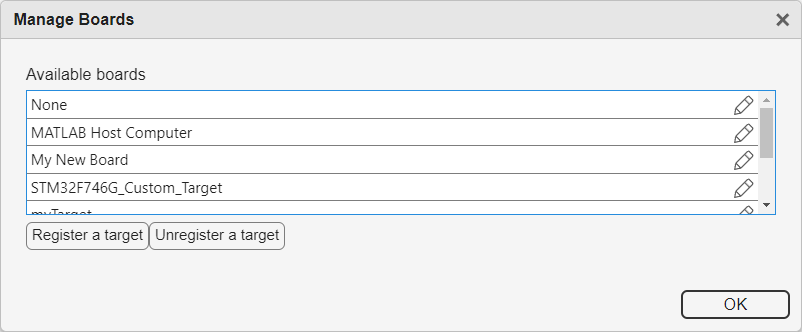
Click Register a target. Select the registration file for your target.
If there are no errors, your target board name appears in the list of boards. Click OK to complete target registration.
In the project configuration, select your registered target board from the Target board name (Testing) list.
If your target board registration file defines a toolchain and processor, when you select the board, other options in the configuration are also specified.
The
Processoroption is set to the processor defined in your target board registration file. You cannot select a different processor.The
Compilation toolchain (Testing)option is set to the toolchain defined in your target board registration file. However, you can change this setting to a different toolchain for compilation.
NoneDo not use a target board for test execution. You can use this setting to build the sources and tests in a project but cannot execute them.
Use this setting if the target you registered consists of a toolchain only (build command with compiler and linker) and check if your project builds without errors using the registered toolchain. Using this setting helps you avoid writing additional MATLAB code in your custom target registration file to associate the toolchain with a board.
Tips
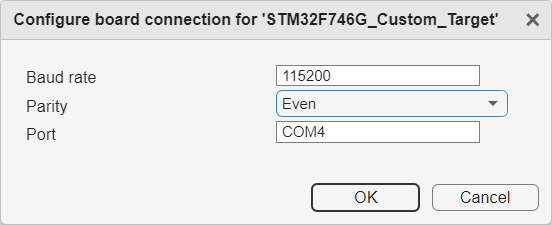
You can override some properties related to your target connection without having to
create an entirely new target and registering the new target. In the project build
configuration, click Edit board connection  next to the Target board name
(Testing) option. Modify the connection to the board as needed. For
instance, you can change the parity of the serial connection to the board.
next to the Target board name
(Testing) option. Modify the connection to the board as needed. For
instance, you can change the parity of the serial connection to the board.
Command-Line Information
Parameter:
-manage-target-package |
Example (Target Registration):
polyspace-test -manage-target-package -register-from-file |
Example (Target Override):
polyspace-test -manage-target-package -config |
See Also
Processor | Compilation toolchain (Testing) | polyspace-test -manage-target-package | polyspace-test -build | polyspace-test -run | polyspace.project.BuildConfiguration
Topics
- Run C/C++ Tests on Target in Polyspace Platform User Interface
- Automate C/C++ Test Execution on Targets Using Polyspace Platform Projects
- Get Started with C/C++ Test Execution on Target
- Automate C/C++ Code Profiling on Targets Using Polyspace Platform Projects
- Calculate C/C++ Code Profiling Metrics on Target in Polyspace Platform User Interface
- Edit TOML Configuration Files

