phased.CustomCascadeComponent
R2026bDescription
The phased.CustomCascadeComponent
System object™ is used with the phased.Transmitter or phased.Receiver
System objects to implement cascade configurations. Cascade configurations let you customize
signal processing behavior. To enable a cascade configuration, set the property
Configuration="Cascade" in the phased.Transmitter or phased.Receiver
System objects.
To create and use a phased.CustomCascadeComponent
System object:
Create the
phased.CustomCascadeComponentobject and set its properties.Call the object with arguments, as if it were a function.
To learn more about how System objects work, see What Are System Objects?
Use a phased.CustomCascadeComponent together with a phased.Transmitter and phased.Receiver
System object to create cascade configurations. You can specify a behavior function, the
number of input and output channels, and its name.
Creation
Syntax
Description
component = phased.customCascadeComponent()phased.CustomCascadeComponent
System object, component.
component = phased.customCascadeComponent(Name=Value)phased.CustomCascadeComponent
System object
component, with the specified property Name set to the specified
Value. You can specify additional Name=Value arguments in any order as
(Name1=Value1,...,NameN=ValueN).
component = phased.CustomCascadeComponent(fcn,nin,nout,Name=Value)phased.CustomCascadeComponent, component, with the
BehaviorFcn set to fcn, the
NumInputChannels property set to nin, and the
NumOutputChanels property set to nout.
Properties
Usage
Description
Input Arguments
Output Arguments
Object Functions
To use an object function, specify the
System object as the first input argument. For
example, to release system resources of a System object named obj, use
this syntax:
release(obj)
Examples
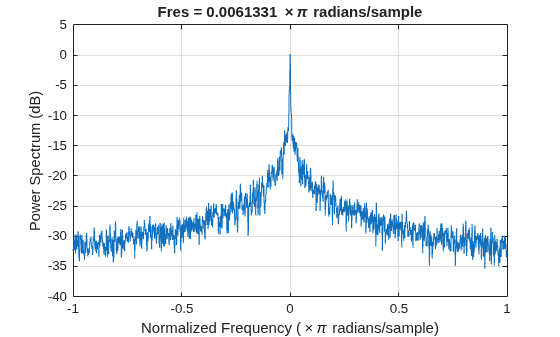
Use the phased.CustomCascadeComponent System object™ to compare additive white noise in a signal to additive pink noise. Pink noise is not evenly distributed across the power spectrum.
First, create an input signal of 10000 zeros to visualize the noise.
nSamples = 1e4;
in = zeros(nSamples,1);
Use the rf.Amplifier System object to add white noise.
amp = rf.Amplifier(IncludeNoise=true);
rx = phased.Receiver(Configuration="Cascade",Cascade={amp});
out = rx(in);
Display the white noise power spectrum.
pspectrum(out,Parent=axes(figure))
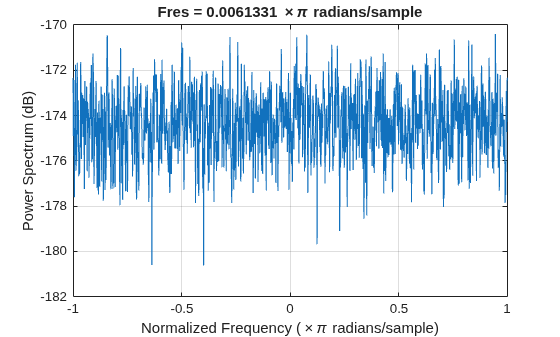
Alternatively, use the phased.CustomCascadeComponent System object to add pink noise using a custom noise generator. Configure the System object to have one input channel and one output channel.
pn = dsp.ColoredNoise(Color="pink",SamplesPerFrame=nSamples);
custnoise = phased.CustomCascadeComponent(@(x)x+(pn()+pn()*1i), ...
   NumInputChannels=1,NumOutputChannels=1)
custnoise =
  phased.CustomCascadeComponent with properties:

          BehaviorFcn: @(x)x+(pn()+pn()*1i)
     NumInputChannels: 1
    NumOutputChannels: 1
        ComponentName: "Custom"
rx = phased.Receiver(Configuration="Cascade",Cascade={custnoise});
out = rx(in);
viewLayout(rx)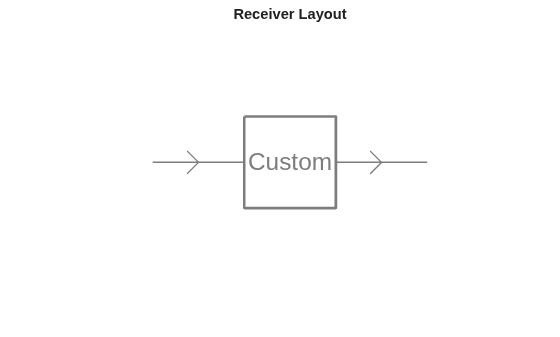
Display the pink noise power spectrum.
pspectrum(out,Parent=axes(figure))
Use a Butler Matrix within a cascade to create an analog beamforming network in which the antenna pattern depends on the input port.
Set up two-element Butler matrix
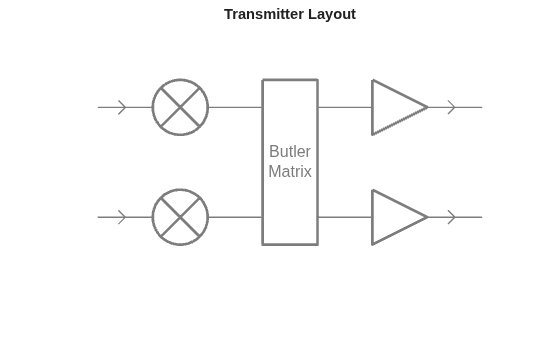
Model the transmitter as a mixer followed by Butler matrix followed by an amplifier.
mixer = rf.Mixer;
bmsize = 2;
butler = phased.CustomCascadeComponent( ...
    @(x)Butler2x2(x),bmsize,bmsize, ...
    ComponentName="Butler Matrix");
pa = rf.Amplifier(Gain=30);
tx = phased.Transmitter(Configuration="Cascade",Cascade={mixer,butler,pa});
viewLayout(tx)
Set up two-element ULA
fc = 2.4e9;
ula = phased.ULA(NumElements=bmsize, ...
    ElementSpacing=freq2wavelen(fc)/2);
txAntenna = phased.Radiator(Sensor=ula, ...
    OperatingFrequency=fc);
We form the antenna pattern when a signal is injected into transmit channel one vs transmit channel two.
Steer Matrix
Plot pattern.
ax = axes(figure);
hold(ax,"on")
xlabel(ax,"Azimuth Angle")
ylabel(ax,"Response")
legend(ax)
Transmit a signal from each Tx port and visualize the antenna pattern.
txang = -90:90;
radAngles = [txang;zeros(1,length(txang))];
for i = 1:bmsize
    % Output only on a single channel
    sig = zeros(1,bmsize);
    sig(i) = 1i;

    % Propagate from -90 to 90
    txout = tx(sig);
    radout = txAntenna(txout,radAngles);
    plot(ax,txang,abs(radout),DisplayName=['Antenna Pattern Channel ',num2str(i)]);
end
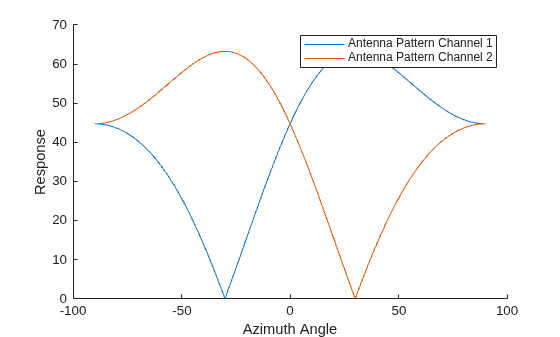
Create a 2-by-2 Butler Matrix and apply Butler Matrix weights.
function y = Butler2x2(x)
weights = [0 -pi/2;
    -pi/2 0];
y = x*exp(1i*weights);
end
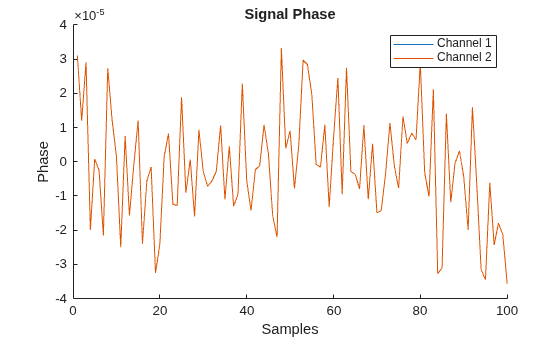
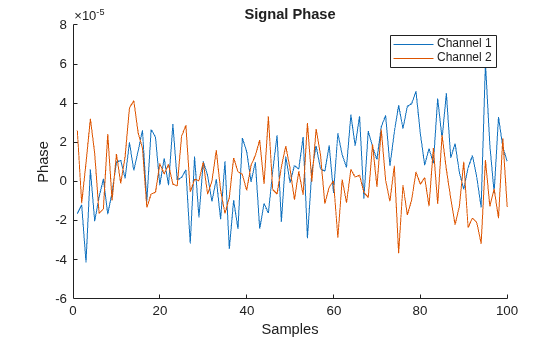
Use a custom cascade component to model heterogeneous behavior between channels. Show how to apply uncorrelated phase noise between channels with a custom component and an array of rf.Mixer System objects. When setting up a transmitter as a cascade of mixers and amplifiers, the phase noise between channels is correlated.
Create correlated phased noise
Create two-channel input signal and components.
nchannel = 2;
in = ones(100,nchannel);
mixer = rf.Mixer(IncludePhaseNoise=true);
amp = rf.Amplifier(Gain=10);
tx = phased.Transmitter(Configuration="Cascade", ...
    Cascade={mixer,amp});
Show that phase noise is correlated by showing that the phase noise is identical in both channels.
out = tx(in);
plotPhaseNoise(out)
Set up array of parallel mixers
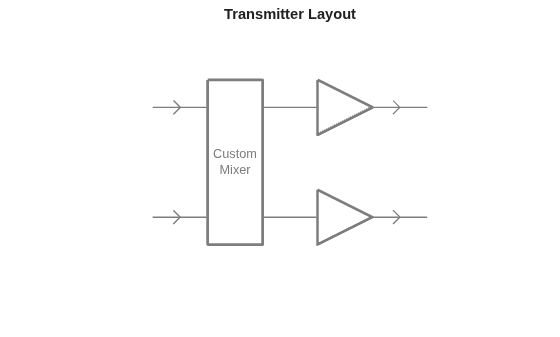
We can use the custom object to model uncorrelated phase noise by setting up an array of mixers in parallel in a custom cascade.
mixers = arrayfun(@(x)rf.Mixer(IncludePhaseNoise=true), ...
    1:nchannel,UniformOutput=false);
customMixer = phased.CustomCascadeComponent( ...
    @(x)mixSignals(x,mixers),nchannel,nchannel, ...
    ComponentName="Custom Mixer");
amp = rf.Amplifier(Gain=10);
tx = phased.Transmitter(Configuration="Cascade", ...
    Cascade={customMixer,amp});
Show the transmitter layout.
viewLayout(tx,Parent=axes(figure))
Plot the uncorrelated phase noise.
out = tx(in);
plotPhaseNoise(out)
Auxiliary functions
function y = mixSignals(x,mixers)
nmix = length(mixers);
y = zeros(size(x,1),nmix);
for imix = 1:nmix
    y(:,imix) = mixers{imix}.step(x(:,imix));
end
end

function plotPhaseNoise(out)
ax = axes(figure);
hold(ax,"on")
nchannel = size(out,2);
for iChannel = 1:nchannel
    plot(ax,angle(out(:,iChannel)), ...
        DisplayName=['Channel ', ...
        num2str(iChannel)])
end
ylabel(ax,"Phase")
xlabel(ax,"Samples")
title(ax,"Signal Phase")
legend(ax)
end
Version History
Introduced in R2026a

