Investigate Early Termination of Optimization
R2026bInspect the Objective Graphs and Contour Views to check for optimizations that have terminated early. Early termination typically occurs with runs that have warning orange triangle Accept icons, but can also occur when the optimizer has returned a successful green square Accept icon.
This figure shows an optimization run with a warning orange triangle Accept icon that has been forced to terminate because it exceeded the iterations limit.
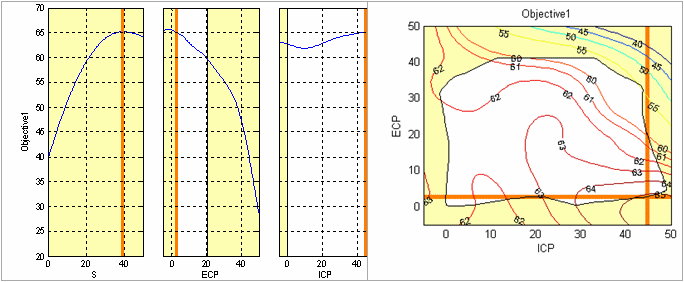
In this case, the optimizer has almost found the optimal solution for this run. If this optimizer has taken a long time to run, then as this solution is almost optimal it is probably worth marking as acceptable (select the Accept box in the Optimization Results table for this run).
This figure shows another example where an optimization terminated early because it exceeded the iterations limit.
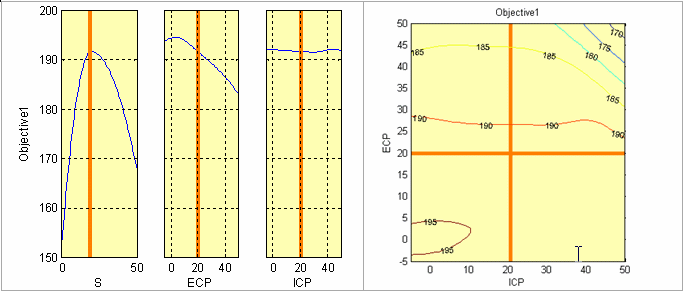
In this case, the problem appears to be over constrained because the plots are entirely shaded yellow. You can check the constraint summary table or the output table to identify if constraints are met. Also inspect the constraint summary and constraint graphs.
The constraint graphs for this case are shown in this figure.
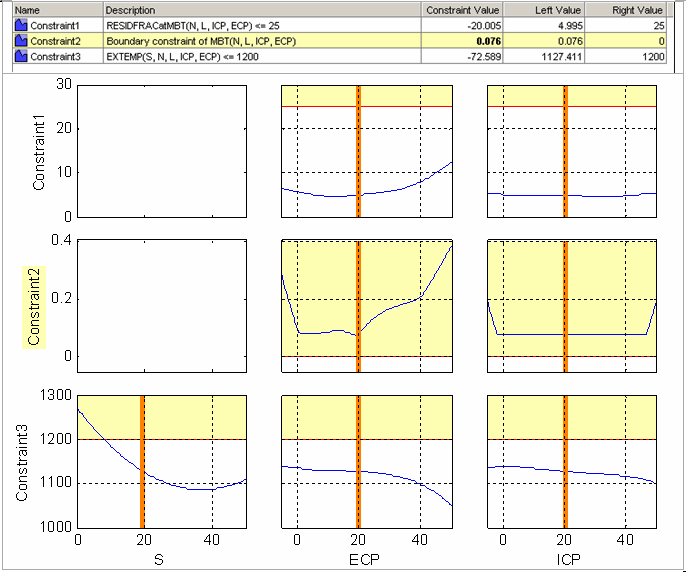
These constraint views confirm that Constraint2 is violated for
this run. Therefore, this solution is probably best left as unacceptable. In cases like
this, if it is not already marked as unacceptable, clear the Accept
box in the Optimization Results table for this run.
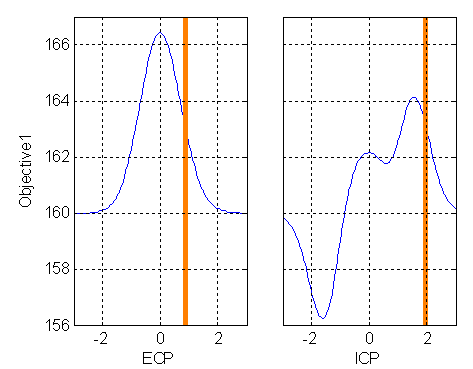
This figure shows an optimization that appears to have terminated early despite returning a positive exit flag. You can see that the optimizer has not located the maximum. You should investigate cases like this.
There are many reasons why an optimization appears to terminate early. Two common causes and possible resolutions are discussed in this section.
Poor algorithm parameter settings
fmincon may not return a local optimum if these parameter
values are too high:
Variable tolerance
Function tolerance
Constraint tolerance
In this case try reducing the values of these parameters to improve
performance. However, do not reduce these parameter values too low (less than
~10-10) to avoid internal issues with
fmincon. Models that have nonphysical nonlinearity can also
cause failure.
Some nongradient-based algorithms may not return an optimum solution. An example
of this is the genetic algorithm (ga) optimization in CAGE. A
poor choice of parameters for such algorithms can lead to early termination of the
optimization. For example, setting the Crossover Fraction
parameter of the ga algorithm to 1 can lead to a situation where
the algorithm prematurely converges. In this case, try rerunning the optimization at
alternative parameter settings. For best results, rerun the algorithm with a
Crossover Fraction lower than 1 (the default is 0.8).
Using fmincon with noisy models
Optimizations can terminate early because the models are noisy and you used a
gradient based algorithm (fmincon) to solve the optimization
problem.
If the contour plots or any results are suspicious you should always investigate model trends to check if they are sensible and not overfitting. Examine models in the CAGE Surface Viewer or the Model Browser response surface view. You may need to remodel.
To check whether your model is noisy, zoom in on a line plot of the model in the CAGE Surface viewer. Following is a plot of Objective1 against x around the value of x returned by the optimizer.
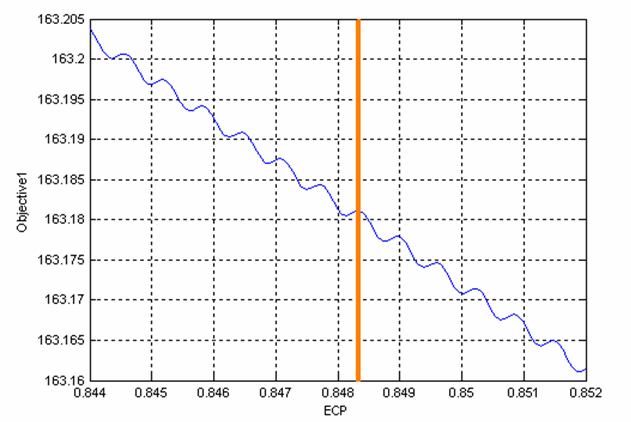
You can see that the model is noisy and the optimizer has (correctly) returned a local maximum of the model. However, this result is a maximum of the noise component in the model and not the physical component. If the noise is not behavior of the physical system, then you should remodel the noisy models in the Model Browser. The CAGE Import tool can be used to replace the noisy models with the results of the remodeling and the optimization can be rerun.
Handling Flat Optima
Functions that are flat in the vicinity of their optima can be difficult to optimize. This figure shows an example of such a function, , and its surface plot.
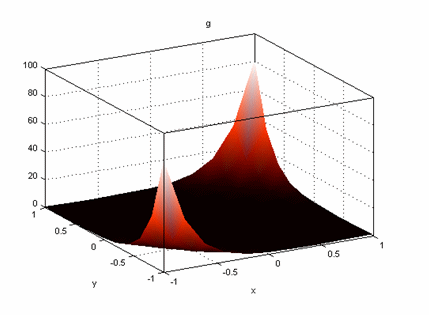
This function has a global minimum at (0, 0) and is very flat in the vicinity of the optimal solution.
Using the fmincon algorithm in CAGE to find the minimum of this
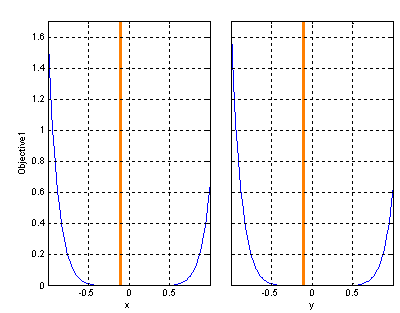
function (from initial conditions of ) produces the result shown in this figure. The optimizer finds a
solution at , which is not optimal. In these plots, you can clearly see that
the optimizer has not located the minimum at (0, 0).
To adjust the optimizer to find the minimum, you can take one of several approaches:
Change the initial conditions.
For a gradient-based algorithm (
fminconin CAGE), changing the initial conditions can help the optimizer locate a minimum where the objective function is flat in the vicinity of the minimum. In the example shown in the previous figure, changing the initial conditions to (x,y) = (1,1) leads tofminconfinding the minimum at (0, 0).Rescale the objective function.
Rescale the objective function with an operation that does not change the location of any optimal solutions, e.g., try taking a square root, fourth root or log, or multiplying by a positive scalar. Check that the position of the optimum is not changed. When an objective function is flat in the vicinity of an optimum, rescaling the objective function can help gradient-based optimization algorithms such as
fminconin CAGE. In the example shown in the previous figure, whenfminconin CAGE is used to minimize , the minimum at (0, 0) is located.Use a non-gradient based algorithm.
Try either the pattern search or genetic algorithm options. As these algorithms do not use gradient information, they can perform better when used on optimization problems with flat minima. In the example shown in the previous figure, the pattern search algorithm in CAGE located the minimum using the default settings.
Run the optimization from several initial condition values.
If you are using
fminconthen another possible workaround is to set the Number of Start Points parameter to be greater than 1. This setting runsfminconthe specified number of times from different start conditions. Use this option only for the affected runs as it can be time consuming.Change tolerances.
For a gradient-based algorithm (
fminconin CAGE), changing the variable or function tolerances can help the optimizer locate a minimum where the objective function is flat in the vicinity of the minimum. Reducing the variable and function tolerances may improve the convergence to the optimum value in this case.
See Also
View Your Optimization Results | All Optimization Results | Current Result - Optimization Solution

