Adjust Settings to Improve Results
R2026bAfter you investigate your results to identify problems, use these suggestions to try to improve your optimization results:
If you detect local optima, try running the optimization again to locate the best optimum.
Edit the initial condition manually for this optimization operating point and rerun.
For point optimizations that use the
fminconalgorithm, set the Number of start points to be greater than 1 and rerun. In this case, CAGE performs the optimization more than once for each run. To save time, you might want to only repeat the offending runs in this way.Use an alternative algorithm on the runs that have found a local optimum. For example, you could try the
gaorpatternsearchalgorithms in CAGE (if you tried thefminconalgorithm first).
If the optimization terminates early:
In cases where the optimizer runs out of iterations/function evaluations/time and the solution returned is feasible, determine whether the solution is acceptable to you.
To accept the solution, select the Accept check box on the Optimization Results table.
If you reject the solution, rerun the optimization with modified parameter settings. In this case, if
fminconorpatternsearchis being used, it is advisable to start the optimizer from the solution that has just been found.
In cases where the optimizer runs out of iterations/function evaluations/time and the solution returned is infeasible, you can try rerunning the optimization from different initial conditions (for
fminconorpatternsearch) or different parameter settings (all algorithms). If this approach does not resolve the problem, determine if any constraint has been violated. Investigate violated constraints, to determine whether they can be relaxed. If they can, rerun the optimization with the relaxed constraints; if not, leave the check box unselected to indicate the solution is unacceptable.
See also Handling Flat Optima.
Detecting Local Optima
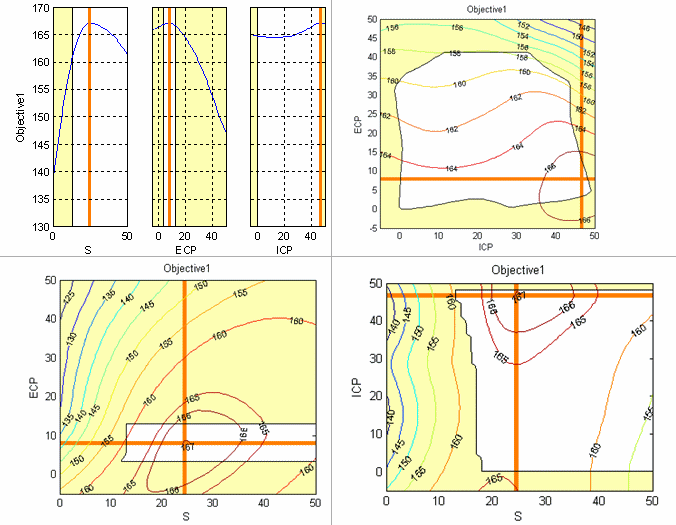
This figure shows views for an optimization which has found the optimal solution. The objective is to maximize Torque (Objective1) against spark angle (S), Exhaust valve closing (ECP) and Intake valve opening (ICP).
When you analyze the optimization results, look for results that have located the best optimum against the free variables.
In this case, an individual plot can only show it is highly likely rather than definitely the optimal value because there are more than two free variables. For problems with more than two free variables, the Objective Graphs and Contours views cannot guarantee that an optimal solution has been found because they provide projections of the model.
For further confirmation, you should inspect the Objective Contour view for as many pairs of free variables as you have time to analyze.
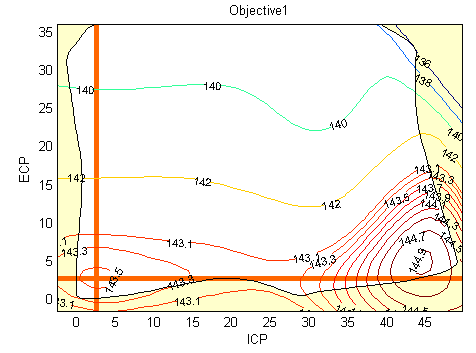
This example shows the algorithm has found a local maximum (marked by the orange cross). You can see the global maximum for this optimization in the lower-right corner of the contour plot.
A constraint, such as a table gradient constraint, could cause a local maximum result. This result could be desirable, however, because it may be preferable for table smoothness to find a local maximum with a slight loss of torque compared to the global maximum (in this case, about 1.3 NM of torque (1%) which is within model accuracy).
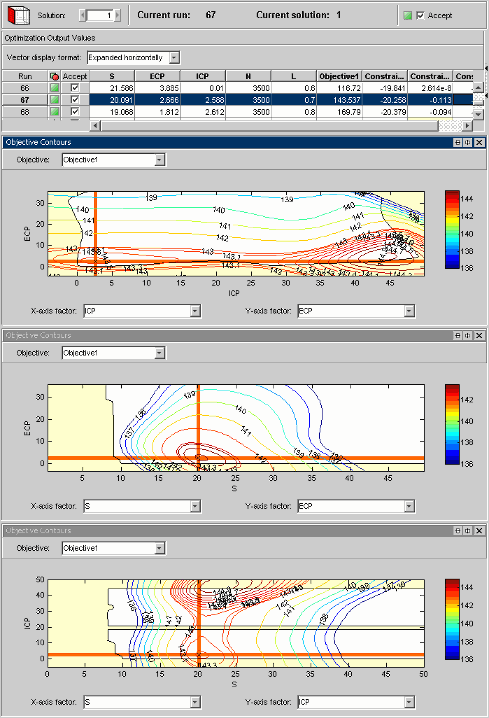
To inspect contour plots for many pairs of free variables, you can configure the Optimization Output view to display multiple contour plots simultaneously. Simultaneous display can help locate those runs that have converged to a local optimum.
This figure simultaneously shows contour plots for all pairs of free variables for the gasoline case study.
See Also
View Your Optimization Results | All Optimization Results | Current Result - Optimization Solution

