Generate Random Numbers on the GPU in Generated Code
R2026bWhen you generate GPU code from the random number generation functions
rand, randi, and randn, the
code uses the CPU to generate random numbers by default. However, if your application
generates large quantities of random numbers, or the code uses the random numbers for
computation on the GPU, you can generate random numbers on the GPU by using GPU random number
generation functions.
To generate code that generates random numbers on the GPU, replace the MATLAB® random number generation functions with the GPU Coder™ random number generation functions. Then, replace the code that controls the random number generator on the CPU with code that controls the random number generator on the GPU.
Replace Random Number Generation Functions
To generate random numbers on the GPU in generated code, replace MATLAB random number generation functions with GPU Coder functions. This table shows the MATLAB functions and their GPU Coder counterparts.
| MATLAB Function | GPU Coder Function | Description |
|---|---|---|
rand | gpucoder.rand | Generate uniformly distributed random numbers |
randi | gpucoder.randi | Generate uniformly distributed random integers |
randn | gpucoder.randn | Generate normally distributed random numbers |
When you generate code from the GPU Coder random number functions, the generated code creates a random number generator on the GPU from the NVIDIA® cuRAND library.
Note
Because the cuRAND library and MATLAB use different random number generators, the results of
gpucoder.rand, gpucoder.randi, and
gpucoder.randn in MATLAB do not match the results from the generated GPU code.
For example, consider this MATLAB function which generates N pairs of
uniformly distributed numbers on the interval (-1,1) by using the rand
function. The function approximates pi by calculating the number of pairs inside a circle of
radius 1.
function [pi_est,count] = approxPi(N)
P = rand(N,2).*2-1;
count = sum(sum(P.^2,2) <= 1);
pi_est = 4*count/N;
end
Because the function uses rand, the generated code creates random
numbers on the CPU and copies them to the GPU. To check for memory copies, profile the
generated code by using the gpuPerformanceAnalyzer function.
N = 2^13;
cfg = coder.gpuConfig("mex");
gpuPerformanceAnalyzer("approxPi.m",{N},Config=cfg);
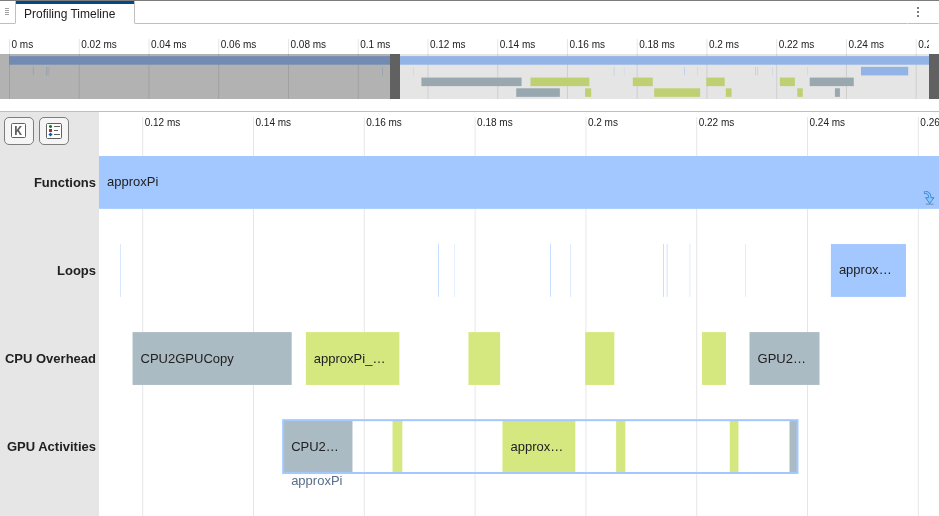
In the GPU Performance Analyzer, the Profiling Timeline pane shows that the code copies memory from the CPU to the GPU before launching GPU kernels.
To generate code that creates random numbers on the GPU, replace the call to
rand with a call to gpucoder.rand.
function [pi_est,count] = approxPi(N)
P = gpucoder.rand(N,2).*2-1;
count = sum(sum(P.^2,2) <= 1);
pi_est = 4*count/N;
end
Profile the GPU code from this function by using the GPU Performance Analyzer. The Profiling Timeline pane shows the code does not copy memory to the GPU and the generator creates random numbers directly on the GPU. The CPU Overhead row contains a single memory copy from the GPU to the CPU.
gpuPerformanceAnalyzer("approxPi.m",{N},Config=cfg);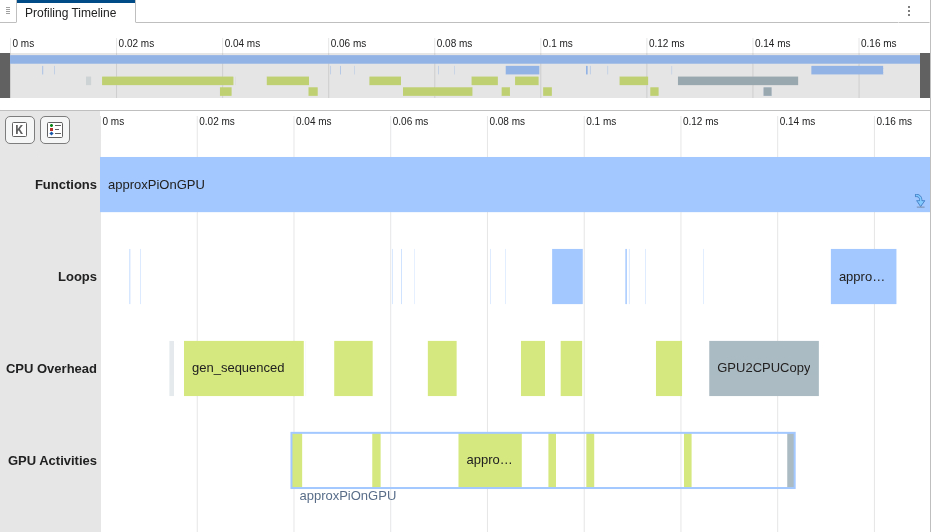
Control Random Number Generator on the GPU
The MATLAB random number generation functions use a pseudorandom number generator to
return random numbers. If you set the seed of the generator by using the rng function, the results from the random number functions are predictable and
deterministic. You can set the seed of the generator to
repeat the same sequence of random numbers or generate new random numbers each time the
function runs.
To set the seed for the pseudorandom number generator on the GPU, replace the
rng function with the gpucoder.rng
function. The gpucoder.rng function initializes the random number
generator that the GPU random number generation functions use.
For example, consider this version of the approxPi function. The
function accepts a second argument, seed, and initializes the random
number generator with this argument by using rng.
function [pi_est,count] = approxPi(N,seed)
rng(seed)
P = rand(N,2).*2-1;
count = sum(sum(P.^2,2) <= 1);
pi_est = 4*count/N;
end
To generate random numbers on the GPU in generated code, replace the
rand function with the gpucoder.rand function.
To set the seed of the random number generator that gpucoder.rand uses,
replace the rng function with the gpucoder.rng
function.
function [pi_est,count] = approxPi(N,seed)
gpucoder.rng(seed)
P = gpucoder.rand(N,2).*2-1;
count = sum(sum(P.^2,2) <= 1);
pi_est = 4*count/N;
end
Generate a GPU MEX function from approxPi.
seed = 0;
codegen approxPi -config cfg -args {N,seed}
Call the generated MEX function twice with the seed value of 1 and
compare the results. Because the function initializes the random number generator to the
same seed before generating random numbers on both runs, the output is the same.
result1 = approxPi_mex(N,1);
result2 = approxPi_mex(N,1);
abs(result1-result2)
ans =

     0
Alternatively, to generate different random numbers on subsequent runs, use a different
seed on each run. For example, the output from the function with a seed value of
2 differs from the output with a seed value of
1.
result3 = approxPi_mex(N,2);
abs(result1-result3)
ans =

    0.0264
To use a distinct seed on each run, set the seed based on the current time by using the
gpucoder.rng function with the "shuffle" argument.
Note
Using gpucoder.rng with the "shuffle" option
sets the seed by using the current time in seconds. To set a new seed with the
"shuffle" option, use gpucoder.rng at
least one second after the last call to
gpucoder.rng("shuffle").
See Also
gpucoder.rng | gpucoder.rand | gpucoder.randn | gpucoder.randi

