Deploy Speech Enhancer Model on Qualcomm Hexagon DSP
R2026bThis example demonstrates how to deploy a Simulink® model designed to enhance a noisy speech audio on Qualcomm Hexagon DSP using Embedded Coder® Support Package for Qualcomm® Hexagon® Processors. Refer to the corresponding enhanceSpeech (Audio Toolbox) MATLAB function for more information on the model functionality and algorithm.
To optimize the generated code for the speech enhancer model, you can use the Qualcomm Hexagon Library (QHL) CRL, and Hexagon Vector eXtension (HVX) CRL with the HVX instruction set extensions (ISE).
Required Hardware
Qualcomm Hexagon Simulator
Speech Enhancer Model
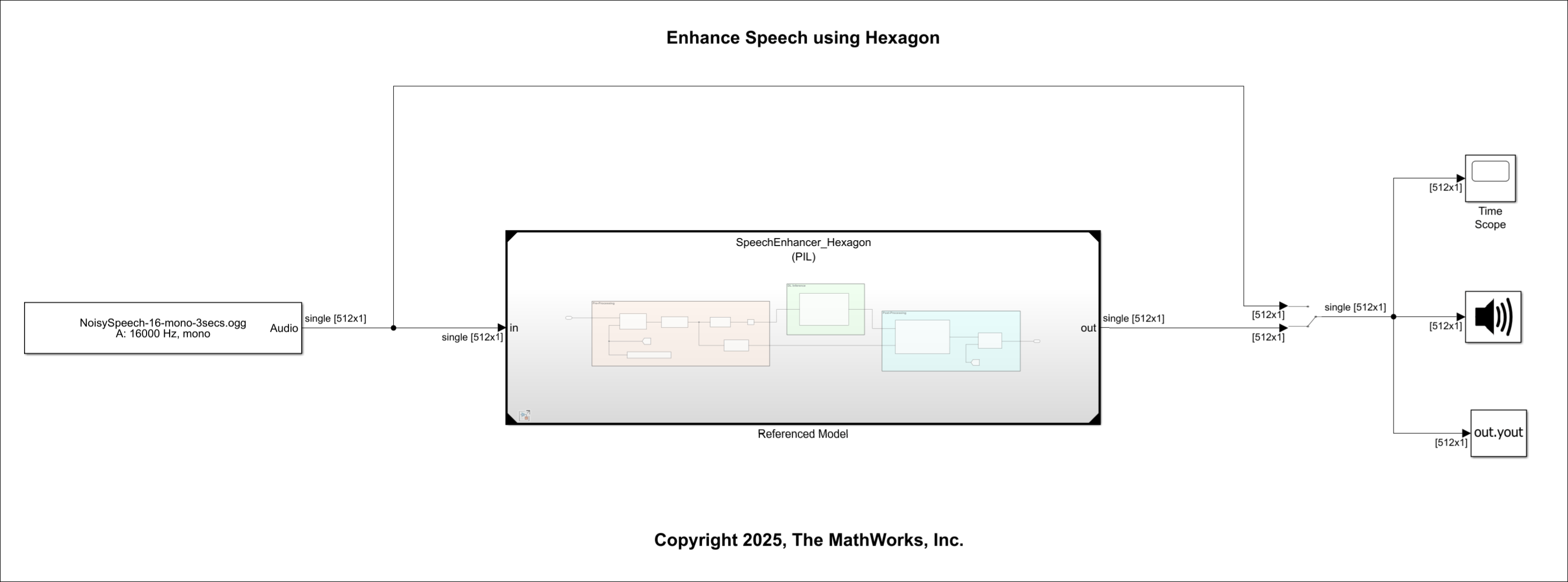
The top-level model consists of these blocks and models:
A From Multimedia File block, which takes the noisy audio as the input.
The referenced model which has the Pre-Processing, DL Inference, and Post-Processing blocks.
An Audio Playback block
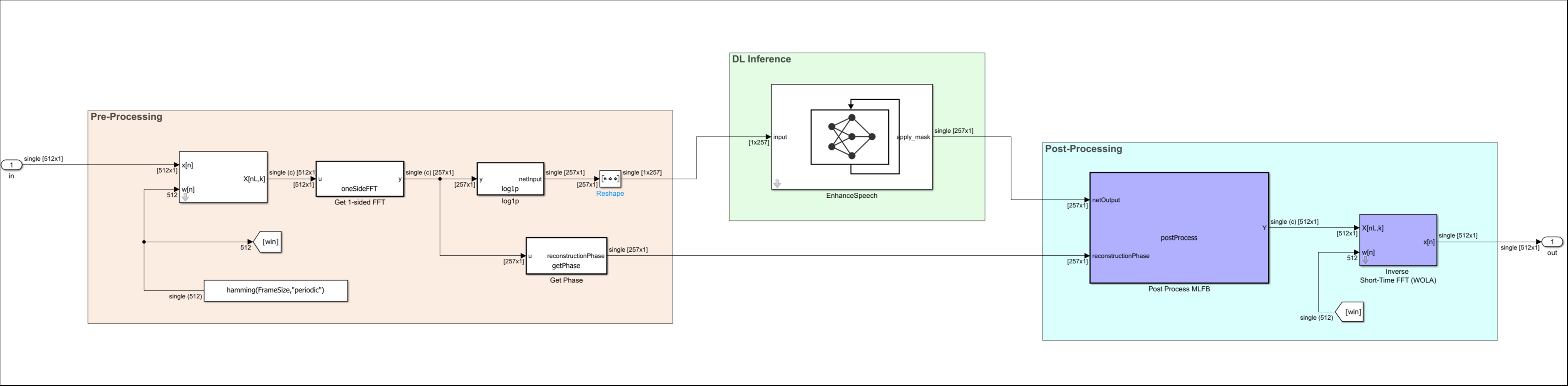
The referenced model has three parts:
Pre-Processing - Prepares the noisy speech audio input for speech enhancement using a pretrained deep learning network. It resamples the audio to a model-specific sampling rate, pads the signal to fit windowing requirements, and computes a lightweight short-time Fourier transform (STFT). The pre-processing step outputs the log-magnitude STFT features for the network and saves the phase information for later reconstruction.
DL Inference - The pretrained deep learning network receives preprocessed audio input features and predicts an audio output with reduced noise to enhance the speech.
Post-Processing - Reconstructs a time-domain audio signal from the output of the pretrained deep learning network. The post-processing step restores the phase, applies inverse STFT, and then resamples the audio output to the original sampling rate. Additionally, the post-processing step removes any padding and clamps the audio to the valid range.
To open the top-level model, execute this command.
open_system("enhanceSpeechModel");The simulation time of the top-level model is set to 3 seconds. The referenced model is configured to run in the processor-in-loop (PIL) simulation mode. To view the output in normal mode, you override the simulation modes without modifying any models. See Override Model Reference Simulation Modes for more information.
To observe the noisy audio input signal after model simulation on the host, execute these commands.
set_param("enhanceSpeechModel/Manual Switch","sw","1");
set_param("enhanceSpeechModel", ModelReferenceSimulationModeOverride="all-normal");
sim("enhanceSpeechModel",SimulationMode="normal");
To observe the enhanced audio signal after model simulation on the host, execute these commands.
set_param("enhanceSpeechModel/Manual Switch","sw","0");
set_param("enhanceSpeechModel", ModelReferenceSimulationModeOverride="all-normal");
sim("enhanceSpeechModel",SimulationMode="normal");
Revert the referenced model to the original state to allow PIL mode simulation to generate optimized code and deploy the code on the selected target.
set_param("enhanceSpeechModel", ModelReferenceSimulationModeOverride="none");
Configure Model for Code Generation
You can configure the referenced model using either the interactive approach or the programmatic approach.
To open the referenced model, execute this command.
open_system("SpeechEnhancer_Hexagon");Interactive Approach
Generate code for Qualcomm Hexagon simulator, configure the model in the same way as described in the Getting Started with Embedded Coder Support Package for Qualcomm Hexagon Processors example.
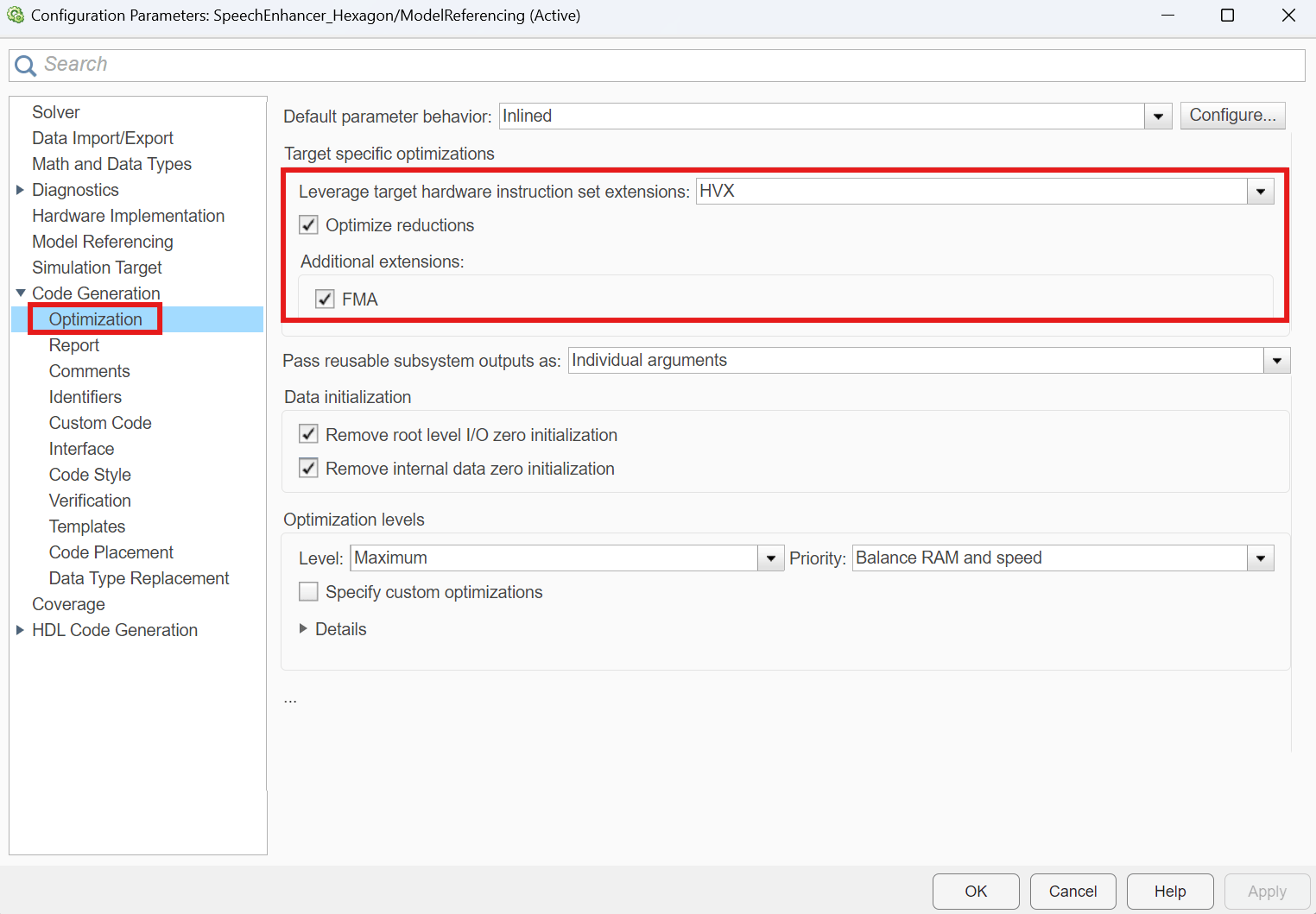
To set the HVX ISE, set Leverage target hardware instruction set extensions to HVX located in the Optimization section, under Target specific optimizations. Additionally, to include specific SIMD instructions, enable Optimize reductions and FMA.
Programmatic Approach
To configure the SpeechEnhancer_Hexagon.slx model for deployment on the Qualcomm Hexagon Simulator, execute the commands below.
set_param("SpeechEnhancer_Hexagon","HardwareBoard","Qualcomm Hexagon Simulator");
set_param("SpeechEnhancer_Hexagon","SystemTargetFile","ert.tlc");
set_param("SpeechEnhancer_Hexagon","BuildConfiguration","Faster Runs");
Set the CRLs and ISE. To generate a code optimized for Qualcomm Hexagon simulator, set OptimizeReductions and InstructionSetFMA to on.
targetInfo = get_param("SpeechEnhancer_Hexagon","CoderTargetData");
targetInfo.Device.EnableHVX = 1;
targetInfo.Device.ProcessorVersion = 'V75';
set_param("SpeechEnhancer_Hexagon","CoderTargetData",targetInfo);
set_param("SpeechEnhancer_Hexagon","InstructionSetExtensions", "HVX");
set_param("SpeechEnhancer_Hexagon","OptimizeReductions","On");
set_param("SpeechEnhancer_Hexagon","InstructionSetFMA","On");
set_param("SpeechEnhancer_Hexagon","CodeReplacementLibrary","Qualcomm Hexagon HVX, Qualcomm Hexagon QHL");
Save and close the model.
close_system("SpeechEnhancer_Hexagon", 1);Run on Target
To simulate the top-level model in normal mode, click Run under the Simulation tab on the Simulink toolstrip.

Alternatively, execute this command to run the model on the target.
out = sim("enhanceSpeechModel",SimulationMode="normal");
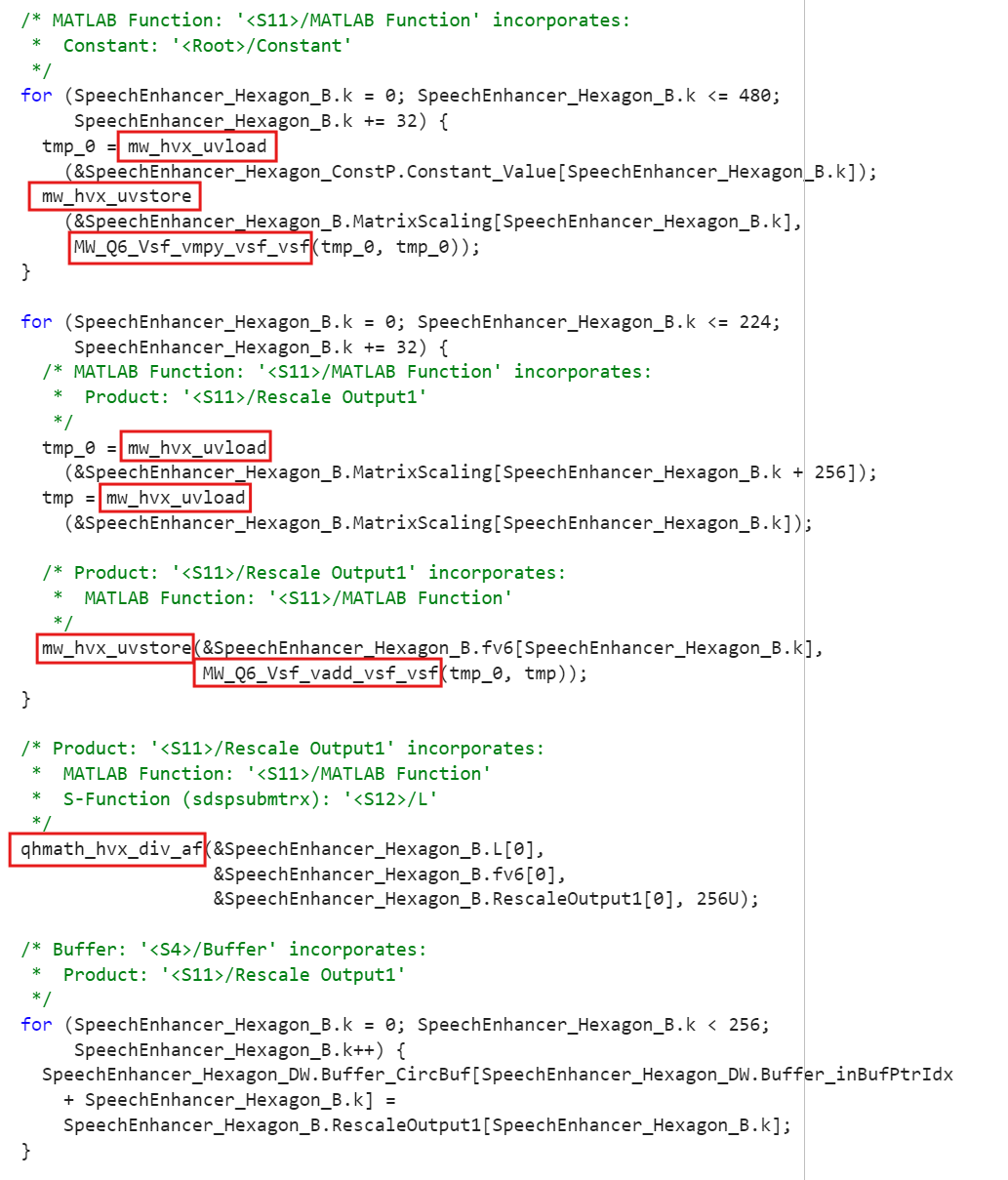
Once the code generation is complete, you can find the generated code for the referenced model in the slprj/ert/SpeechEnhancer_Hexagon directory in the MTALAB working folder.
Verify on Target Using SIL/PIL Manager
To perform numerical accuracy verification of the generated code against the simulation output, use the SIL/PIL Manager App in the top-level model.
Go to SIL/PIL Manager.
Set Mode to Automated Verification.
Set the System Under Test to Model blocks in SIL/PIL mode.
Set the Top Level Mode to Normal.
Click Run Verification.

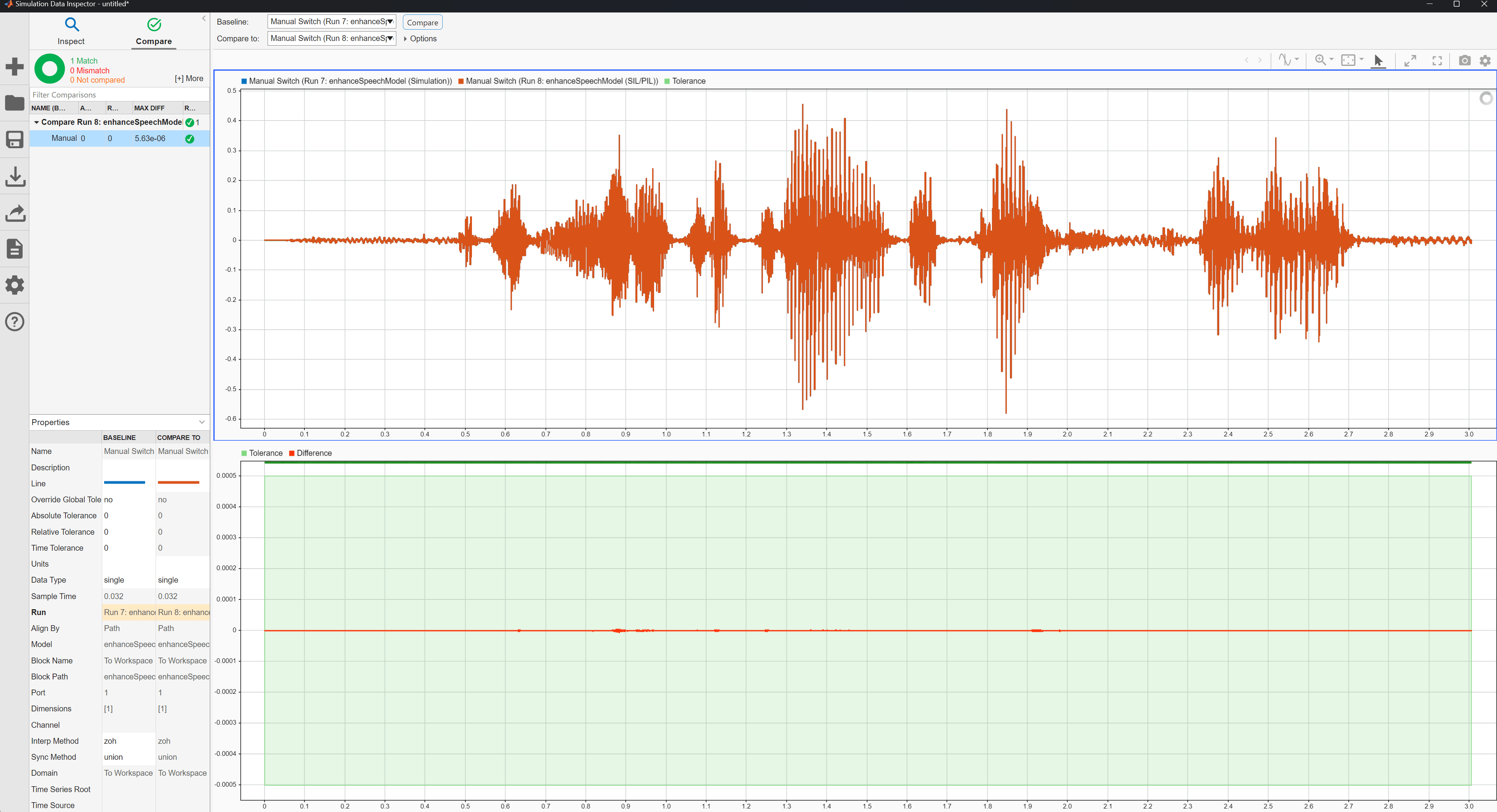
You can verify the numerical accuracy using the Simulation Data Inspector. Refer to the Getting Started with Embedded Coder Support Package for Qualcomm Hexagon Processors example for detailed instructions.
Compare Performance
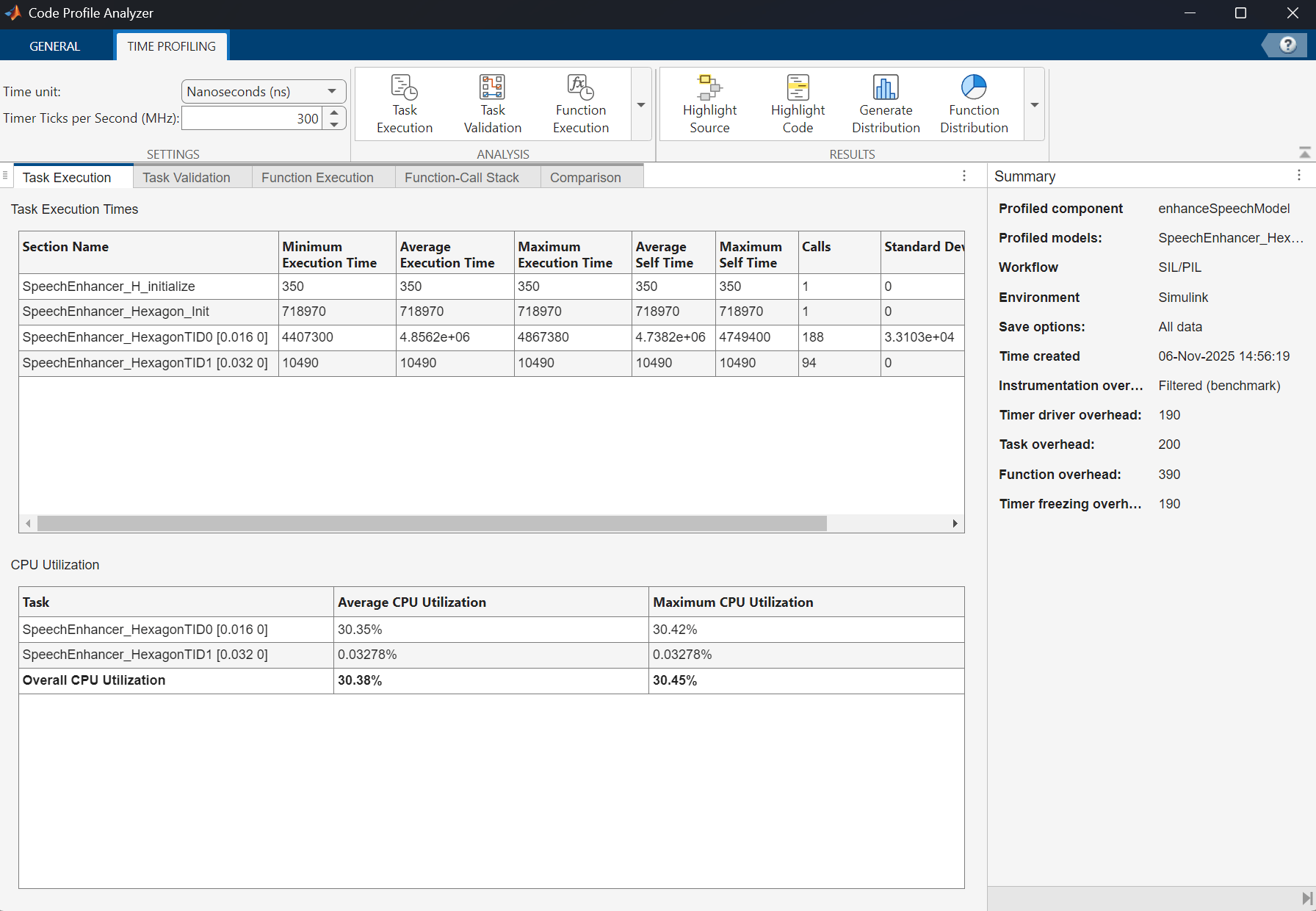
To quantify the optimization using the CRLs and the ISE, you can compare the performance of the optimized generated code against Plain C generated code. Refer to the Compare Performance section of the Getting Started with Embedded Coder Support Package for Qualcomm Hexagon ProcessorsGetting Started with Embedded Coder Support Package for Qualcomm Hexagon Processorsexample for detailed instructions.
This calculation estimates the average execution time for a 1-second duration by scaling the total execution times of two step sections.The 62 calls for the SpeechEnhancer_HexagonTID0 and 31 calls for the SpeechEnhancer_HexagonTID1, are normalized based on the actual number of calls (188 and 94, respectively) during a 3-second run.
ticksWithCRLAndISE = ((out.executionProfile.Sections(3).TotalExecutionTimeInTicks) * (62/188) + (out.executionProfile.Sections(4).TotalExecutionTimeInTicks) * (31/94))
ticksWithCRLAndISE = uint64

90422619
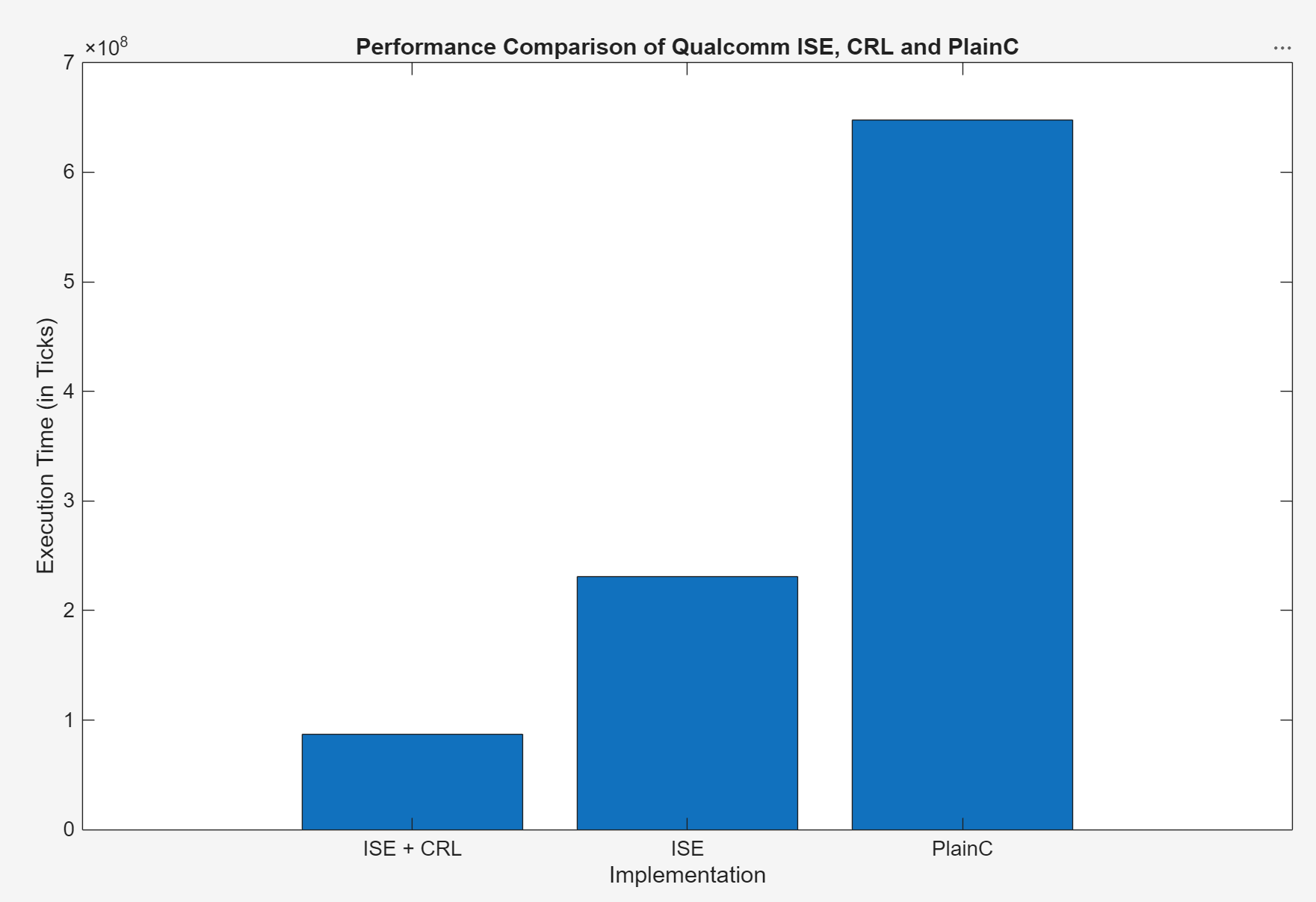
You observe that the step functions consume 90,422,619 cycles when QHL, HVX CRLs, and HVX ISE are enabled. The Code Profile Analyzer also provides insights into the average execution time. For details, refer to the Analyze Profile Information section in Getting Started with Embedded Coder Support Package for Qualcomm Hexagon Processors.
Repeat the same steps without selecting the ISE or the CRLs in the referenced model.
set_param("SpeechEnhancer_Hexagon","InstructionSetExtensions","None");
set_param("SpeechEnhancer_Hexagon","CodeReplacementLibrary","None");
ticksWithoutCRLAndISE = ((out.executionProfile.Sections(3).TotalExecutionTimeInTicks) * (62/188) + (out.executionProfile.Sections(4).TotalExecutionTimeInTicks) * (31/94))
The step function consumes approximately 648,031,302 cycles in case of plain C generated code without any optimizations.
The step function consumes 230,974,806 cycles when only HVX ISE is enabled using the following configuration.
set_param("SpeechEnhancer_Hexagon","InstructionSetExtensions","HVX");
set_param("SpeechEnhancer_Hexagon","OptimizeReductions","On");
set_param("SpeechEnhancer_Hexagon","InstructionSetFMA","On");
set_param("SpeechEnhancer_Hexagon","CodeReplacementLibrary","None");
This figure shows the performance comparison between the HVX Instruction Set Extension, Qualcomm Hexagon CRLs, and Plain-C. The HVX ISE implementation achieves a performance improvement of 2.8 times over Plain-C, while the Qualcomm Hexagon CRLs combined with HVX ISE implementation is 7.4 times faster compared to plain C.