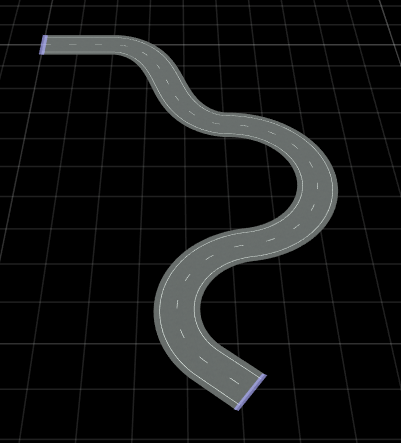
シーン作成用の MATLAB 関数
アクター、論理位相、ウェイポイントなどの RoadRunner シナリオの要素を MATLAB® を使用して作成および変更
Automated Driving Toolbox™ には、MATLAB コマンド ライン インターフェイスから道路の追加、道路のジオメトリの変更、車線の追加などをすることで、RoadRunner のシーンをプログラムで作成できる関数が用意されています。シーンをプログラムで作成すると、シーンの作成をアプリケーションの切り替えなしですばやく行うことができ、繰り返し実行する作成タスクを自動化して、自動テスト用のシーン バリエーションを生成できます。
関数
roadrunnerAPI | RoadRunner authoring API (R2025a 以降) |
Project | Specify RoadRunner project folder (R2025a 以降) |
Scene | Current RoadRunner scene (R2025a 以降) |
createAsset | Create new asset (R2025a 以降) |
getAsset | Extract object for specified asset (R2025a 以降) |
道路タイプの定義
addLineArcRoad | Add road with line-arc horizontal curve type to RoadRunner scene (R2025a 以降) |
addSegmentedRoad | Add road with segmented curve type to RoadRunner scene (R2025a 以降) |
addClothoidFitRoad | Add clothoid curve type road to RoadRunner scene (R2025a 以降) |
道路のレイアウト
Road | Specify road in RoadRunner scene (R2025a 以降) |
水平方向の道路曲線のジオメトリの定義
addControlPoint | Add control point to line-arc road curve (R2025a 以降) |
addLine | Add new line segment to horizontal curve of segmented road (R2025a 以降) |
addArc | Add new arc segment to horizontal curve of segmented road (R2025a 以降) |
addSpiral | Add new spiral segment to horizontal curve of segmented road (R2025a 以降) |
addParametricCubic | Add new parametric cubic segment to horizontal curve of segmented road (R2025a 以降) |
水平方向の道路曲線のタイプ
LineArcRoadCurve | Specify line-arc road curve in RoadRunner scene (R2025a 以降) |
LineArcRoadCurvePoint | Specify control point on line-arc road curve in RoadRunner scene (R2025a 以降) |
SegmentedRoadCurve | Define horizontal curve of segmented road (R2025a 以降) |
車線オブジェクトの抽出
Lane | Lane on road in RoadRunner scene (R2025a 以降) |
ReferenceLane | Reference lane of road in RoadRunner scene (R2025a 以降) |
車線の追加
addLaneToRight | Add lane to right side of specified lane (R2025a 以降) |
addLaneToLeft | Add lane to left side of specified lane (R2025a 以降) |
車線区分線プロファイルの定義
LaneMarkingProfile | Marking profile for lane boundaries in RoadRunner scene (R2025a 以降) |
LaneMarkingStyle | Marking style of lane boundary in RoadRunner scene (R2025a 以降) |
LaneMarkingSpan | Span in lane marking profile in RoadRunner scene (R2025a 以降) |
LaneMarkingNode | Node in lane marking profile in RoadRunner scene (R2025a 以降) |
車線幅プロファイルの定義
LaneWidthProfile | Width profile for lane boundaries in RoadRunner scene (R2025a 以降) |
LaneWidthSpan | Span in lane width profile in RoadRunner scene (R2025a 以降) |
LaneWidthNode | Node in lane width profile in RoadRunner scene (R2025a 以降) |
垂直方向の道路曲線のジオメトリの定義
insertNode | Insert node in span sequence (R2025a 以降) |
垂直方向の道路曲線のタイプ
SpanSequence | Define sequence of nodes connected by spans (R2025a 以降) |
SpanSequenceNode | Define span sequence node in span sequence (R2025a 以降) |
SpanSequenceSpan | Define span between two nodes in span sequence (R2025a 以降) |
SuperElevationCurve | Road superelevation or banking angle profile (R2026a 以降) |
SuperElevationNode | Road superelevation or banking angle at point (R2026a 以降) |
SuperElevationSpan | Banking angle transition between adjacent superelevation nodes along road (R2026a 以降) |
addSuperElevation | Add or update road superelevation or banking angle at point (R2026a 以降) |
注目の例
Design a Curved Road Programmatically using MATLAB Scene Authoring Functions
Design a curved road using scene authoring functions.
MATLAB Command
You clicked a link that corresponds to this MATLAB command:
Run the command by entering it in the MATLAB Command Window. Web browsers do not support MATLAB commands.
Web サイトの選択
Web サイトを選択すると、翻訳されたコンテンツにアクセスし、地域のイベントやサービスを確認できます。現在の位置情報に基づき、次のサイトの選択を推奨します:
また、以下のリストから Web サイトを選択することもできます。
最適なサイトパフォーマンスの取得方法
中国のサイト (中国語または英語) を選択することで、最適なサイトパフォーマンスが得られます。その他の国の MathWorks のサイトは、お客様の地域からのアクセスが最適化されていません。
南北アメリカ
- América Latina (Español)
- Canada (English)
- United States (English)
ヨーロッパ
- Belgium (English)
- Denmark (English)
- Deutschland (Deutsch)
- España (Español)
- Finland (English)
- France (Français)
- Ireland (English)
- Italia (Italiano)
- Luxembourg (English)
- Netherlands (English)
- Norway (English)
- Österreich (Deutsch)
- Portugal (English)
- Sweden (English)
- Switzerland
- United Kingdom (English)