transmitRepeat
R2026bSyntax
Description
Add-On Required: This feature requires the Communications Toolbox Support Package for USRP Radio add-on.
Examples
Create and initialize the transmitter System object. Set the interpolation factor.
sampleRate = 1e6;
tx = comm.SDRuTransmitter(Platform="B210",SerialNum='3136D08',...
                   CenterFrequency=2e9,MasterClockRate=50e6,...
                   Gain=30);
tx.InterpolationFactor = tx.MasterClockRate/sampleRate;
Create and initialize the receiver System object. Set the decimation factor.
rx = comm.SDRuReceiver(Platform="B210",SerialNum='3136D08',...
                CenterFrequency=2e9,MasterClockRate=50e6,...
                Gain=45);
rx.DecimationFactor = rx.MasterClockRate/sampleRate;
Generate a sine wave for transmission.
sinewave = dsp.SineWave(1,50e3);
sinewave.SampleRate = sampleRate ;
sinewave.SamplesPerFrame = 2e4;
sinewave.OutputDataType = 'double';
sinewave.ComplexOutput = true;
txData = sinewave();
Initialize the timescope and spectrum analyzer for visualization at the receiver.
timeScope = timescope(SampleRate=sampleRate);
spectrumScope = spectrumAnalyzer(SampleRate=sampleRate);
spectrumScope.ViewType="spectrum";
spectrumScope.PeakFinder.Enabled = true;
Transmit the sine wave in the background using the transmitRepeat function.
samplePerFrame = 2e4;
stopTime = 1;
transmitRepeat(tx,txData);
## Setting up radio for repeated transmission.
## Waveform transmission has started successfully and will repeat indefinitely. Call the stopTransmission() method to stop the transmission.
Receive the sine wave in the foreground. Use the isTransmitting function to check if the transmitter is transmitting in the background.
if isTransmitting(tx)
    for i = 1:40
        [data, ~] = rx();
timeScope(data)
spectrumScope(data)
    end
end
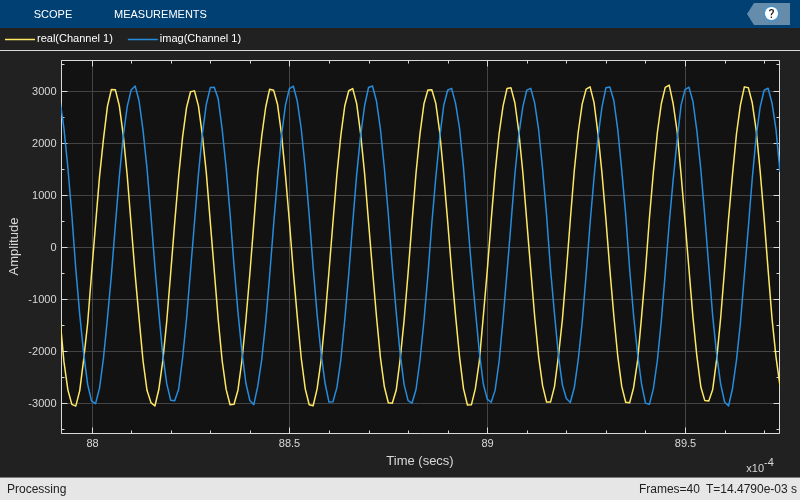
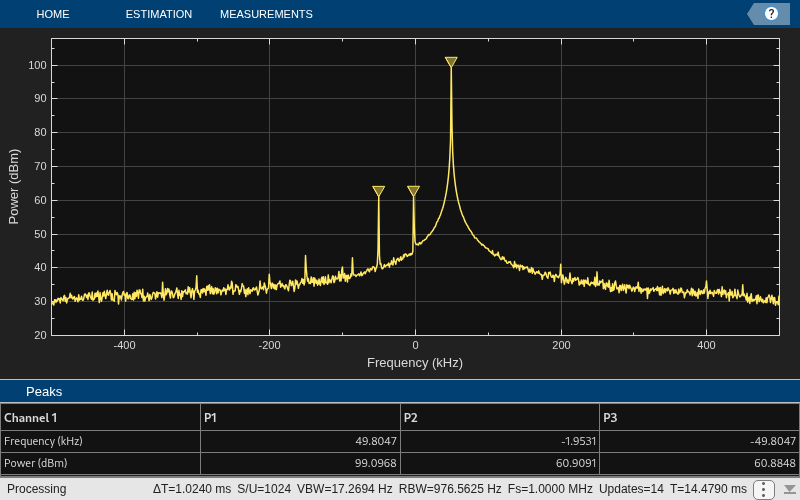
Stop the background transmission and release the transmitter and receiver System objects.
stopTransmission(tx);
disp('Transmission ended')
Transmission ended
release(tx);
release(rx);
Input Arguments
Version History
Introduced in R2026a

