subplotHelper

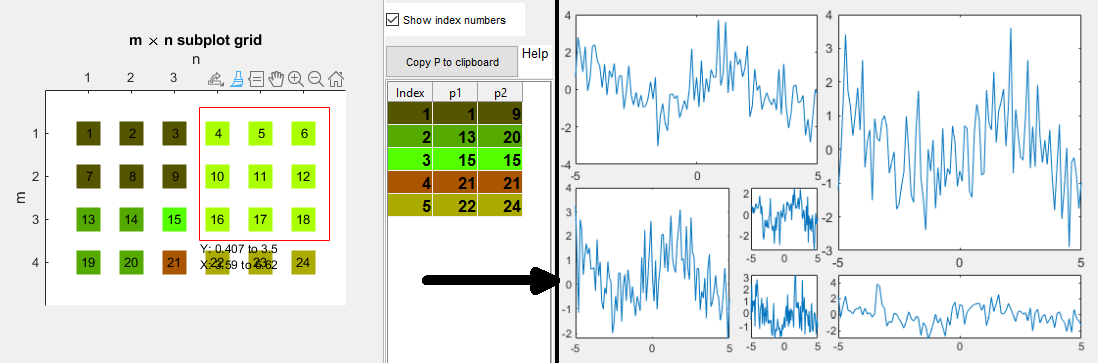
Helps with organizing and referring to SUBPLOT axes with an interactive grid tile chooser.

現在この提出コンテンツをフォロー中です。

編集メモ: This file was selected as MATLAB Central Pick of the Week

This simple class helps with using SUBPLOT(M, N, P) by showing the SUBPLOT grid
that will be created. The user can interactively choose the grid tiles that should
be used for each axes by brushing the displayed rectangles. The property 'p' then
holds a two-column matrix where each row is the P-input to each axes in the
SUBPLOT for the respective grid part.

Example:

% 1) open the GUI
m = 4; % rows
n = 6; % columns
sbh = subplotHelper(m, n); % open grid tile chooser

% 2) Interactively choose which tiles should be used for subplots

% 3) Retrieve the subplot arrangement matrix:
% Either by copying it to the clipboard (via the button in the GUI) or by calling this:
p = sbh.p;

%% Workflow for subplot arrangement:

% 1) Define subplot dimensions
m = 4; % rows
n = 6; % columns
sbh = subplotHelper(m, n); % open grid tile chooser, choose layout
p = sbh.p; % get subplot arrangement matrix

% 2) Use the matrix for your subplot
x = -5:0.1:5;
for iP = 1:size(p, 1)
ax = subplot(m, n, p(iP, :));
plot(ax, x, sin(x)+randn(size(x)));
end

% 3) Optional: Adjust subplot layout
% show layout again and adjust the tile arrangement using the GUI table
sbh = subplotHelper.showP(m, n, p);
p = sbh.p;
% Then go back to step 2, applying the adjusted layout

引用

Frederick Zittrell (2026). subplotHelper (https://jp.mathworks.com/matlabcentral/fileexchange/71369-subplothelper), MATLAB Central File Exchange. に取得済み.

一般的な情報

MATLAB リリースの互換性

  • R2017a 以降のリリースと互換性あり

プラットフォームの互換性

  • Windows
  • macOS
  • Linux
バージョン 公開済み リリース ノート Action
2.0

Add GUI elements that permit convenient adjustment of the chosen grid arrangement.
Add static method 'showP' that allows for displaying and adjusting a previously defined subplot grid.

1.0.1

Update required MATLAB version

1.0.0