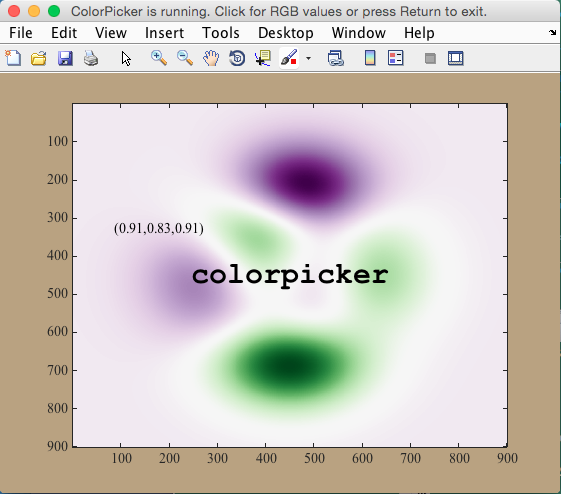

colorpicker

Get RGB values of any point(s) on a figure from mouse click(s)

現在この提出コンテンツをフォロー中です。

colorpicker gets RGB values from mouse clicks anywhere on a figure. Press
Return to exit.

% Syntax
colorpicker
colorpicker(256)
colorpicker(...,TextProperty,TextValue)
RGB = colorpicker(...)
[R,G,B] = colorpicker(...)

% Description
colorpicker gets RGB values of anywhere you click on the current figure.
Values are temporarily printed at the location of the click until you
click somewhere else or press Return to exit.

colorpicker(256) scales values from 0 to 256 rather than the Matlab
default method of scaling from 0 to 1.

colorpicker(...,TextProperty,TextValue) specifies text formatting for the
temporary RGB labels.

RGB = colorpicker(...) returns RGB values of all clicks while the color
picker is open. If only one output is requested, RGB values a an N-by-3
array, where N is the number of clicks.

[R,G,B] = colorpicker(...) returns RGB values as three individual N-by-1
arrays. I'm not sure when you'd ever need this, but it's certainly an
option.

% Example 1: Open a figure and start clicking around to get RGB values:

imagesc(peaks)
colorpicker

% Example 2: Do the same as above, but specify label format:
imagesc(peaks)
colorpicker('fontweight','bold','color','r')

% Example 3: Get 8 bit integer values:
imagesc(peaks)
colorpicker(256)

% Example 4: Return an N-by-3 array of RGB values, where N is the number of times you click:
imagesc(peaks)
rgb = colorpicker;

% Example 5: Get individual R, G, and B arrays scaled from 0 to 255 and specify label formatting:
imagesc(peaks)
[r,g,b] = colorpicker(256,'fontangle','italic',...
'fontsize',30,'backgroundcolor','w');

引用

Chad Greene (2026). colorpicker (https://jp.mathworks.com/matlabcentral/fileexchange/53656-colorpicker), MATLAB Central File Exchange. に取得済み.

カテゴリ

Help Center および MATLAB AnswersEntering Commands についてさらに検索

一般的な情報

MATLAB リリースの互換性

  • すべてのリリースと互換性あり

プラットフォームの互換性

  • Windows
  • macOS
  • Linux
バージョン 公開済み リリース ノート Action
1.0.0.0