StructBrowser

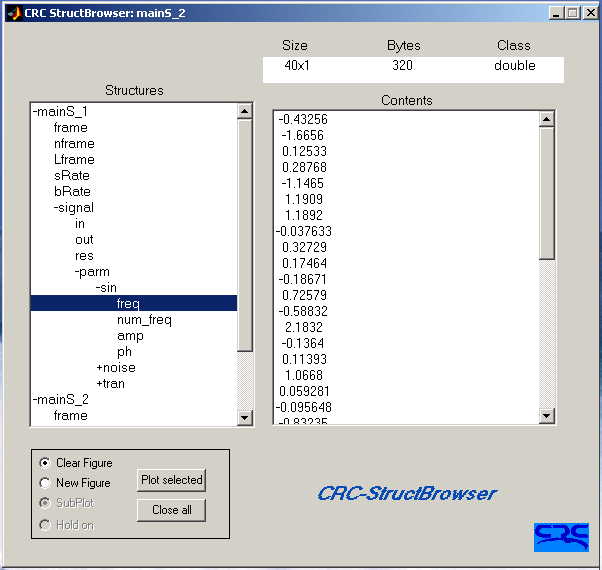
StructBrowser, GUI for browsing any structure (or nested structures) and plotting its fields.

ダウンロード: 4.9K
更新 2009/6/19

ライセンスの表示

The CRC-StructBrowser is designed to expose the contents of all variables of class struct to any depth and plot any of the components. The tool is very useful especially for nested structures. It displays the structure in a tree format starting from the first level. The tree is expanded (or shrunk) to the corresponding level by double-clicking.

Syntax:
StructBrowser
StructBrowser_gui_g(cell_struct)

The easiest way of starting up the GUI is to type the command "StructBrowser" while the workspace contains some information (the same command can be used in the debug mode).

The GUI can also be launched by typing: StructBrowser_gui_g(cell_struct)
in the MatLab command. cell_struct is a cell of size (2 X N), where N is the number of structures to browse. The first row of cell_struct contains all the structures' names, and the second row contains all the corresponding values. Assuming your workspace contains the 3 structures struct_1, struct_2 and struct_3, cell_struct is described by the following:

cell_struct = ...{'struct_1', 'struct_2', 'struct_3'; ...
struct_1, struct_2, struct_3};

In the case of the base workspace, the function "copy_all_struct" is provided to copy all variables of class struct from workspace and store them in a cell array. The syntax of this function is:

cell_struct = copy_all_struct;

引用

Hassan Lahdili (2026). StructBrowser (https://jp.mathworks.com/matlabcentral/fileexchange/3523-structbrowser), MATLAB Central File Exchange. 取得日: .

MATLAB リリースの互換性
作成: R13
すべてのリリースと互換性あり
プラットフォームの互換性
Windows macOS Linux
カテゴリ
Help Center および MATLAB AnswersEnvironment and Settings についてさらに検索
バージョン 公開済み リリース ノート
1.1.0.0

BSD license

1.0.0.0

Add screenshot.