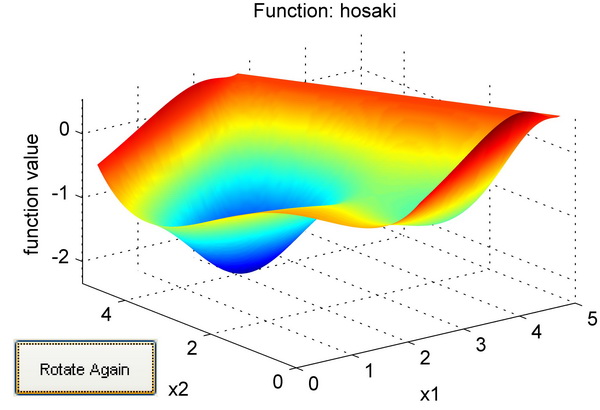
Plot Multi Dimensional Functions

Evaluates multi dimensional functions; and visualizes and animates in two dimensions interactively.

現在この提出コンテンツをフォロー中です。

Usage:

plotfunction(fcn,LB,UB,varargin)

EXAMPLES:
1. plotfunction(@hosaki,[0 0],[5 5]);
% Plot hosaki function in the range of 0 - 5 in both dimension.

2. LB = zeros(1,4);UB= 10*ones(1,4); xypar = [2 3];
plotfunction(@shekel,LB,UB,xypar);
% Plot shekel function in the range of 0 - 10 in second and third dimension while keeping constant value (average of 0 and 10) in other dimensions.

3. baseValue = [3.2 4 4 6.8];
plotfunction(@shekel,LB,UB,xypar,baseValue);
% Plot shekel function keeping constant value of 3.2 in first dimension and 6.8 in last dimension. Here values in second and thirs dimension is overwriten by range of LB and UB as done in example 2.

4. For example you have the following function
f = parameterized_rosenbrock(x,a,b)
x1 = x(1);
x2 = x(2);
f = a * (x2 - x1^2)^b + (1 - x1)^b;

% Use the following to visualise the above function
LB=[-5 -2];UB=[5 8];
a = 100; b = 2; % additional argument to the function
plotfunction(@parameterized_rosenbrock,LB,UB,[],[],a,b)

引用

Durga Lal Shrestha (2026). Plot Multi Dimensional Functions (https://jp.mathworks.com/matlabcentral/fileexchange/26566-plot-multi-dimensional-functions), MATLAB Central File Exchange. に取得済み.

カテゴリ

Help Center および MATLAB AnswersAnimation についてさらに検索

一般的な情報

MATLAB リリースの互換性

  • すべてのリリースと互換性あり

プラットフォームの互換性

  • Windows
  • macOS
  • Linux
バージョン 公開済み リリース ノート Action
1.0.0.0