Subversion GUI

GUI for command-line subversion client

現在この提出コンテンツをフォロー中です。

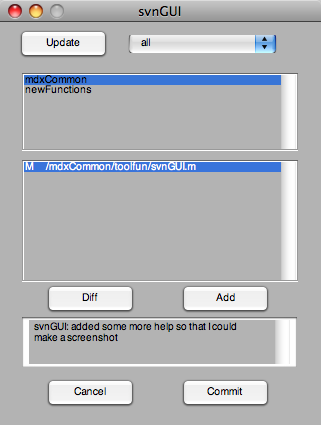
SVNGUI provides a GUI for the subversion version control system. There are excellent third-party tools that do this, such as TortoiseSVN for Windows, or Versions & Cornerstone for Mac, though the Mac GUIs cost money.
All third-party tools require you to switch to another program, which, on some days is just too much hassle. With this GUI, there is no excuse anymore to not commit your code regularly :)

For this to work, you need a command-line subversion client installed on your system. If the server hosting the code uses certificates, you have to accept it on the command line once, before you run svnGUI, otherwise Matlab hangs. If you know how to accept certificates from within Matlab, please let me know.

The GUI allows you to update, commit, add, and assess the difference between files that are under version control

There are three ways to call svnGUI
(1) svnGUI
(2) svnGUI(somePath)
(3) svnGUI('ask')
(1) assumes that the directories under version control are located in $MATLABHOME/matlab/, or in $HOME/matlab/, where $xx are environment variables with name xx that specify a path.
(2) assumes that the directories under version control are located in somePath/
(3) lets you interactively choose where the directories under version control are located.

Note that svnGUI is only committing code from directories where you entered a message that is different from noCommit. In other words, if there have been changes for two directories, but you only write a comment for the first one, changes in the second directory are not committed.

引用

Jonas (2026). Subversion GUI (https://jp.mathworks.com/matlabcentral/fileexchange/23508-subversion-gui), MATLAB Central File Exchange. に取得済み.

カテゴリ

Help Center および MATLAB AnswersSource Control についてさらに検索

一般的な情報

MATLAB リリースの互換性

  • すべてのリリースと互換性あり

プラットフォームの互換性

  • Windows
  • macOS
  • Linux
バージョン 公開済み リリース ノート Action
1.5.0.0

changed title

1.3.0.0

Fixed some bugs, including a Matlab display problem for OSX.
Added the possibility to supply the location of the working copies.

1.2.0.0

Fixed a bug when committing multiple files from different working directories.

1.1.0.0

Fixed Windows bug

1.0.0.0