参加しましょう!
ディスカッションは、仲間と出会い、共に大きな課題に挑戦し、楽しみながら学べる交流の場です。
更新されたディスカッション

We got wonderful questions from the Design For Every Ear workshop session and we did not have chance to respond to them. We use this thread to share some more resources and references to continue the discussion.
- Concepts, tools and examples: https://www.mathworks.com/solutions/medical-devices/hearing-aids.html
- Example references used in the workshop:
- The Hearing Loss Simulation Plugin by Angeliki Mourgela (Queen Mary University of London and BBC R&D), MATLAB File Exchange 79541.
- MathWorks shipping example: Cochlear Implant Speech Processor.
- MathWorks shipping examples, including Speaker Recognition Using x-vectors.
- Embedded AI technology and workflow: https://www.mathworks.com/solutions/embedded-ai.html
- Set up the AI tutor in your own MATLAB: MATLAB MCP Core Server (https://github.com/matlab/matlab-mcp-core-server), MATLAB Agentic Toolkit (https://github.com/matlab/matlab-agentic-toolkit) and Simulink Agentic Toolkit (https://github.com/matlab/simulink-agentic-toolkit)
Thanks!
Many of us have someone in our lives whose hearing has gradually changed with age. Maybe it's a grandparent who leans in a little closer at the dinner table, or a friend who enjoys a chat more in a quiet cafe than a busy one. For many people, hearing loss over the years becomes part of everyday life.
Behind every hearing instrument is an engineering team trying to help people keep enjoying those conversations.
We'd love to hear from you:
- Has hearing changed the way someone you know enjoys music, conversations or learning?
- If you've worked on audio, hearing aids or wearables, what inspired you, and what made it hard?
Join us at MATLAB Expo Online for the hands-on workshop Designing For Every Ear. Together we will explore the technologies right in MATLAB.

Exploring various cutting-edge technologies was an inspiring experience. Thank you, MathWorks, for this invaluable opportunity!

I have been using MATLAB on a daily basis for more than 30 years. For the past few months, I have been working with version 2026, and the problems I have encountered are staggering, especially when debugging functions.
The issues started to appear gradually with R2026a. Suddenly, the cursor would disappear, copy and paste would stop working, and MATLAB often had to be restarted because of these issues. In addition, the new figure UI is painfully slow, and entering debug mode has become frustrating. When stepping through code, MATLAB can take several seconds to respond to a debugging command such as Step.
Today, I finally got fed up and reinstalled R2024b. It works perfectly fine.

I will appreciate you If you send me URL connecting MATLAB EXPO 2026.

Hi there,
Is there a change in the json response when I do http write to a channel ?
I send:
POST /update.json HTTP/1.1
Content-Type: application/x-www-form-urlencoded
Host: api.thingspeak.com
Connection: close
Content-Length: 102
apikey=xxxxxxxxxxxx&field1=-4.803&field3=18&field4=91&field5=109&field6=56&field7=0&field8=7
and I don't receive the normal response
I get sth like:
'unsafe-eval'; style-src 'self' https: 'unsafe-inline'; connect-src 'self' https: https://*.mathworks.com https://*.thingspeak.com https://*.omtrdc.net https://*.demdex.net; frame-src 'self' https: https://*.mathworks.com

This Week's Quiz
165 responses

Let's continue the conversation from our MATLAB EXPO Online talk...
Here are the key highlights from our talk to get you started:
- Automated execution of hundreds of real-time test scenarios in just a few hours, down from days, cutting validation time by 70% to 85%.
- Achieved end-to-end traceability across requirements, architecture, models, and test results essential for evidence-driven decision-making.
- Engineered an extensible framework to future-proof autonomy capabilities across various vehicle platforms and operational design domains.
- Supercharged the digital thread with agentic AI capabilities, while preserving the structure, traceability, and credibility of digital engineering.

It was a great experience learning about various cutting-edge technologies. Thank you MathWorks, for this valuable learning opportunity!

One-Button Game Mini Hack Entry: Pump-Send
Hi everyone! Pump-Send is a side-view mountain bike game on an endless desert pump track. You never pedal: all your speed comes from pumping the rollers, and one button does everything. On the ground, a tap pumps or pops; in the air, it throws you into a backflip.
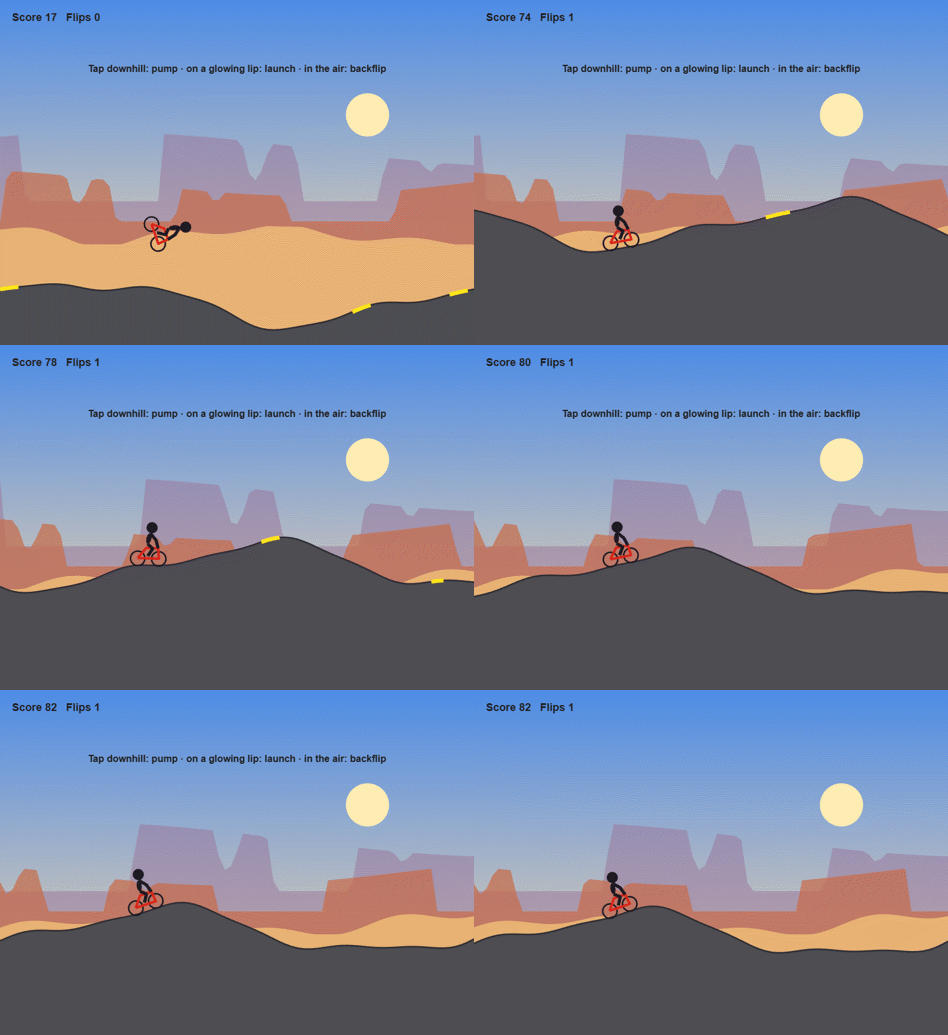
How scoring works
- You get 1 point for every meter you ride. The run ends if you run out of momentum or crash.
- Every clean backflip is worth 50 points, so one flip equals 50 meters of riding.
- Your score and flip count are shown in the top-left corner.
Definitions
- Pump: A tap while rolling downhill. You push the bike into the slope and gain speed.
- Scrub: A tap at the wrong time (going uphill, or a second tap right after a pump). It costs you a little speed.
- Lip: The rising face just before the top of a hill. It glows yellow.
- Pop: A tap on a glowing lip. It's the only way to get airborne.
- Flip: A tap in the air spins the rider backward. Each full rotation you land counts as one flip. Tap only; don't hold the button.
- Stall: Going too slow for too long. This ends the run.
Physics you'll want to know
- Steeper downhill = bigger pump. A pump on a steep drop gives you a big shove, about a third of your starting speed. On a nearly flat stretch, it does almost nothing. Aim for one good pump on each downhill.
- Scrubs add up. A badly timed tap only takes back about a third of a good pump, but a few in a row can leave you crawling.
- Watch the hills scroll. If the scenery slows down and you're barely making it over the crests, pump now or you'll stall.
- Speed is hang time. The faster you hit a glowing lip, the higher and longer you fly, and the more time you have to finish a flip.
- Spin fades in the air. Each tap adds spin, and the spin slowly dies down. More taps spin you faster, but you have to be wheels-down at the right angle when you touch the ground.
- Land matching the slope. Don't start another flip if you won't finish it in time to land at the right angle.
Quick tips
- Build speed with a few pumps before you try your first flip.
- On a big jump, one tap in the air is usually a full flip. Count, then stop tapping.
- When in doubt, skip the flip: distance points still add up.
- The game gets harder as you go, with tighter pump timing and landing requirements.
Behind the scenes
I built Pump-Send with a team of Claude Code agents: one designed the game, one wrote the tests (113 of them!), one built it, one reviewed the code, and one judged prototypes to help me choose among my four original ideas. The judging turned out to be less useful than I expected, since it was pretty obvious after playing which idea would pan out best. The most interesting lesson for me was about using bots to tune the physics.
Lesson one: the bot was too good
The first bot was simply too good at the game. It predicted where each jump would land and planned its flips accordingly, scoring hundreds of points. Then I took the wheel (err, handlebars) and crashed in seconds.
So I had the agents build a bot that plays like a person. It makes the same decisions, but each tap arrives 100 ± 60 ms late, it waits to see what one tap did before deciding again, and it taps at most 10 times per second. That bot survived a median of 8 seconds and crashed in 17 of 30 rides.
Here's what it uncovered and what I changed:
- A slightly late tap on a lip turned into a backflip spin on a tiny hop. Now you only leave the ground when you tap.
- Riders landed on the next uphill 55–68% of the time. Now a lip glows only if a pop at your current speed will land on a downhill.
- A flat dead zone at every crest turned late taps into scrubs. It's gone.
- Everything runs in gentle slow motion (0.8×), so every timing window lasts 25% longer.
- In most flips, the rider's head went through the ground. Now the rider spins around the hips.
After those fixes, the human-like bot survived a median of 53 seconds with 0 of 30 crashes. "The human-like bot survives at least 30 seconds" is now a permanent test for every new build.
Lesson two: bad players on purpose
Bots that play badly are just as useful. Every build is tested against `idle` (never taps), `spam` (taps every frame), and `masher` (8 taps per second). Each one has to die within 15 seconds or score under a fifth of what the scripted bot scores, so you can't win by ignoring or mashing the button. A `random` tapper rounds out the lineup.
Results for the current build, 20 rides of up to 60 seconds each (a different set of rides from the 30 above, so the human-like numbers differ a little):
+------------+----------------------------+-----------------+--------------+--------------+
| Bot | How it plays | Median survival | Median score | Median flips |
+------------+----------------------------+-----------------+--------------+--------------+
| idle | Never taps | 12.8 s | 40 | 0 |
| spam | Taps every frame | 2.2 s | 1 | 0 |
| masher | 8 taps per second | 2.3 s | 9 | 0 |
| random | Random taps | 6.2 s | 30 | 0 |
| human-like | Smart taps, 100 ms late | 46.3 s | 801 | 8.5 |
| scripted | Smart taps, perfect timing | 51.2 s | 1,391 | 14.5 |
+------------+----------------------------+-----------------+--------------+--------------+
Your turn
What's your high score? Did you beat the human-like bot? I'd love to hear if anyone lands three flips in one jump.

What a great first day of MATLAB EXPO Online 2026! Thanks to everyone who joined us, participated in the sessions, and helped make Day 1 such a great experience.
We’re not done yet. Join us tomorrow, November 5, for another full day of great sessions, ideas, and inspiration.
What are you most looking forward to on Day 2? Let us know in the comments!

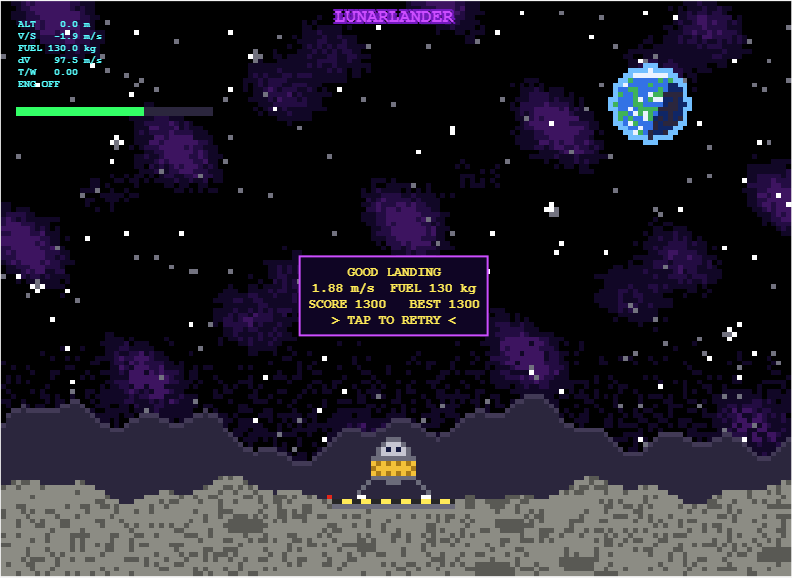
My entry for the one-button game mini hack Lunar Lander - Tap to Burn, is a one-button powered descent. You start 500 m above the surface, falling at 10 m/s, with 200 kg of propellant. One tap turns on the engine, and the next tap stops it.
How scoring works
- Crash: landing at 3 m/s or faster scores 0.
- Abort: rising above 750 m scores 0.
- Safe landing: below 3 m/s scores 10 points per kilogram of fuel remaining.
- Perfect touchdown: below 1 m/s doubles the reward to 20 points per kilogram of fuel remaining.
Physics in the game
- Fuel mass decreases as propellant is burned.
- Gravity continuously accelerates the lander downward.
- The engine does not reach full thrust instantly, so timing matters.
- The display turning red indicates when a full thrust landing burn becomes possible.
Display readouts
- ALT [m]: Height above the surface.
- V/S [m/s]: Vertical speed.
- FUEL [kg]: Remaining propellant.
- dV [m/s]: remaining velocity change the fuel can provide, from the rocket equation Δv=Isp·g₀·ln(m/m_dry).
- T/W: Thrust to weight ratio.
My best so far is 1300. Has anyone managed a sub 1m/s landing?

When the agent tunes the controller, what stops it from passing the specs on the nominal model but failing on delay, saturation, or parameter variation? Do you make it run a robustness sweep, not just one simulation?

Once you've uploaded your one-button game, it doesn't seem like there's a way to edit/update it. That's led me to fall into a couple of traps. One has a simple solution, so I'll share it. The other has me still scratching my head, so I'll open it up for discussion.
- Restarting. While you're developing and testing in MATLAB, it's easy enough to close the window and rerun your game. But the process is clunkier in the online gallery, so make sure your game includes a clean way to restart. If you're using an agent, it's easy enough to instruct it to modify the spacebar/click callback when the game ends so that it now calls the start/initialization function. This is a nice job for an agent (standard coding pattern it will probably do right, while I'll mess up and get annoyed).
- Timing. I can't figure out how to translate frame rate on my slow desktop MATLAB to the online running framework. Things that seem very sedate while testing suddenly get very exciting when I upload. Anyone know a good way to emulate just how zippy the real game will be?

I'm excited to be attending MATLAB Expo for the first time, even though I'll be joining online. I'm looking forward to exploring the latest advancements in MATLAB, discovering innovative applications, and learning how these technologies are being used to solve real-world challenges. As a Computer Science student with an interest in Artificial Intelligence and Machine Learning, I'm particularly interested in gaining insights into emerging technologies and their practical applications.
Looking forward to an engaging and insightful experience, learning from industry experts, and connecting with fellow enthusiasts!

had a wonderful experience of the recent session.I am attending the matlab expo for the first time

If you are as excited as me to play these games but somehow something is stopping you from doing just that, you are at the right place. Follow the steps below and you will be playing in no time (maybe some time depending on your browser, network speed, etc.):
- Click on the game you like the look of (let's say, something that is transformative).
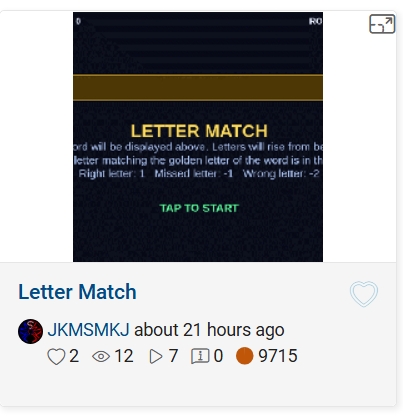
- This will open up its details page with the game code, preview video and the "Play Game" button. Click the video or the button.
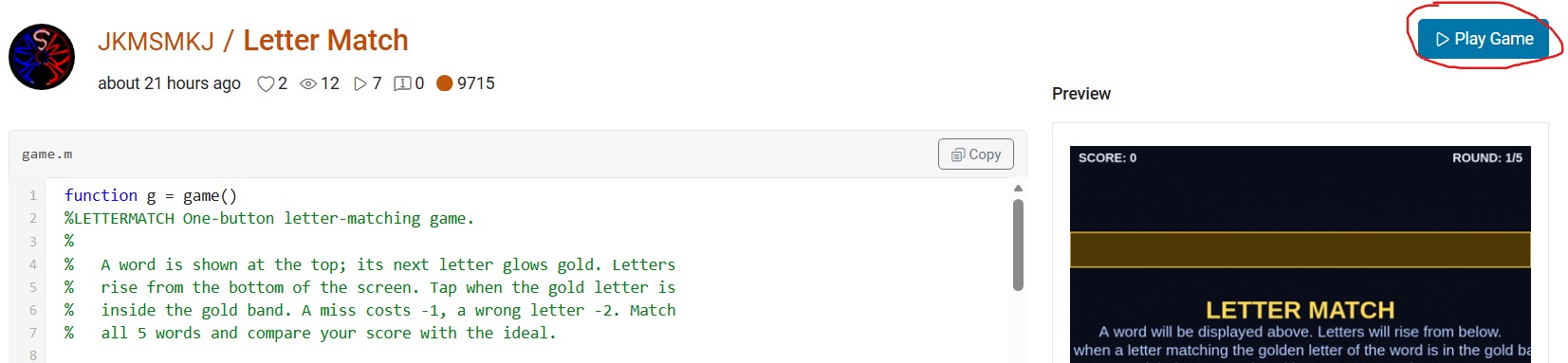
- This will open up "MATLAB Drive" in a new browser window with a preview screenshot of a half-played game and a "Run this App" button. Click this button and nothing will seem to happen at first. And nothing will happen at any other subsequent tries. But don't worry, that's why you're here.
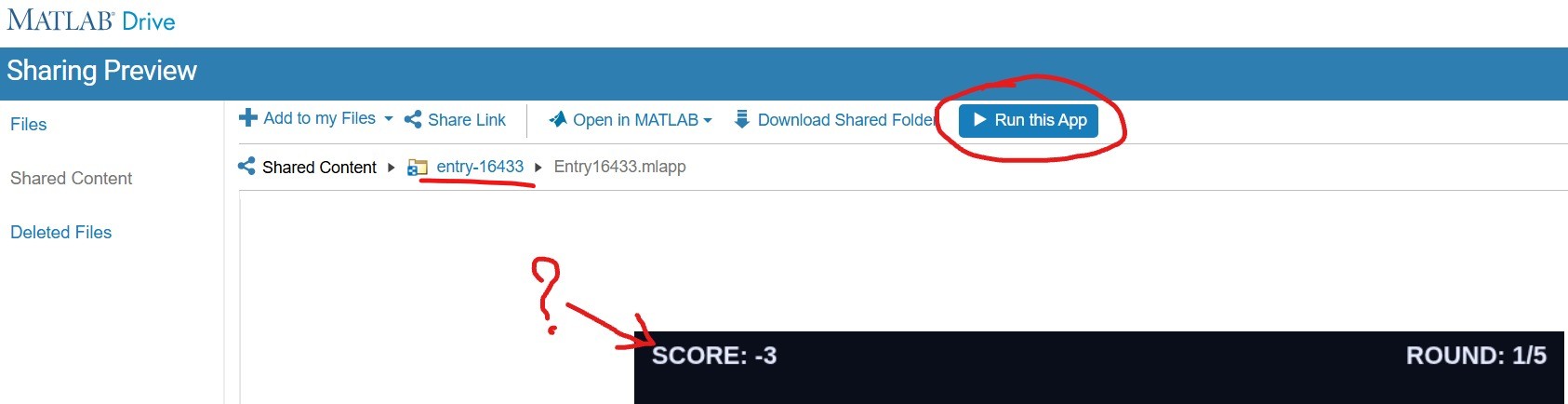
- Click on the "entry-×××××" blue hyperlink just above the preview area (underlined in red above). This will take you to a list of two files but hide the crucial blue button. Click on the "Entry×××××.mlapp" file to resurface the blue button.
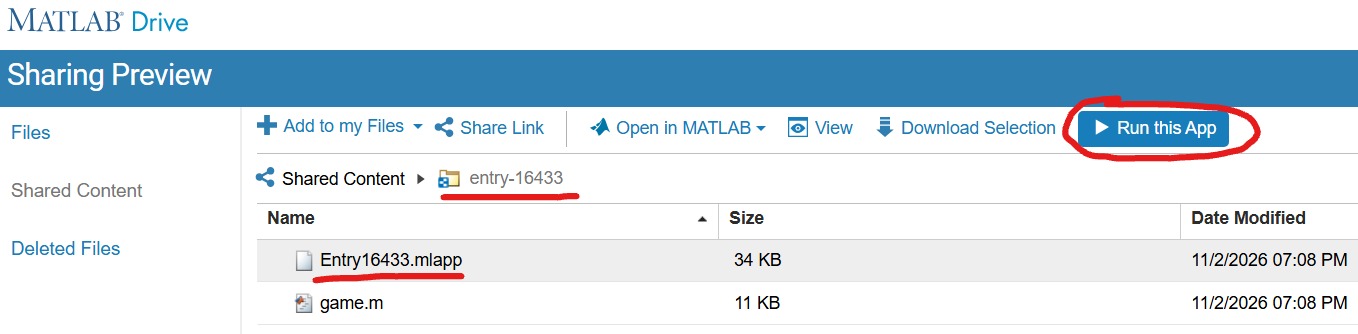
- With expectant hands, click the "Run this App" button. This time it will reload the "MATLAB Drive" and put it in the mode to run your chosen game.
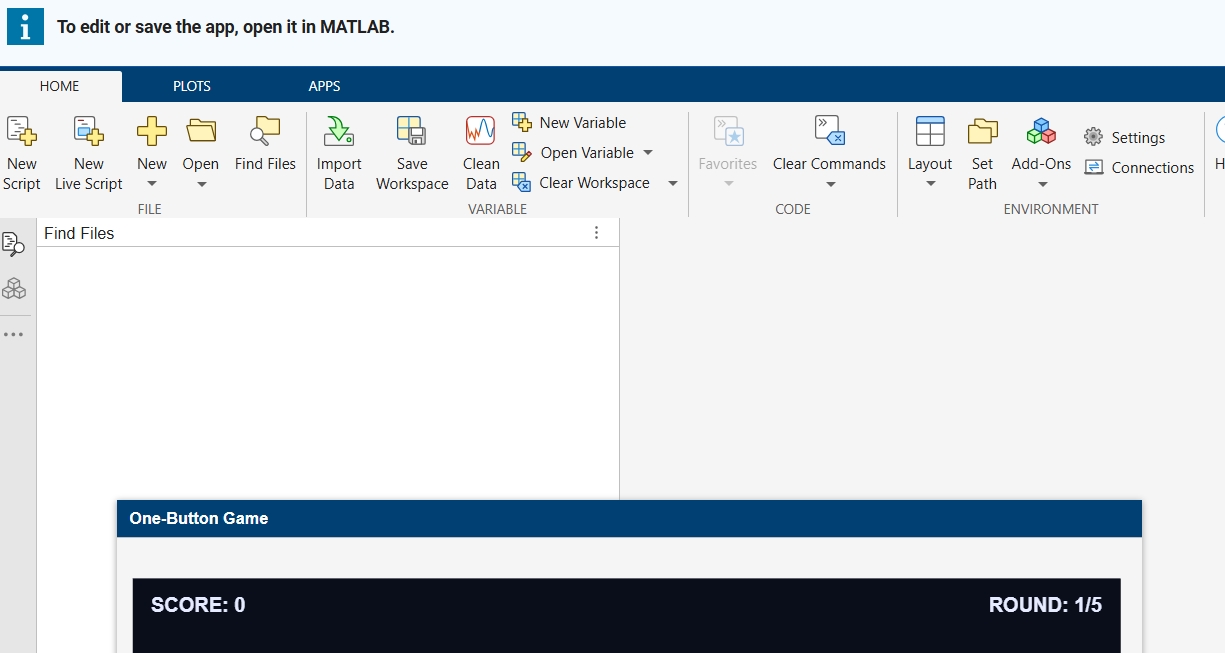
- Finally, you are where you expected to be in the point 3! Enjoy your game.🥳

This is my first time attending the MATLAB EXPO and it's been nothing short of amazing so far. I am a mechanical engineering student, interested in aerospace and automobiles. Let's connect and discuss our interests. I attended 3 tracks as of now, and absolutely loved 'How 3D Digital Twins Enabled the Development of an Autonomous Rebar-Tying Robot' . I'd especially love to talk more about that and other topics too. If anyone enjoyed it as i did, do connect!

This is my first time attending the MATLAB Expo. I am learning so many new things as a beginner. Hope to further improve my programming skills to stay up to date with what the industry needs.

I can not understand why Plot Browser was taken away in latest Matlab... I use Plot Browser all of the time! Having to find and click the particular line I want in a plot with a lot of lines is way less convenient than just selecting it in the Plot Browser. Also, being able to quickly hide/show multiple lines at once with the plot browser was so helpful in a lot of cases. Please bring Plot Browser back!!!! Please reply with support for this if you feel the same as I do!
Discussions について
Discussions is a user-focused forum for the conversations that happen outside of any particular product or project.
Get to know your peers while sharing all the tricks you've learned, ideas you've had, or even your latest vacation photos. Discussions is where MATLAB users connect!
Get to know your peers while sharing all the tricks you've learned, ideas you've had, or even your latest vacation photos. Discussions is where MATLAB users connect!
その他のコミュニティ エリア

MATLAB Answers
MATLAB と Simulink について、質問や回答をしましょう!

File Exchange
ユーザーが投稿したコードをダウンロードしたり、コードにコントリビュートしましょう!

Cody
問題グループを解き、MATLAB を学習してバッジを獲得しましょう!

ブログ
MATLAB と Simulink についてさらに詳しく知りましょう!

AI Chat Playground
AI を活用して、初期版の MATLAB コードを作成したり、疑問を解決したりしましょう!

