単一カメラのキャリブレーションの精度の評価
R2026bこの例では、単一カメラ キャリブレーター アプリの使用アプリまたは関数estimateCameraParametersを使用して推定されたカメラ パラメーターの精度を評価する方法を説明します。
概要
カメラのキャリブレーションは、特別なキャリブレーション パターンのイメージを使用してカメラのパラメーターを推定するプロセスです。パラメーターには、カメラの内部パラメーター、歪み係数およびカメラの外部パラメーターがあります。カメラをキャリブレーションしたら、推定されたパラメーターの精度をいくつかの方法で評価できます。
カメラの相対位置とキャリブレーション パターンのプロット
再投影誤差の計算
パラメーター推定誤差の計算
カメラのキャリブレーション
チェッカーボードのキャリブレーション パターンからなる一連のイメージを使用して、カメラ パラメーターを推定します。
% Create a set of calibration images.
images = imageDatastore(fullfile(toolboxdir("vision"), "visiondata", ...
    "calibration", "mono"));
imageFileNames = images.Files;

% Detect calibration pattern.
[imagePoints, patternDims] = detectCheckerboardPoints(imageFileNames);

% Generate world coordinates of the corners of the squares.
squareSize = 29; % millimeters
worldPoints = patternWorldPoints("checkerboard", patternDims, squareSize);

% Calibrate the camera.
I = readimage(images, 1);
imageSize = [size(I, 1), size(I, 2)];
[params, ~, estimationErrors] = estimateCameraParameters(imagePoints, worldPoints, ...
                                     ImageSize=imageSize);
外部パラメーター
カメラとキャリブレーション パターンの相対位置をプロットすることで、キャリブレーションでの明らかな誤差を素早く検出できます。関数showExtrinsicsを使用して、カメラの座標系でキャリブレーション パターンの位置をプロットするか、パターンの座標系でカメラの位置をプロットします。パターンがカメラの背後にあったり、カメラがパターン背後にあるといった、明らかな問題点を探します。また、パターンがカメラから遠すぎないか、あるいはカメラに近すぎないかも確認します。
figure;
showExtrinsics(params, "CameraCentric");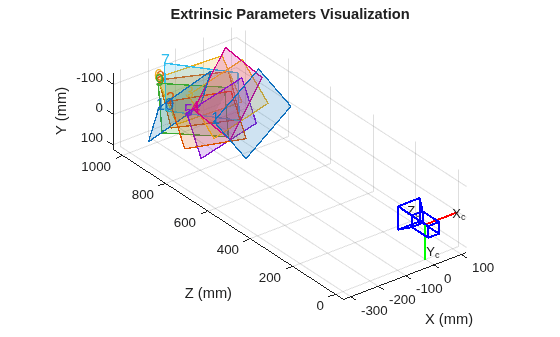
figure;
showExtrinsics(params, "PatternCentric");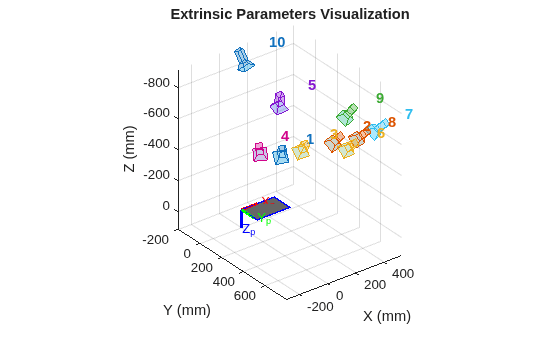
再投影誤差
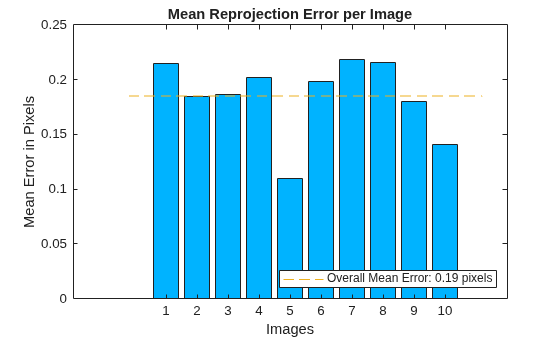
再投影誤差では精度の定性的な測度が与えられます。再投影誤差は、キャリブレーション イメージ内で検出されたパターンのキーポイントと、それに対応する同じイメージに投影されたワールド ポイントとの間の距離です。関数showReprojectionErrorsでは、各キャリブレーション イメージにおける平均再投影誤差を可視化できて便利です。全体的な平均再投影誤差が大きすぎる場合、誤差が最も大きいイメージを排除してから、再度キャリブレーションを行うことを検討してください。
figure;
showReprojectionErrors(params);
推定誤差
推定誤差は、各推定パラメーターの不確かさを表します。関数estimateCameraParametersは、オプションで estimationErrors 出力を返しますが、そこには推定された各カメラ パラメーターに対応する標準誤差が含まれます。返された標準誤差 (単位は対応するパラメーターと同じ) を使用して、信頼区間を計算できます。たとえば、+/- は 95% 信頼区間に対応します。つまり、特定のパラメーターの実際値が、その推定値の 以内にある確率が 95% であるということです。
displayErrors(estimationErrors, params);
			Standard Errors of Estimated Camera Parameters
			----------------------------------------------

Intrinsics
----------
Focal length (pixels):   [  715.6004 +/- 3.2097      711.9391 +/- 3.9533  ]
Principal point (pixels):[  568.2643 +/- 5.3069      356.9332 +/- 3.2326  ]
Radial distortion:       [   -0.3489 +/- 0.0084        0.1572 +/- 0.0442  ]

Extrinsics
----------
Rotation vectors:
                         [   -0.6072 +/- 0.0053       -0.1847 +/- 0.0072       -0.3856 +/- 0.0023  ]
                         [   -0.7277 +/- 0.0049       -0.1056 +/- 0.0071        0.1941 +/- 0.0026  ]
                         [   -0.6704 +/- 0.0050       -0.1504 +/- 0.0072       -0.1352 +/- 0.0025  ]
                         [   -0.5807 +/- 0.0055       -0.2958 +/- 0.0073       -0.5644 +/- 0.0024  ]
                         [   -0.3148 +/- 0.0064       -0.1499 +/- 0.0073       -0.1077 +/- 0.0011  ]
                         [   -0.7540 +/- 0.0050        0.0044 +/- 0.0071        0.0324 +/- 0.0029  ]
                         [   -0.7581 +/- 0.0051        0.1884 +/- 0.0071        0.4301 +/- 0.0030  ]
                         [   -0.7508 +/- 0.0050        0.0705 +/- 0.0071        0.2047 +/- 0.0028  ]
                         [   -0.6224 +/- 0.0052        0.0170 +/- 0.0072        0.3644 +/- 0.0023  ]
                         [    0.3477 +/- 0.0063       -0.2275 +/- 0.0072       -0.0426 +/- 0.0014  ]

Translation vectors (mm):
                         [ -151.2156 +/- 5.9311      -28.2216 +/- 3.6489      798.5417 +/- 3.7745  ]
                         [ -215.3819 +/- 6.8378      -61.0244 +/- 4.2600      922.2884 +/- 4.4834  ]
                         [ -135.4469 +/- 6.9656      -45.6901 +/- 4.2781      938.6421 +/- 4.3475  ]
                         [ -156.7286 +/- 6.5718      -28.8202 +/- 4.0424      885.0802 +/- 4.2501  ]
                         [ -180.6922 +/- 6.5872      -25.8705 +/- 4.0686      887.2998 +/- 4.5253  ]
                         [ -184.5416 +/- 7.5880      -81.3827 +/- 4.6929     1021.8031 +/- 4.7191  ]
                         [ -141.0393 +/- 7.7491     -105.2355 +/- 4.7829     1043.4016 +/- 4.6635  ]
                         [ -180.5464 +/- 7.5515      -74.8831 +/- 4.6742     1017.9787 +/- 4.6574  ]
                         [ -209.2900 +/- 7.2992      -89.5635 +/- 4.5438      984.2866 +/- 4.7521  ]
                         [ -325.3385 +/- 6.2035     -121.2853 +/- 4.0001      829.3924 +/- 4.7997  ]
キャリブレーションの精度を改善する方法
特定の再投影誤差または推定誤差を許容できるかどうかは、特定アプリケーションの精度要件によって決まります。キャリブレーションの精度を許容できないと判断した場合には、いくつかの方法で改善することができます。
キャリブレーションの設定を変更する。3 つの半径方向歪み係数を使用して、円周方向歪みもしくはせん断を推定します。
使用するキャリブレーション イメージの数を増やす。イメージ内のパターンはさまざまな 3 次元方向に置かれなければならず、キーポイントが視野のすべての部分に存在するよう配置する必要があります。特に、歪み係数の推定値を改善するには、イメージのエッジとコーナーの近くにキーポイントがあることが非常に重要です。
再投影誤差の大きいイメージを排除して、キャリブレーションをやり直す。
まとめ
この例では、カメラのキャリブレーション誤差を取得および解釈する方法を説明しました。
参考文献
[1] Z. Zhang. A flexible new technique for camera calibration. IEEE Transactions on Pattern Analysis and Machine Intelligence, 22(11):1330-1334, 2000.

