このページの内容は最新ではありません。最新版の英語を参照するには、ここをクリックします。
プログラムによるシーケンス図の作成
R2026aR2024b 以降
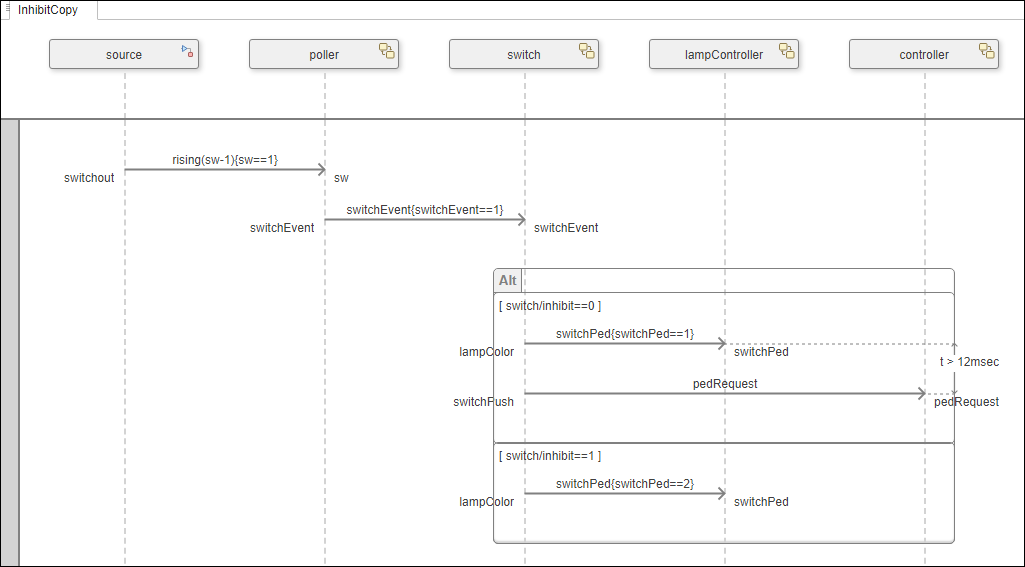
シーケンス図をプログラムで作成して、信号機のある交差点で道路を横断する歩行者のシナリオを記述します。
シーケンス図の詳細については、Author Sequence Diagrams Interactivelyを参照してください。
信号機の例を開く
TLExample アーキテクチャ モデルを読み込みます。
model = systemcomposer.openModel('TLExample');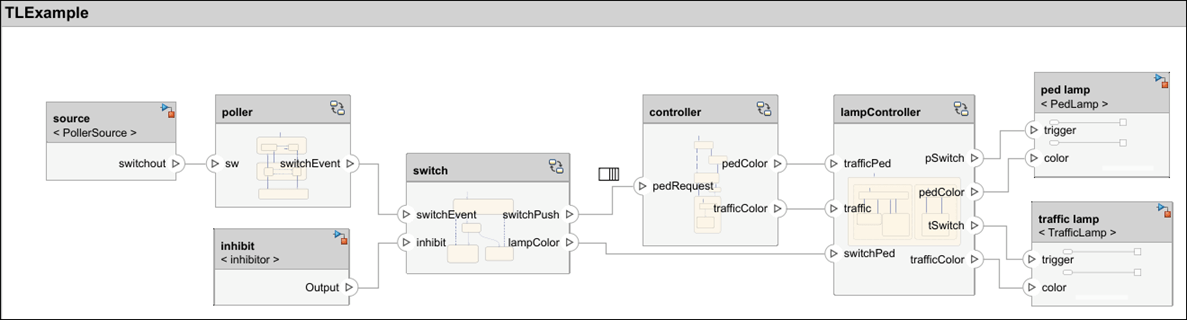
'InhibitCopy' という名前の新しいシーケンス図を作成します。
diagram = model.addInteraction('InhibitCopy');ライフラインの追加
アーキテクチャの各コンポーネントに対するライフラインを追加します。
sourceLifeline = diagram.addLifeline('TLExample/source');
pollerLifeline = diagram.addLifeline('TLExample/poller');
switchLifeline = diagram.addLifeline('TLExample/switch');
lampLifeline = diagram.addLifeline('TLExample/lampController');
controllerLifeline = diagram.addLifeline('TLExample/controller');
相互作用のルート フラグメントとルート オペランドを取得します。
rootFragment = diagram.RootFragment;
rootOperand = rootFragment.Operands(1);
メッセージとフラグメントの追加
ルート オペランドにメッセージを 2 つ追加します。
sourceToPollerMsg = rootOperand.addMessage(sourceLifeline, "switchout", pollerLifeline, "sw", "rising(sw-1){sw==1}");
pollerToSwitchMsg = rootOperand.addMessage(pollerLifeline, "switchEvent", switchLifeline, "switchEvent", "switchEvent{switchEvent==1}");
ルート オペランドに代替フラグメントを追加します。
altFrag = rootOperand.addFragment('Alt');代替フラグメントの各オペランドに対するガード式を指定します。
op1 = altFrag.Operands(1);
op1.Guard = "switch/inhibit==0";
op2 = altFrag.addOperand("switch/inhibit==1");
代替フラグメントの 1 番目のオペランドにメッセージを 2 つ追加します。
switchToLampControllerMsg1 = op1.addMessage(switchLifeline, "lampColor", lampLifeline, "switchPed", "switchPed{switchPed==1}");
switchToControllerMsg = op1.addMessage(switchLifeline, "switchPush", controllerLifeline, "pedRequest", "pedRequest");
代替フラグメントの 2 番目のオペランドにメッセージを追加します。
switchToLampControllerMsg2 = op2.addMessage(switchLifeline, "lampColor", lampLifeline, "switchPed", "switchPed{switchPed==2}");
期間の制約の追加
代替フラグメントの 1 番目のオペランドで 2 つのメッセージ間に期間の制約を追加します。
startEvent = switchToLampControllerMsg1.End;
endEvent = switchToControllerMsg.End;
expression = "t > 12msec";
durationConstraint = diagram.addDurationConstraint(startEvent, endEvent, expression);
シーケンス図を開く
新しく作成したシーケンス図を開きます。
open(diagram);
参考
systemcomposer.interaction.Interaction | systemcomposer.interaction.Lifeline
参考
ツール
関数
openViews|sim|addInteraction|getInteraction|getInteractions|open|addLifeline|addFragment|addOperand|addMessage|addDurationConstraint|addAnnotation|findLifeline|findElement|move|move|move|destroy|next|current|reset
オブジェクト
systemcomposer.arch.Model|systemcomposer.interaction.Interaction|systemcomposer.interaction.Iterator|systemcomposer.interaction.Lifeline|systemcomposer.interaction.MessageEvent|systemcomposer.interaction.FormalGate|systemcomposer.interaction.Message|systemcomposer.interaction.Fragment|systemcomposer.interaction.Operand|systemcomposer.interaction.DurationConstraint|systemcomposer.interaction.Annotation

