Convert Between Subsystems and Referenced Subsystems
R2026bThis example shows how you can convert a Subsystem block in a model or library to a Subsystem Reference block. The example also shows how you can convert a referenced subsystem to a regular subsystem.
Convert Subsystem Block in a Model to a Subsystem Reference Block
Consider a model sldemo_mdlref_conversion with a Subsystem block Bus Counter that models a counter algorithm.
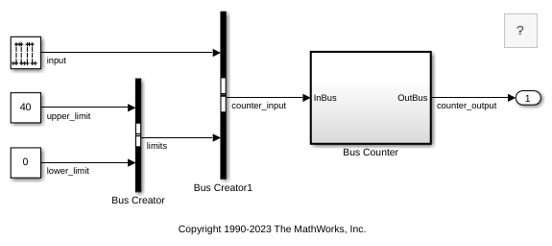
To convert the Bus Counter Subsystem block to a Subsystem Reference block:
1. Open the conversion dialog box by using either of these options:
Right-click the
Bus Counterblock and select Convert to > Referenced Subsystem.Select the
Bus Counterblock and on the Subsystem Block tab, select Convert > Convert to Referenced Subsystem.
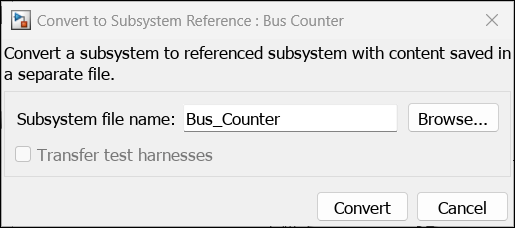
2. Enter a valid MATLAB® name such as Bus_Counter in the Subsystem file name field. If a test harness is associated with the subsystem, you can select the Transfer test harnesses check box to save the test harnesses of the subsystem with the subsystem file.
3. Click Convert. The Subsystem block changes into a Subsystem Reference block with the name of the subsystem file Bus_Counter displayed at the top of the block icon. The subsystem file contains the Bus Counter subsystem and is saved in the current folder.
When you convert a subsystem to a referenced subsystem, the Subsystem Reference block automatically inherits the properties of its input and output signals. You do not need to explicitly define the interface for the Subsystem Reference block.
Alternatively, to convert the block programmatically, enter this command in the MATLAB Command Window:
Simulink.SubsystemReference.convertSubsystemToSubsystemReference( ...
'sldemo_mdlref_conversion/Bus Counter','Bus_Counter');
For more information, see Simulink.SubsystemReference.convertSubsystemToSubsystemReference.
4. Save the model.
Convert Subsystem Reference Block to Subsystem Block
You can convert a referenced subsystem to a regular subsystem. To revert the Bus Counter Subsystem Reference block in the model sldemo_mdlref_conversion to a Subsystem block, use either of these options:
Right-click the
Bus Counterblock and select Convert to > Regular Subsystem.Select the
Bus Counterblock and on the Subsystem Block tab, select Convert > Convert to Subsystem.
A Subsystem block replaces the Subsystem Reference block.
Alternatively, to convert the block programmatically, enter this command in the MATLAB Command Window:
Simulink.SubsystemReference.convertSubsystemReferenceBlockToSubsystem( ...
            'sldemo_mdlref_conversion/Bus Counter');
For more information, see Simulink.SubsystemReference.convertSubsystemReferenceBlockToSubsystem.
Convert Library Subsystem Block to Subsystem Reference Block
To convert Library Subsystems (Simulink Coder) to referenced subsystems use the same steps as converting a Subsystem block to a Subsystem Reference block in a model. However, you must unlock the library before conversion and then save the library to preserve the changes made during the conversion process.
When you convert a library subsystem block to a Subsystem Reference block, all the linked instances of the library Subsystem block are converted to subsystem reference. Alternatively, you can also convert only a specific instance of a linked subsystem. First break the link of the instance to the parent library and then perform the conversion. For more information on breaking links to libraries, see Disable or Break Links to Library Blocks.
Conditions to Convert to Referenced Subsystems
A block cannot be converted to a referenced subsystem when:
The block is read-only.
The block is a Configurable Subsystem, Variant Subsystem, Stateflow, or Simulink Function.
The block is an injector subsystem or a linked subsystem, except when the value of the Link Status parameter of the linked block is
none.The block is the component under test inside the test harness.
The block is masked with its contents hidden.
The block is inside models that have AUTOSAR or Software architectures.
The state owner and accessor blocks are not inside the same subsystem.

