Troubleshoot Simulink Copilot Errors
R2026bUse this topic to diagnose and resolve errors you might encounter when using Simulink® Copilot. This topic includes a general troubleshooting workflow and a list of error categories with the exact error messages shown in the product and recommended actions you can try before contacting MathWorks® Technical Support.
Most Simulink Copilot errors are caused by an outdated MathWorks Service Host. For best results, use the latest version of MathWorks Service Host version. Connecting to internet automatically upgrades the MathWorks Service Host to the latest version. If your system restricts updates (for example, due to admin controls), you might need help from your IT administrator. If you need assistance, contact MathWorks Technical Support.
General Troubleshooting Workflow
If Simulink Copilot is unable to connect to the required services, you may see the error messages similar to the following in the Copilot Chat panel or the Diagnostic Viewer:
Unable to connect to Simulink Copilot services right now. Close the
                    MATLAB session and end the MathWorks Service Host tasks.
To resolve this issue, follow these steps:
Close the MATLAB session.
Open your system’s process manager:
On Windows® platforms, open Task Manager and navigate to the Background processes section.
On Linux® platforms, open System Monitor and view the list of running background processes.
Right-click each instance of MathWorks Service Host and click End task.
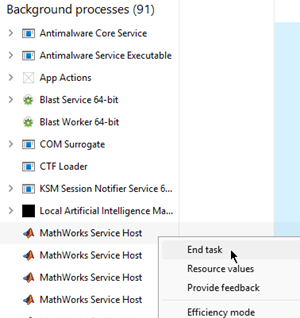
If any
slcopilotlocalprocesses are running, end them.Restart MATLAB and start a Simulink Copilot chat session.
If this workflow does not resolve the error, try the category-specific guidance in the next section.
Error Categories and Recommended Actions
The table maps each error category to the message you might see and recommended actions.
| Error Category | Error message | Possible Causes | Recommended Actions |
|---|---|---|---|
| Connection Issues (CONN) | Unable to provide Simulink Copilot services right
now. |
|
|
| Operation Timeout (TOUT) | Unable to provide Simulink Copilot services right
now. |
|
|
| Authentication or Permission Failure (AUTH) | Your session expired or authorization failed. Please
sign in again, then restart Simulink
Copilot. |
|
|
| Initialization, Execution, or Unknown Errors (INIT, INPT, EXEC, CNFG, UNKNOWN) |
|
|
|
| LLM Provider Configuration Change in Bring Your Own Key (INPT_0702) | Unable to provide Simulink Copilot services right
now. | LLM provider was changed in the Bring Your Own Key configuration while a Simulink Copilot chat session was open. | Start a new chat session and retry your query. |
| Resource Limitation (ROUT) | Unable to provide Simulink Copilot services right
now. |
|
|
| Rate Limiting Errors (RATE) | Unable to provide Simulink Copilot services right
now. | Request rate exceeds the allowed frequency. | Reduce the frequency of requests. |
| Data Streaming Issues (DATA) | The response generation was interrupted. Retry your
request. |
|
|
| Session Management Errors (SESS) | Unable to process this request. Please try
again. |
| Close Simulink Copilot, restart it, and retry the query. |
| MATLAB–MathWorks Service Host Synchronization Errors (SYNC) | Unable to connect to Simulink Copilot services right
now. Close the MATLAB session and end the MathWorks Service Host
tasks. | MATLAB cannot connect to MathWorks Service Host. | Follow the General Troubleshooting Workflow. If the issue persists, get the latest version of MathWorks Service Host. |
| Clear History Errors (HIST) | Unable to clear chat history. Please try
again. | Unexpected error during history cleanup. |
|
| Chat Operation Errors (CHAT) | Unable to process this request. Please try
again. |
|
|
| Request Cancellation Errors (CNCL) | Unable to provide Simulink Copilot services right now.
Retry your request. | Cancellation operation does not work. | If Simulink Copilot becomes unresponsive after cancellation, close and restart it. |
Chat Panel Stuck in Loading State
If the chat panel remains in a loading state (for example, the spinner does not resolve and the panel does not become interactive), an outdated MathWorks Service Host is the most common cause of this issue. Connecting to internet upgrades the MathWorks Service Host to the latest version unless your have restricted admin control setup. If the issue persists, restart MATLAB and try again.

