winwrite
R2026bクラス: sigwin.tukeywin
名前空間: sigwin
テューキー ウィンドウの ASCII ファイルへの保存
構文
winwrite(H)

winwrite(H,'filename')
説明
winwrite(H) は、テューキー ウィンドウ オブジェクトの値を ASCII ファイルにエクスポートするためのダイアログ ボックスを開きます。ファイル拡張子 .wf が自動的に付加されます。
winwrite(H,'filename') により、現在のフォルダーにあるテューキー ウィンドウ オブジェクト H の値が列ベクトルとして ASCII ファイル 'filename' に保存されます。ファイル拡張子 .wf が filename に自動的に付加されます。
例
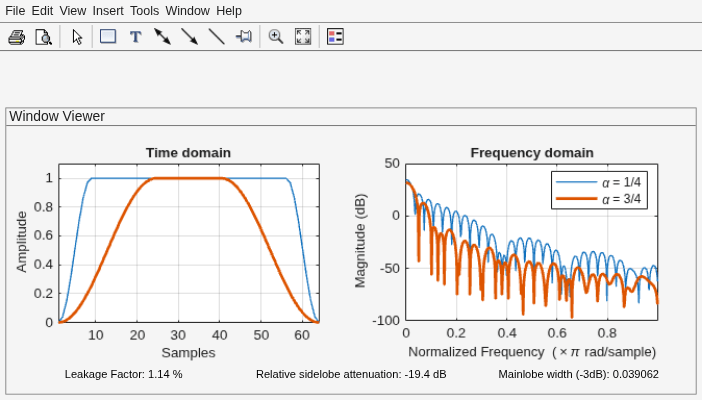
長さ N = 64 の 2 つのテューキー ウィンドウを生成します。
最初のウィンドウは α = 1/4 です。α は定数部の長さに対するウィンドウのテーパー部の長さの比です。
2 番目のウィンドウは α = 3/4 です。
2 つのウィンドウを表示します。
H14 = sigwin.tukeywin(64,1/4);
H34 = sigwin.tukeywin(64,3/4);

wvt = wvtool(H14,H34);
legend(wvt.CurrentAxes,'\alpha = 1/4','\alpha = 3/4')
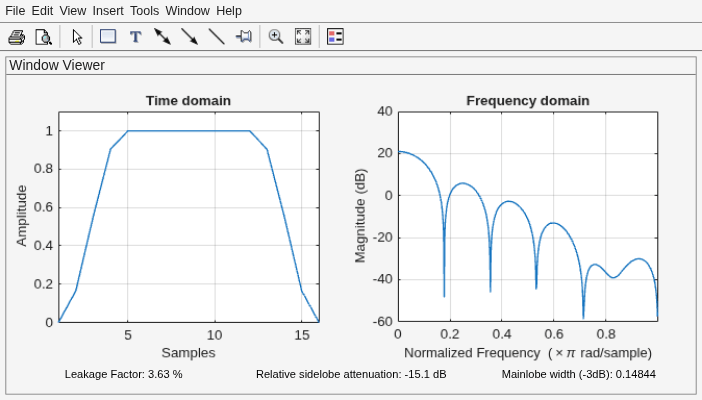
長さ N = 16 で、既定で α = 1/2 であるテューキー ウィンドウを生成します。その値を列ベクトルとして返します。ウィンドウ オブジェクトに関する情報が表示されます。ウィンドウを表示します。
H = sigwin.tukeywin(16);

win = generate(H)
win = 16×1

         0
    0.1654
    0.5523
    0.9045
    1.0000
    1.0000
    1.0000
    1.0000
    1.0000
    1.0000
    1.0000
    1.0000
    0.9045
    0.5523
    0.1654
      ⋮
wininfo = info(H)
wininfo = 4×13 char array
    'Tukey Window '
    '------------ '
    'Length  : 16 '
    'Alpha   : 0.5'
wvtool(H)