メインコンテンツ

cascade

Cascade digital filters

Since R2026a

    Description

    dOut = cascade(d1,d2,...,dn) cascades n digital filters into a digital filter cascade, dOut. You can cascade between 2 and 15 digitalFilter objects.

    example

    dOut = cascade(___,SampleRate=Fs) specifies the sample rate for the cascaded filter.

    example

    Examples

    collapse all

    Design a lowpass IIR filter with passband and stopband frequencies of 0.65π rad/sample and 0.80π rad/sample, respectively. The passband ripple is 1 dB and the stopband attenuation is 50 dB. Plot the filter response.

    d1 = designfilt("lowpassiir", ...
        PassbandFrequency=0.65,StopbandFrequency=0.80, ...
        PassbandRipple=1,StopbandAttenuation=50);
    freqz(d1)
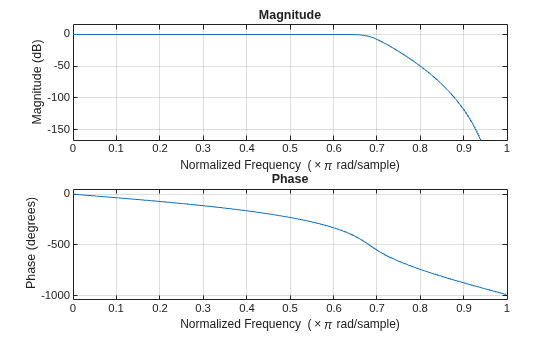
    Figure contains 2 axes objects. Axes object 1 with title Phase, xlabel Normalized Frequency (\times\pi rad/sample), ylabel Phase (degrees) contains an object of type line. Axes object 2 with title Magnitude, xlabel Normalized Frequency (\times\pi rad/sample), ylabel Magnitude (dB) contains an object of type line.

    Design a bandstop IIR filter with passband ripples of 1 dB and stopband attenuation of 50 dB. The passband frequencies are 0.25π rad/sample and 0.34π rad/sample. The stopband frequencies are 0.36π rad/sample and 0.45π rad/sample. Plot the filter response.

    d2 = designfilt("bandstopiir", ...
        PassbandFrequency1=0.25,StopbandFrequency1=0.34, ...
        StopbandFrequency2=0.36,PassbandFrequency2=0.45, ...
        PassbandRipple1=1,StopbandAttenuation=50, ...
        PassbandRipple2=1);
    freqz(d2)
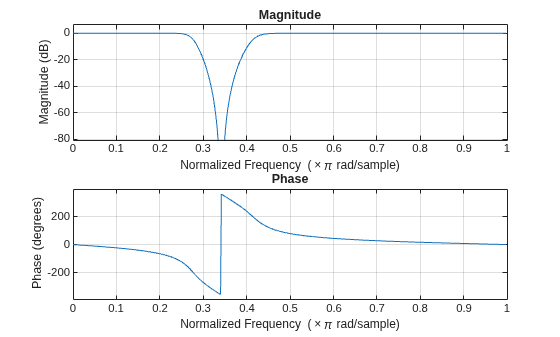
    Figure contains 2 axes objects. Axes object 1 with title Phase, xlabel Normalized Frequency (\times\pi rad/sample), ylabel Phase (degrees) contains an object of type line. Axes object 2 with title Magnitude, xlabel Normalized Frequency (\times\pi rad/sample), ylabel Magnitude (dB) contains an object of type line.

    Cascade the lowpass IIR and bandstop IIR filters to form a cascaded filter. Plot the filter response.

    d3Norm = cascade(d1,d2)
    d3Norm = 
     digitalFilter cascade with properties:
    
       Stages:
                     Stage1: [1×1 digitalFilter]
                     Stage2: [1×1 digitalFilter]
    
       Specifications:
        NormalizedFrequency: 1
    
     Use filterAnalyzer to visualize filter
     Use filter to filter data
    
    
    freqz(d3Norm)
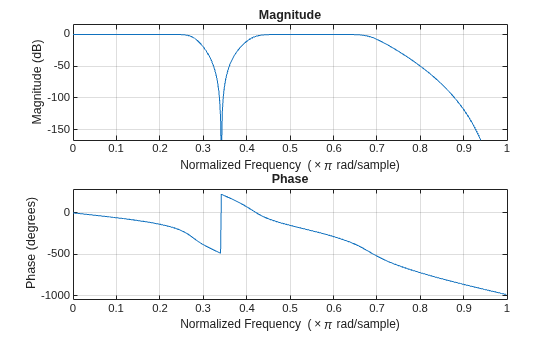
    Figure contains 2 axes objects. Axes object 1 with title Phase, xlabel Normalized Frequency (\times\pi rad/sample), ylabel Phase (degrees) contains an object of type line. Axes object 2 with title Magnitude, xlabel Normalized Frequency (\times\pi rad/sample), ylabel Magnitude (dB) contains an object of type line.

    Set the sample rate to 20 Hz and cascade the lowpass IIR and bandstop IIR filters to form a cascaded filter.

    Fs = 20;
    d3Freq = cascade(d1,d2,SampleRate=Fs)
    d3Freq = 
     digitalFilter cascade with properties:
    
       Stages:
                     Stage1: [1×1 digitalFilter]
                     Stage2: [1×1 digitalFilter]
    
       Specifications:
        NormalizedFrequency: 0
                 SampleRate: 20
    
     Use filterAnalyzer to visualize filter
     Use filter to filter data


    Input Arguments

    collapse all

    Digital filter, specified as a digitalFilter object. Use designfilt to generate a digital filter based on frequency-response specifications.

    Example: d = designfilt("lowpassiir",FilterOrder=3,HalfPowerFrequency=0.5) specifies a third-order Butterworth filter with normalized 3 dB frequency 0.5π rad/sample.

    Sample rate of the cascaded filter, specified as one of these:

    • "auto"cascade automatically sets the sample rate of the cascaded filter.

      • If all the digital filter inputs use normalized frequency, then cascade sets all the stages of dOut to use normalized frequency.

      • If some of the digital filter inputs have a common sample rate of Fs Hz and the rest of them use normalized frequency, then cascade uses Fs to set the sample rate of dOut.

      • If at least two of the digital filter inputs have a different sample rate, cascade errors out.

    • "normalized"cascade sets all the stages of dOut to use normalized frequency.

    • Positive scalar — cascade uses the value specified in this argument to set the sample rate of dOut, in Hz.

    Data Types: char | string | single | double

    Output Arguments

    collapse all

    Digital filter cascade, returned as a digitalFilter object.

    More About

    collapse all

    Version History

    Introduced in R2026a