Simulation 3D Physics Backhoe
R2026bSimulation 3D Physics Backhoe block
To add a block to a model, double-click the canvas and start typing the block name. Then, select the block from the list.
Libraries:
Offroad Autonomy Library /
Simulation 3D
Description
Add-On Required: This feature requires the Robotics System Toolbox Offroad Autonomy Library add-on.
The Simulation 3D Physics Backhoe block provides an interface to implement a backhoe vehicle in the Simulink® 3D world.
Note
Simulating models with the Simulation 3D Physics Backhoe block requires Simulink 3D Animation™ and the Robotics System Toolbox™ Offroad Autonomy Library support package. For more information about downloading the support package, see Install Robotics System Toolbox Offroad Autonomy Library Support Package.
To use this block, ensure that the Simulation 3D Scene
Configuration block is in your model. If you set the Sample
time parameter of the Simulation 3D Physics Backhoe block to
-1, the block inherits the sample time specified in the Simulation
3D Scene Configuration block. The sample time in the Simulation 3D Scene
Configuration block must be set to 0.01 or less to prevent jittering of the backhoe
in the 3D visualization environment.
These illustrations show the dimensions and locations of the backhoe asset parameters
relative to the coordinate axes, following the yaw(z),
pitch(y), roll(x) sequence. The vehicle layout follows
Unreal Engine® co-ordinate system which follows the left-hand rule world coordinate system. For
more information, see Coordinate Systems for Unreal Engine Simulation in Robotics System Toolbox.


Ports
Note
This block processes all the input and output values using the right-hand rule world coordinate system. For more information, see Coordinate Systems for Unreal Engine Simulation in Robotics System Toolbox.
Input
Output
Parameters
To edit block parameters interactively, use the Property Inspector. From the Simulink Toolstrip, on the Simulation tab, in the Prepare gallery, select Property Inspector.
Chassis
Backhoe chassis type, specified as Wheeled
Backhoe.
Backhoe body color, specified as one of these drop down options:
BlueYellowOrange
Backhoe identifier name, specified as a string scalar.
Initial Values
Backhoe Initialization
Initial translation of backhoe vehicle, specified as a three-element row vector, in the form [x, y , z]. x, y , and z are the translations along the x, y, and z axes respectively, which uses the right-hand rule world coordinate system. Units are in meters.
Initial rotation of backhoe vehicle, specified as a three-element row vector, in the form [yaw, pitch, roll]. yaw, pitch, and roll are the rotations about the z, y, and x axes respectively, which uses the right-hand rule world coordinate system. Units are in radians.
rigidBodyTree Geometry Settings
Set the parameters in this tab to enable the visualization of the rigid body tree geometry in the 3D visualization environment.
Collision Geometry Visualization
Select this parameter to visualize rigid body tree collision geometry in the 3D visualization environment.
Color of the rigid body tree collision geometry being visualized in the 3D visualization environment, specified as a three-element row vector.
Transparency of the rigid body tree collision geometry being visualized in the 3D visualization environment, specified as a scalar.
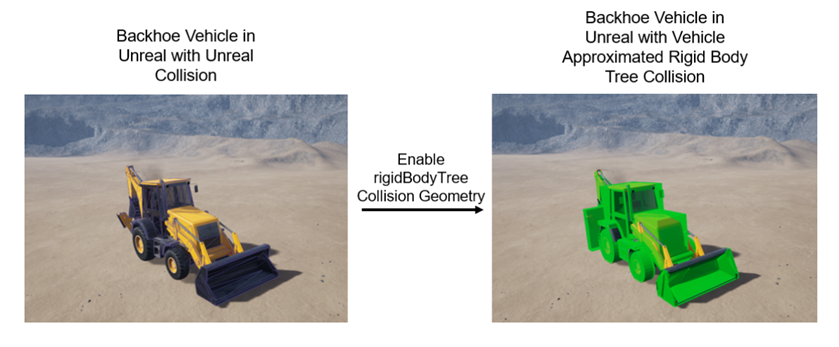
Enabling rigid body tree collision visualization overlays Robotics System Toolbox collision geometry in the Unreal Engine scene for visualization only and does not modify or replace Unreal Engine collision used for physics simulation. This image shows the dump truck vehicle in Unreal Engine scene with Unreal Engine collision, followed by the same vehicle with the approximated rigid body tree collision geometry visualized in the Unreal Engine scene.
Inputs
Backhoe Inputs
Select this parameter to disable the velocity input and specify throttle at the input port to move the backhoe vehicle.
Specify foot brake torque at the input port to de-accelerate the backhoe vehicle.
Front Bucket Inputs
Select this parameter to specify the loader frame and front bucket angles at the input port.
Rear Bucket Inputs
Select this parameter to specify the swing frame, boom, arm, and rear bucket angle at the input port.
Outputs
Backhoe Outputs
Select this parameter to output ground truth world translation of backhoe at the BackhoeTranslation output port.
Select this parameter to output ground truth world rotation of backhoe at the BackhoeRotation (YPR) output port.
Select this parameter to output current velocity of backhoe at the BackhoeVelocity output port.
Select this parameter to output current angular velocity of backhoe at the BackhoeAngularVelocity output port.
Front Bucket Outputs
Select this parameter to output ground truth world translation of front bucket at the FrontBucketTranslation output port.
Select this parameter to output ground truth world rotation of front bucket at the FrontBucketRotation (YPR) output port.
Select this parameter to output current loader frame and front bucket joint angle at the CurrentLoaderFrameAngle and CurrentFrontBucketAngle output ports respectively.
Rear Bucket Outputs
Select this parameter to output ground truth world translation of rear bucket at the RearBucketTranslation output port.
Select this parameter to output ground truth world rotation of rear bucket at the RearBucketRotation (YPR) output port.
Set this parameter to output the current swing frame angle and the current rear bucket, rear boom, and rear arm joint angles at the CurrentSwingAngle, CurrentRearBucketAngle, CurrentBoomAngle, and CurrentArmAngle output ports, respectively.
Programmatic Use: Add Block
To add the block programmatically, use the add_block function with one of these library block paths as the source.
"offroadsim3dlib/Simulation 3D Physics Backhoe"
Example: add_block("offroadsim3dlib/Simulation 3D Physics Backhoe","myModel/myBlock",MakeNameUnique="on")
Version History
Introduced in R2024b

