add
R2026bDescription
Add-On Required: This feature requires the Optical Design and Simulation Library for Image Processing Toolbox add-on.
Examples
Create an empty optical system.
opsys = opticalSystem;
To add a lens component to the optical system, add two refractive surfaces using the addRefractiveSurface object function. Specify the glass material of the lens using the Material name-value argument. Specify the center thickness of the lens, in millimeters, using the DistanceToNext name-value argument.
addRefractiveSurface(opsys,Radius=10,DistanceToNext=4,Material=pickGlass("N-BK7"))
addRefractiveSurface(opsys,Radius=-10)
Display the position of the vertex of the convex lens using the ConstructionFrame property, which defines the construction reference frame origin for the next component.
opsys.ConstructionFrame
ans = 4×4

     1     0     0     0
     0     1     0     0
     0     0     1     4
     0     0     0     1
To define a sensor component, create an ImagePlane object and specify its position.
simSensor = optics.component.ImagePlane;
simSensor.Shape = 1;
simSensor.Position = [0 2 10];
Add the sensor to the optical system. Specify the construction coordinate system as the reference frame to position the sensor relative to the end vertex of the previous component, the convex lens.
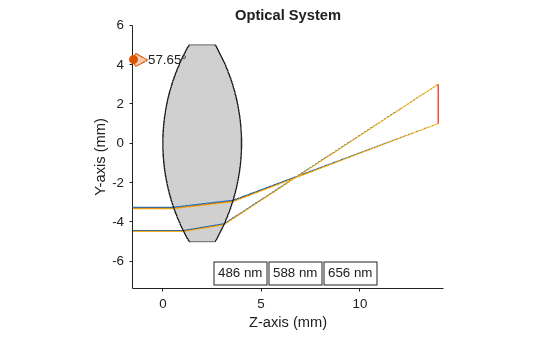
add(opsys,simSensor,ReferenceFrame="ConstructionFrame")Display a 2-D visualization of the optical system using the view2d object function.
hv = view2d(opsys);
Trace marginal rays through the optical system using the traceMarginalRays object function.
mr = traceMarginalRays(opsys);
Visualize the traced rays through the optical system using the addRays object function.
addRays(hv,mr)
Create a empty optical system.
opsys = opticalSystem;
To add a lens component to the optical system, add two refractive surfaces using the addRefractiveSurface object function. Specify the glass material of the lens using the Material name-value argument. Specify the center thickness of the lens, in millimeters, using the DistanceToNext name-value argument.
addRefractiveSurface(opsys,Radius=10,DistanceToNext=4,Material=pickGlass("N-BK7"))
addRefractiveSurface(opsys,Radius=-10)
To define a sensor component, create an ImagePlane object and specify its size and position.
simSensor = optics.component.ImagePlane;
simSensor.Shape = 1;
simSensor.Position = [0 2 10];
Add the sensor to the optical system. Specify the global coordinate system as the reference frame to position the sensor relative to the global origin.
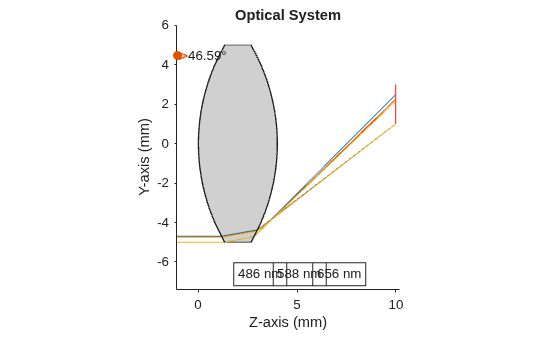
add(opsys,simSensor,ReferenceFrame="Global")Display a 2-D visualization of the optical system using the view2d object function.
hv = view2d(opsys);
Trace marginal rays through the optical system using the traceMarginalRays object function.
mr = traceMarginalRays(opsys);
Visualize the traced rays through the optical system using the addRays object function.
addRays(hv,mr)
Input Arguments
Tips
To add a gap after you add a component using the
addfunction, use theaddGapfunction.
Alternative Functionality
To insert an optical component between specified components in the optical system, use the
insert object
function.
Version History
Introduced in R2026a
See Also
opticalSystem | addImagePlane | addRefractiveSurface | addDiaphragm | addMirror | addGap | setConstructionFrame

