Get Started with MATLAB to High-Level Synthesis Workflow Using the Command Line Interface
R2026bThis example shows how to use the HDL Coder™ command-line interface to generate High-Level Synthesis (HLS) code from MATLAB® code, including floating-point to fixed-point conversion for a symmetric finite impulse response (FIR) filter using the Xilinx Vitis HLS synthesis tool. Before you create the project, set up the HLS tool path by using the function hdlsetuphlstoolpath.
Create and Config Fixed-Point Conversion Configuration Object
If your design already uses fixed-point types and functions, skip this step.
To perform floating-point to fixed-point conversion, create a fixed-point configuration object and specify your test bench name:
fixptcfg = coder.config("fixpt");
fixptcfg.TestBenchName = "mlhdlc_sfir_tb";
The code generator can propose fixed-point types based on your choice of either word length or fraction length. These two options are mutually exclusive.
Base the proposed types on a word length of 24:
fixptcfg.DefaultWordLength = 24;
fixptcfg.ProposeFractionLengthsForDefaultWordLength = true;
Alternatively, you can base the proposed fixed-point types on fraction lengths. The following code configures the code generator to propose types based on a fraction length of 10:
fixptcfg.DefaultFractionLength = 10;
fixptcfg.ProposeWordLengthsForDefaultFractionLength = true;
Safety Margin
The code generator increases the simulation data range on which it bases its fixed-point type proposal by the safety margin percentage. For example, the default safety margin is 4, which increases the simulation data range used for fixed-point type proposal by 4%.
Set the SafetyMargin to 10%:
fixptcfg.SafetyMargin = 10;
Data Logging
The code generator runs the test bench with the design before and after a floating-point to fixed-point conversion. You can enable simulation data logging to plot the quantization effects of the new fixed-point data types.
Enable data logging in the fixed-point configuration object:
fixptcfg.LogIOForComparisonPlotting = true;
Numeric Type Proposal Report
Configure the code generator to generate the type proposal report after proposing fixed-point types:
fixptcfg.LaunchNumericTypesReport = true;
Create and Configure HLS Code Generation Configuration Object
Set the path to your third-party HLS synthesis tool by using the hdlsetuphlstoolpath function. To generate HLS code, create an HLS configuration object and specify your test bench name and synthesis tool:
hlscfg = coder.config("hls");
hlscfg.TestBenchName = "mlhdlc_sfir_tb";
hlscfg.SynthesisTool = "Cadence Stratus HLS";
Enable HLS Verification and Synthesis
Generate an HLS test bench from your MATLAB® test bench:
hlscfg.GenerateHLSTestBench = true;
Simulate the generated HLS code by using the test bench:
hlscfg.SimulateGeneratedCode = true;
Synthesize the generated HLS code to produce RTL code:
hlscfg.SynthesizeGeneratedCode = true;
Generate HLS Code
After you configure the fixed-point and HLS configuration objects, run the codegen command to perform floating-point to fixed-point conversion and generate HLS code:
codegen -float2fixed fixptcfg -config hlscfg mlhdlc_sfir -report
HLS Code Generation Report
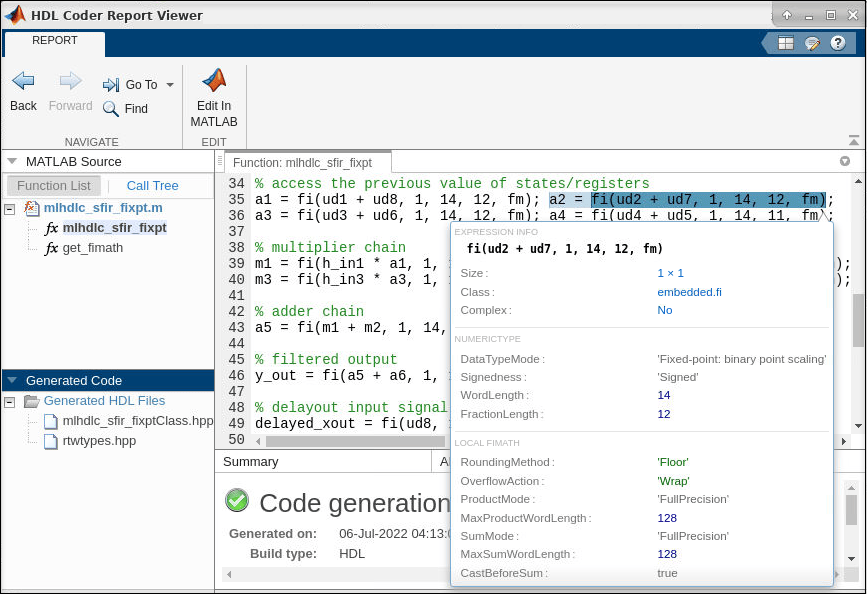
In the MATLAB® Command Window, click View Report to open the code generation report.
Use the code generation report to:
Debug code generation issues and verify that your MATLAB code is suitable for code generation.
View generated HLS code.
Access additional reports, such as a conformance report and resource utilization report.
See how the code generator determines and propagates type information for variables and expressions in your MATLAB code.
To view a MATLAB function in the code pane, click the name of the function in the MATLAB Source pane. When you hover over a variable or expression, a tooltip displays its size, type, and complexity.
For more information, see HLS Code Generation Report.
Limitations
HDL Coder supports only point-to-point (p2p) communication for HLS code generation with Cadence Stratus HLS.
HDL Coder does not support generating HLS code that runs on multiple threads.
HDL Coder does not support arrays of structures, enumerations, and classes as inputs and outputs at the top-level DUT ports for HLS code generation.
See Also
Workflow Advisor | coder.HlsConfig | hdlsetuphlstoolpath | convertToHlsConfig

