read
Read recorded data
Description
[
returns one recorded dataset at the simulation time, simTime,poses,coverageConfigs,detections,sensorConfigs,sensorPlatformIDs,emissions,emitterConfigs,emitterPlatformIDs] = read(TSR)simTime, from a
tracking scenario recording TSR.
Examples
Load recorded data from a prerecorded scenario called recordedScenario. Construct a trackingScenarioRecording object using the recorded data.
load recordedData
recording = trackingScenarioRecording(recordedData);Construct a theater plot to display the recorded data using multiple plotters.
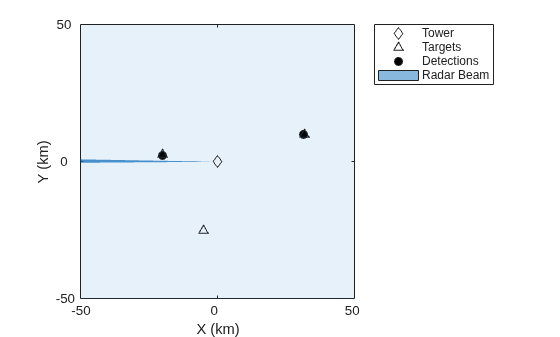
tp = theaterPlot('AxesUnits', ["km" "km" "km"], 'XLimits',[-50 50]*1e3,... 'YLimits',[-50 50]*1e3,'ZLimits', [-20 20]*1e3); to = platformPlotter(tp,'DisplayName','Tower','Marker','d'); pp = platformPlotter(tp,'DisplayName','Targets'); dp = detectionPlotter(tp,'DisplayName','Detections','MarkerFaceColor','black'); cp = coveragePlotter(tp,'DisplayName','Radar Beam'); coverage = struct('Index',1,'LookAngle',[0;-7],'FieldOfView',[1;10],... 'ScanLimits',[0 365;-12 -2],'Range',100e3,'Position',[0;0;-15],... 'Orientation',eye(3));
Run the recorded scenario and animate the results.
scanBuffer = {};
while ~isDone(recording)
% Step the reader to read the next frame of data
[simTime,poses,covcon,dets,senconfig] = read(recording);
scanBuffer = [scanBuffer;dets]; %#ok<AGROW>
plotPlatform(to,poses(1).Position);
plotPlatform(pp,reshape([poses(2:4).Position]',3,[])');
plotCoverage(cp,covcon);
if ~isempty(dets)
plotDetection(dp,cell2mat(cellfun(@(c) c.Measurement(:)', scanBuffer, 'UniformOutput', false)));
end
% Clear the buffer when a 360 degree scan is complete
if senconfig.IsScanDone
scanBuffer = {};
dp.clearData;
end
end
Reset the recording to its beginning.
reset(recording)
Input Arguments
Tracking scenario recording, specified as a trackingScenarioRecording object.
Output Arguments
Simulation time, returned as a nonnegative scalar.
Poses of platforms, returned as an array of structures. The fields of each structure are:
| Field | Description |
|---|---|
PlatformID | Unique identifier for the platform, specified as a positive integer. This is a required field with no default value. |
ClassID | User-defined integer used to classify the type of target, specified as a nonnegative integer. Zero is reserved for unclassified platform types and is the default value. |
Position | Position of platform in scenario coordinates, specified as a real-valued 1-by-3 row vector.
|
Velocity | Velocity of platform in scenario coordinates, specified as a real-valued 1-by-3 row
vector. Units are meters per second. The default value is |
Acceleration | Acceleration of the platform in scenario coordinates, specified as a
1-by-3 row vector in meters per second squared. The default value is
|
Orientation | Orientation of the platform with respect to the local scenario navigation frame,
specified as a scalar quaternion or a 3-by-3 rotation matrix. Orientation
defines the frame rotation from the scenario navigation coordinate system to
the current platform body coordinate system. Units are dimensionless. The
default value is |
AngularVelocity | Angular velocity of the platform in scenario coordinates, specified as a real-valued
1-by-3 vector. The magnitude of the vector defines the angular speed. The
direction defines the axis of clockwise rotation. Units are radians per
second. The default value is |
Sensor coverage configurations, returned as an array of structures. The fields of each structure are:
Fields of configurations
| Field | Description |
|---|---|
Index | A unique integer to identify sensors or emitters. |
LookAngle |
Current boresight angles of the sensor or emitter, specified as:
|
FieldOfView | Field of view of the sensor or emitter, specified as a two-element vector
[azimuth; elevation] in
degrees. |
ScanLimits |
Minimum and maximum angles the sensor or emitter can scan from its
|
Range | Range of the beam and coverage area of the sensor or emitter in meters. |
Position | Origin position of the sensor or emitter, specified as a three-element vector
[X, Y, Z]. |
Orientation | Rotation transformation from the scenario or global frame to the sensor or emitter mounting frame, specified as a rotation matrix, a quaternion, or three Euler angles in ZYX sequence. |
Detections, returned as a cell array of objectDetection objects.
Sensor configurations, returned as an array of structures. The fields of each structure are:
| Field | Description |
SensorIndex | Unique sensor index, returned as a positive integer. |
IsValidTime | Valid detection time, returned as |
IsScanDone |
|
RangeLimits | Lower and upper range detection limits, returned as a two-element real-valued vector in meters. |
RangeRateLimits | Lower and upper range-rate detection limits, returned as a two-element real-valued vector in m/s. |
FieldOfView | Field of view of the sensor, returned as a 2-by-1 vector of positive real values, [ |
MeasurementParameters | Sensor measurement parameters, returned as an array of structures containing the coordinate frame transforms needed to transform positions and velocities in the top-level frame to the current sensor looking-angle frame. |
Platform IDs of sensors, returned as an array of nonnegative integers.
Emissions, returned as a cell array of radarEmission
or sonarEmission
objects.
Emitter configurations, returned as an array of structures. The fields of each structure are:
| Field | Description |
EmitterIndex | Unique emitter index, returned as a positive integer. |
IsValidTime | Valid emission time, returned as |
IsScanDone | Whether the emitter has completed a scan, returned as |
FieldOfView | Field of view of the emitter, returned as a two-element vector [azimuth; elevation] in degrees. |
MeasurementParameters | Emitter measurement parameters, returned as an array of structures containing the coordinate frame transforms needed to transform positions and velocities in the top-level frame to the current emitter looking-angle frame. |
Platform IDs of emitters, returned as an array of nonnegative integers.
Version History
Introduced in R2020a
See Also
MATLAB Command
You clicked a link that corresponds to this MATLAB command:
Run the command by entering it in the MATLAB Command Window. Web browsers do not support MATLAB commands.
Web サイトの選択
Web サイトを選択すると、翻訳されたコンテンツにアクセスし、地域のイベントやサービスを確認できます。現在の位置情報に基づき、次のサイトの選択を推奨します:
また、以下のリストから Web サイトを選択することもできます。
最適なサイトパフォーマンスの取得方法
中国のサイト (中国語または英語) を選択することで、最適なサイトパフォーマンスが得られます。その他の国の MathWorks のサイトは、お客様の地域からのアクセスが最適化されていません。
南北アメリカ
- América Latina (Español)
- Canada (English)
- United States (English)
ヨーロッパ
- Belgium (English)
- Denmark (English)
- Deutschland (Deutsch)
- España (Español)
- Finland (English)
- France (Français)
- Ireland (English)
- Italia (Italiano)
- Luxembourg (English)
- Netherlands (English)
- Norway (English)
- Österreich (Deutsch)
- Portugal (English)
- Sweden (English)
- Switzerland
- United Kingdom (English)