Customize Generated Entry-Point C Function Arguments for Component Models
R2026bEntry-point functions are functions in the generated model code that interface with your external code. You can customize the identifiers of entry-point function arguments and you can customize the way root-level inports and outports are passed to the generated functions. These configurations affect all the entry-point functions generated from the model. You can override these customizations for the step function generated from a single-tasking model, as shown in the example Customize Arguments of Step C Function Generated from Single-Tasking Model. This example shows how to apply these customizations in a model configured for component deployment type. To learn how to apply these customizations in a model configured with subcomponent deployment type, see Customize Generated Entry-Point C Function Arguments for Subcomponent Models.
Open and Explore Model
Open the model EntryPoints.
epModel = "EntryPoints";
open_system(epModel)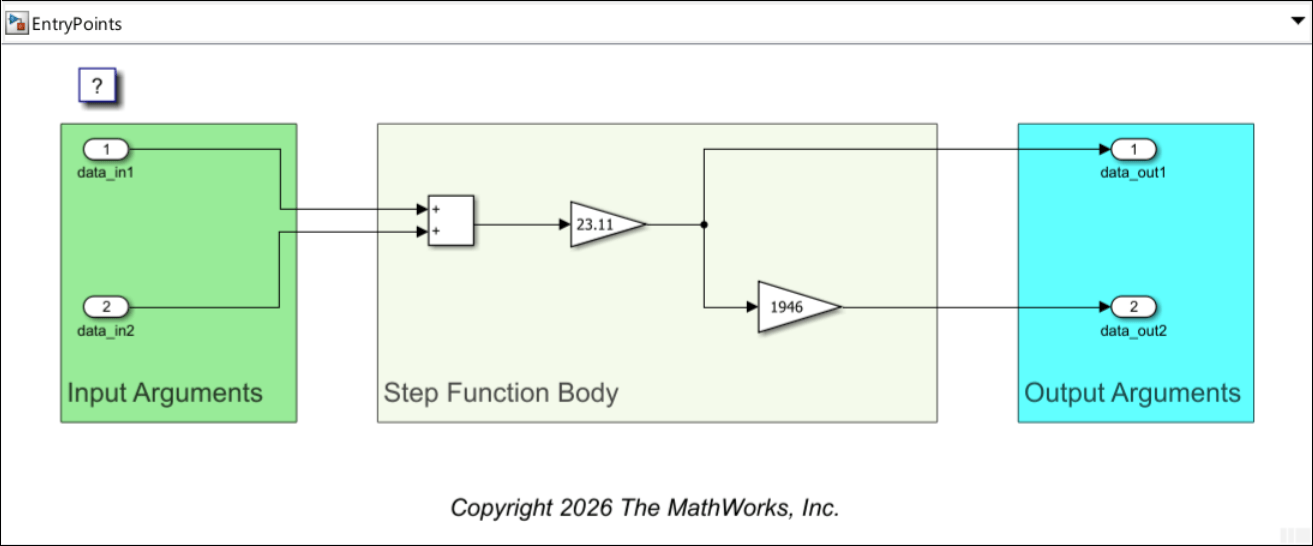
EntryPoints is a nonreusable, single-rate single-tasking model, configured to use the ERT system target file.
Customize Generated Argument Identifiers
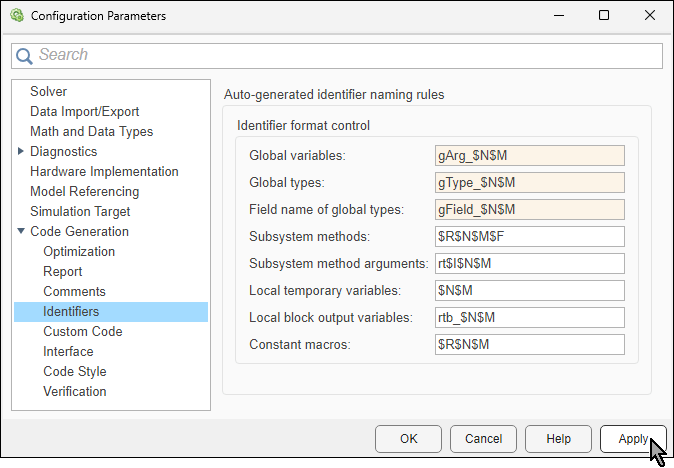
The code generator uses the naming rules of global variables to create identifiers for global variables in the generated code. It also uses these naming rules to create identifiers for arguments of entry-point functions. You specify these naming rules as the values of specific model configuration parameters. Each of these parameters has a set of predefined macros that you use, in combination with valid C language characters, to specify the naming rule.
Each identifier is generated for a specific code object. Some of these objects correspond to model elements, such as model block or model signals, or the model itself. Other code objects, such as the structure that contains model inports, do not directly correspond to actual elements in the model. In this example, you specify the naming rules for the three the configuration parameters in the table.
Elements | Configuration Parameter | Available Macros | Suggested Value For Example |
|---|---|---|---|
Argument identifiers | Global variables |
See Global variables for the definition of each macro. |
|
Argument type identifiers | Global types |
See Global types for the definition of each macro. |
|
Argument field identifiers | Field name of global types |
See Field name of global types for the definition of each macro. |
|
Specify the naming rules as suggested in the table. The suggested values have no special significance. They are only meant to demonstrate how the code generator uses the values of these parameters as naming rules for generating identifiers that are related to entry-point functions. In the specified naming rules:
The macro
$Nis replaced by the name of the code object for which the identifier is created. When the code object corresponds to a model element, the object name is the name of the corresponding model element. When the code object does not correspond to any model element, its name is determined by the code generator based on its role in the code. For example, the name of the structure that contains the variables corresponding to root-level model inports isgType_ExtU.The macro
$Mis replaced by an autogenerated name-mangling text to avoid naming collisions. If there is no name collision, this macro is ignored.
To specify the naming rules, in the Configuration Parameters dialog box, navigate to Code Generation > Identifiers. In the section Auto-generated identifier naming rules > Identifier format control, locate the parameters and specify their values. Then. click Apply.
Generate Nonreusable Void-Void Entry-Point Functions
The model is currently configured as nonreusable, which means that there is only a single instance of the real-time model per process. With these settings, model elements can be represented by global variables in the generated code. This way, entry-point functions can access the variables directly and do not have to rely on arguments for reading data from them or for changing their values. When the model is configured for component deployment type, the default prototype of each nonreusable generated entry-point function is void-void.
Generate model code:
Open the Embedded Coder® app.
In the Simulink® Toolstrip, select the C Coder tab.
In the Generate Code section, click Generate Code
 to generate code from the model.

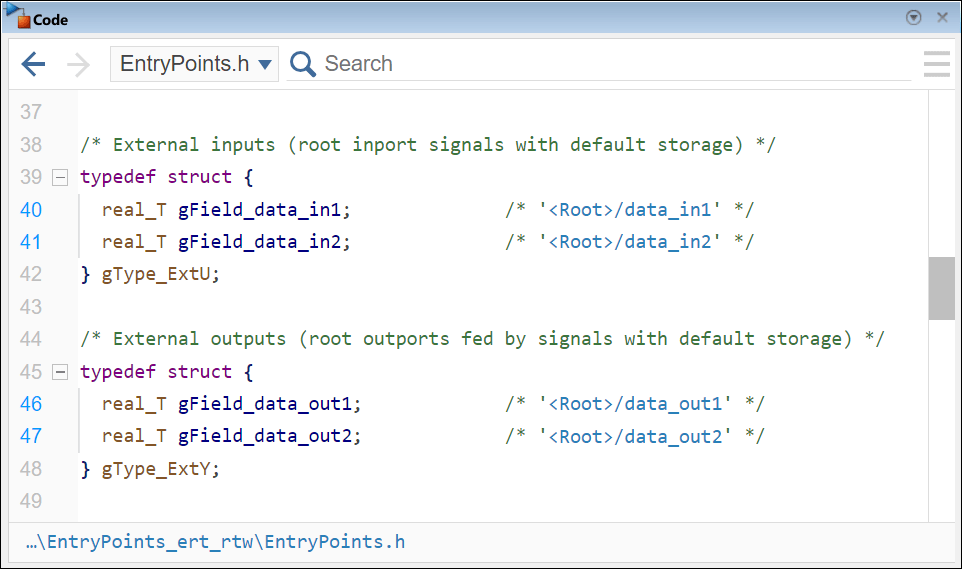
In the Code pane, locate the generated header file EntryPoints.h and examine the definitions of the structure types gType_ExtU and gType_ExtY.
Note that:
The definitions of structures for root-level inports and outports are declared as global types.
The identifies of the structures and the identifiers of their fields were created according to the naming rules you specified.
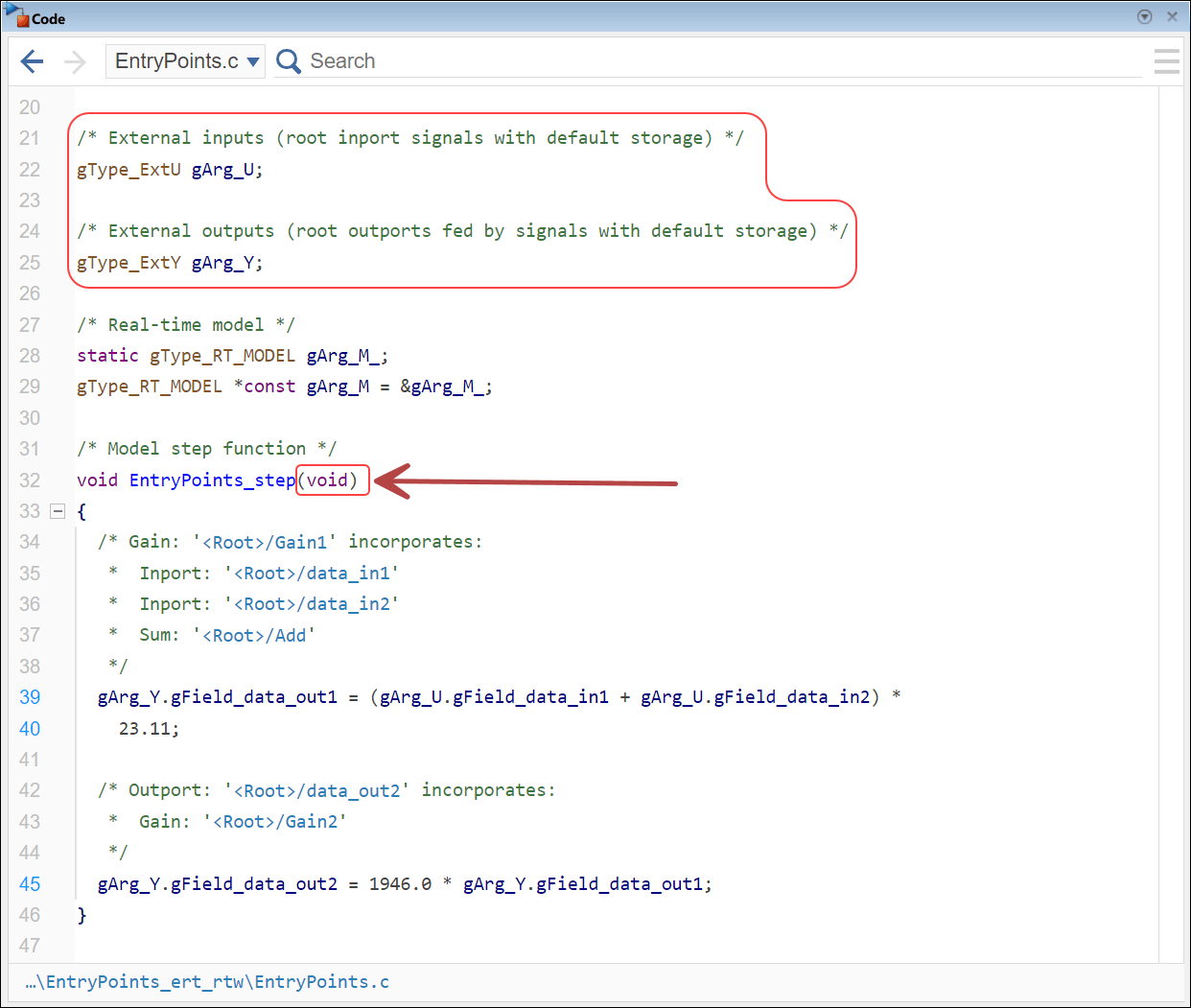
In the Code pane, locate the generated source code file EntryPoints.c and examine the instantiation of the root-level inports and root-level outports structures as global variables. Also observe how the step function directly accesses these global variables to read the inport values and to update the outport values.
In the generated code:
The identifiers of the type definition structures,
gType_ExtUandgType_ExtY, adhere to the naming rule you specified in the configuration parameter Global types. The identifiers of the fields in the structure types adhere to the naming rule you specified in the configuration parameter Field name of global types.The root-level inports structure,
gArg_U, and outports structure,gArg_Y, are instantiated as global variables of typesgType_ExtUandgType_ExtY, respectively. Their identifiers adhere to the naming rule you specified in the configuration parameter Global variables.The function
EntryPoints_stephas no input arguments.The function
EntryPoints_stepdirectly accesses the fields ofgArg_Uto read their values and directly accesses the fields ofgArg_Yto update their values.
Generate Reusable Entry-Point Functions
To allow having multiple real-time instances of the model, configure the model as reusable. In this configuration, the generated entry-point functions are potentially used by more than one real-time model instance within a single process. As such, entry-point functions require arguments to access variables of the specific (real-time model) instance they are invoked by each time.
To configure the model as reusable, in the Configuration Parameters dialog box, navigate to Code Generation > Interface. From the Code interface packaging list, select Reusable function.
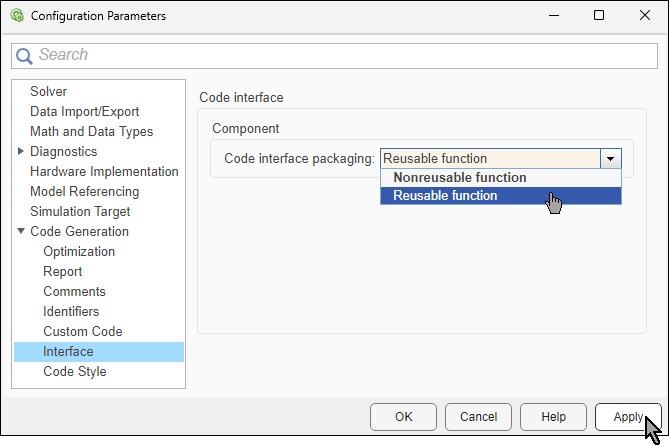
With this configuration, the prototype of each generated entry-point function includes at least one input argument, which is a reference to the real-time model instance. In real time, the generated function can use the real-time model instance to access variables it needs to read or update. However, there are several alternative configuration that specify how root-level inports and outports are passed to the function:
Pass Root-Level Ports as Part of Model Data Structure — The function extracts references to the structures of root-level ports from the real-time object reference.
Pass Root-Level Ports as Structured Reference Arguments — In addition to the real-time object reference, references to the root-level inports and outports structures are passed as input arguments to the function.
Pass Root-Level Ports as Individual Arguments — In addition to the real-time object reference, root-level ports that are used by the function are passed as individual arguments.
Pass Root-Level Ports as Part of Model Data Structure
Configure the model to generate reusable entry-point functions that do not accept arguments for root-level ports. In this setting, the generated function extracts the root-level ports from the real-time instance reference, which is the first input argument.
To configure this option, in the Configuration Parameters dialog box, navigate to Code Generation > Interface. Locate the Code Interface > Component section on the right, and from the Pass root-level I/O as list, select Part of model data structure.
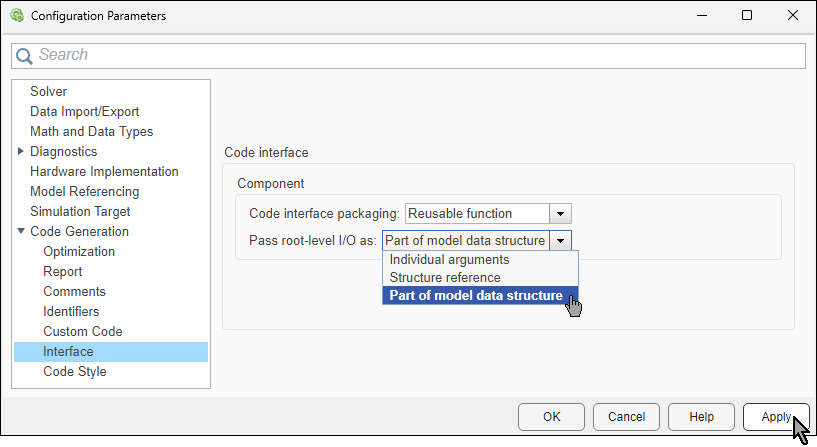
Generate model code again and examine the generated step function in the Code pane.
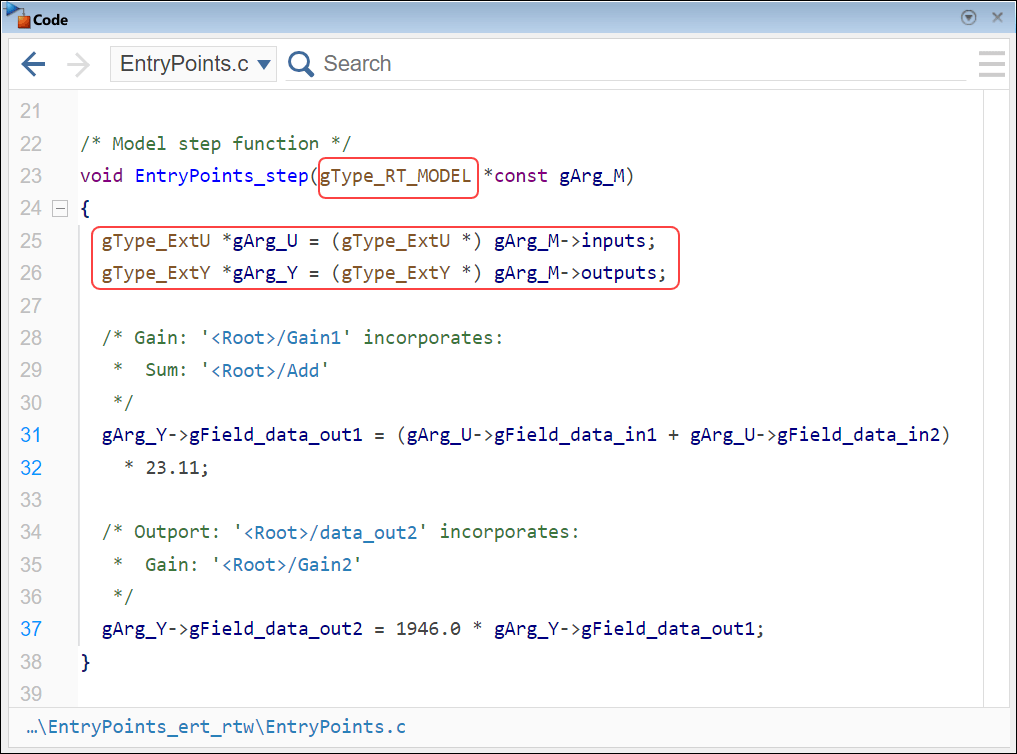
The function extracts the references to the root-level port structures from the single argument, which is the real-time model data structure.
Pass Root-Level Ports as Structured Reference Arguments
You can configure the model to generate reusable entry-point functions that accept root-level ports as references to structures, one structure for the inports and one for the outports.
To configure this option, in the Configuration Parameters dialog box, navigate to Code Generation > Interface. Locate the Code Interface > Component section on the right, and from the Pass root-level I/O as list, select Structure reference.
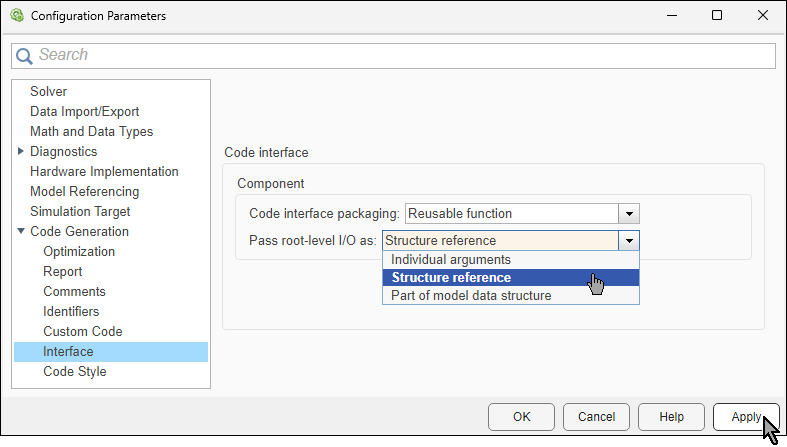
Generate code again and examine the generated step function. The first argument corresponds to the real-time object. The two additional arguments correspond to the root-level inports structure and the root-level outports structure.
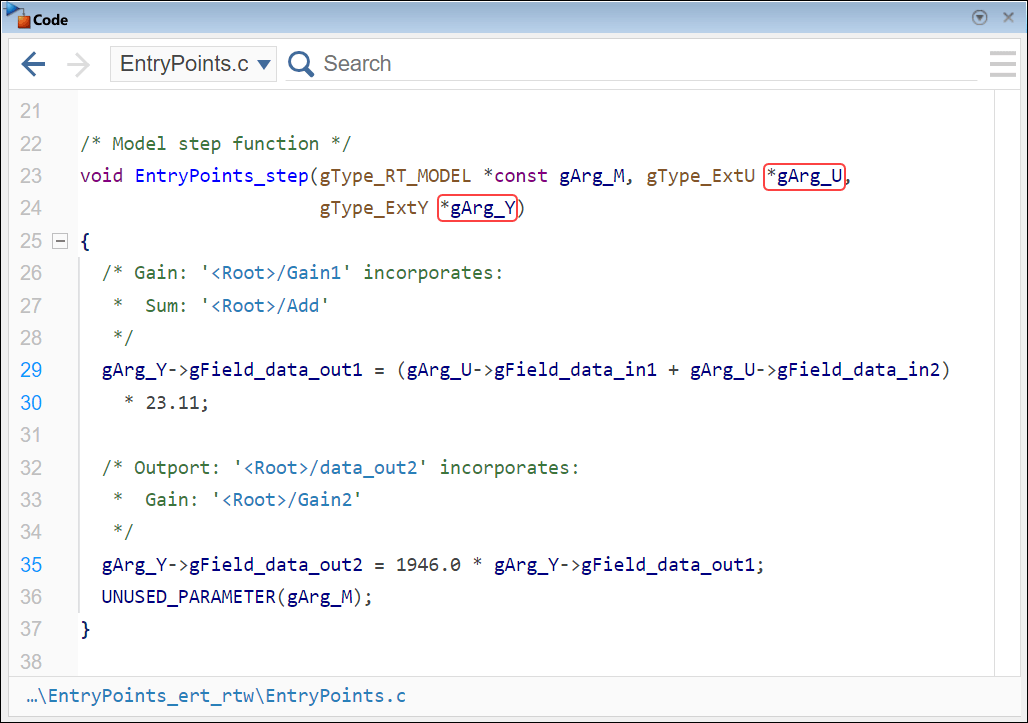
Note how the function:
Accesses root-level inports through the
gArg_Ustructure.Accesses root-level outports through the
gArg_Ystructure.
Pass Root-Level Ports as Individual Arguments
In this configuration, individual root-level ports are passed to the generated function as arguments. Unnecessary ports are not passed.
To configure this option, in the Configuration Parameters dialog box, navigate to Code Generation > Interface. Locate the Code Interface > Component section on the right, and from the Pass root-level I/O as list, select Individual arguments.
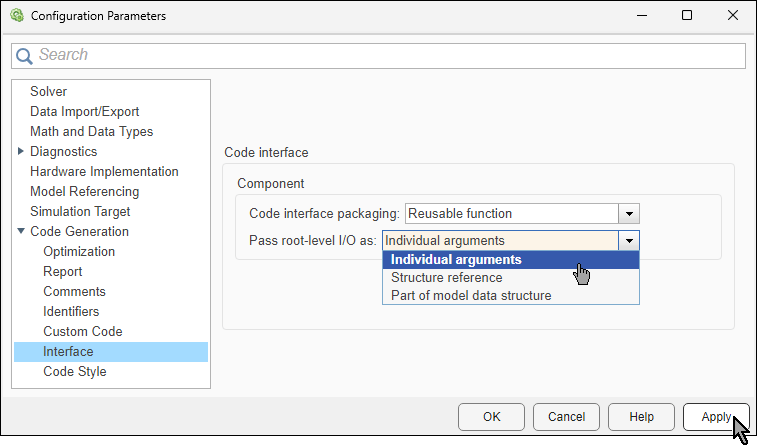
Generate code again and examine the generated step function.
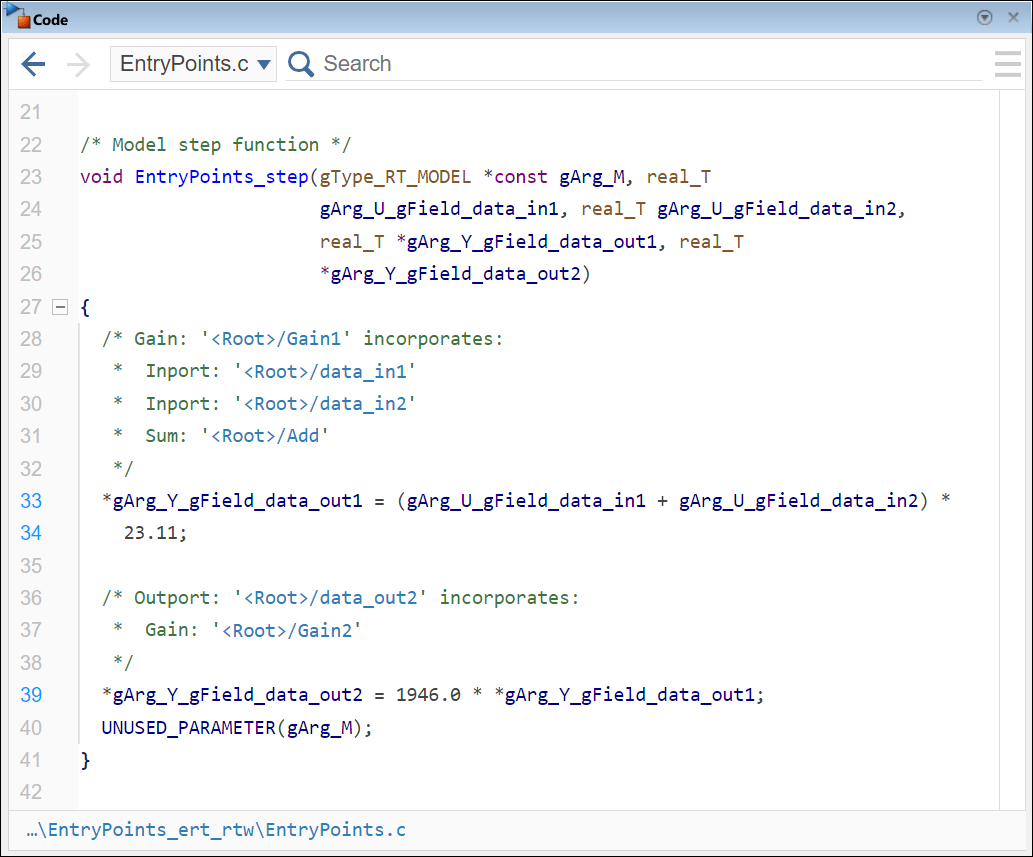
In the generated code:
Identifiers of arguments that correspond to root-level inports include the substring
_U_, and identifiers of arguments that correspond to root-level outports include the substring_Y_.Because the function only needs to read inport values, each root-level inport is passed by value.
Because the function needs to update outport values, each root-level outport is passed by reference.
See Also
Global variables | Global types | Field name of global types

