Create MATLAB Function That Detects Edges Using Inputs From NVIDIA Jetson
R2026bIn this step, you create a Sobel edge detection algorithm that takes snapshots using the camera on an NVIDIA® Jetson™ board and detects edges in the snapshot. You connect to the Jetson board and webcam from MATLAB®, examine an edge detection algorithm, adapt the algorithm to use the camera connected to a Jetson board, and then view the results.
Connect to NVIDIA Jetson
To connect to the Jetson board, create a jetson object. When connecting to the target board for the first time, provide the host name or IP address, user name, and password of the target board.
hwobj = jetson("jetson-deviceaddress","username","password");
If you call the jetson function without input arguments, MATLAB reuses the device address, username, and password from the last successful connection. MATLAB connects to the board and checks the status of the hardware.
hwObj = jetson;
### Checking for CUDA availability on the target...
### Checking for 'nvcc' in the target system path...
### Checking for cuDNN library availability on the target...
### Checking for TensorRT library availability on the target...
### Checking for prerequisite libraries is complete.
### Gathering hardware details...
### Checking for third-party library availability on the target...
### Gathering hardware details is complete.
Board name              : NVIDIA Jetson AGX Xavier Developer Kit
CUDA Version            : 11.4
cuDNN Version           : 8.6
TensorRT Version        : 8.5
GStreamer Version       : 1.16.3
V4L2 Version            : 1.18.0-2build1
SDL Version             : 1.2
OpenCV Version          : 4.5.4
Available Webcams       : Microsoft LifeCam Cinema(TM):
Available GPUs          : Xavier
Available Digital Pins  : 7  11  12  13  15  16  18  19  21  22  23  24  26  29  31  32  33  35  36  37  38  40
When you create a jetson object, the support package performs hardware and software checks, installs the MATLAB IO server on the target board, and gathers information on peripheral devices connected to the target. If the connection fails, MATLAB generates a diagnostics error message. The most likely cause of a connection failure is an incorrect device address or host name.
Connect to Webcam Device
To detect cameras connected to the Jetson board, use the getCameraList function. The function returns a table listing the cameras connected to the hardware, the camera names, and the available resolutions. In this example, there is one camera connected. If the getCameraList function outputs an empty table, disconnect and reconnect the camera, and execute the function again.
camList = getCameraList(hwObj);
              Camera Name              Video Device     Available Resolutions    Pixel Formats
    _______________________________    _____________    _____________________    _____________

    "Microsoft LifeCam Cinema(TM):"    "/dev/video0"    "(View resolutions)"      "YUYV,MJPG"
Select the camera to use. This code selects the first available camera.
cameraName = camList.("Camera Name")(1);Set the resolution on the camera. In this example, the camera uses a 1280-by-800 resolution.
camResolution = [1280 800];
To connect to the camera on the jetson board, create a camera object.
camObj = camera(hwObj,cameraName(1),camResolution);
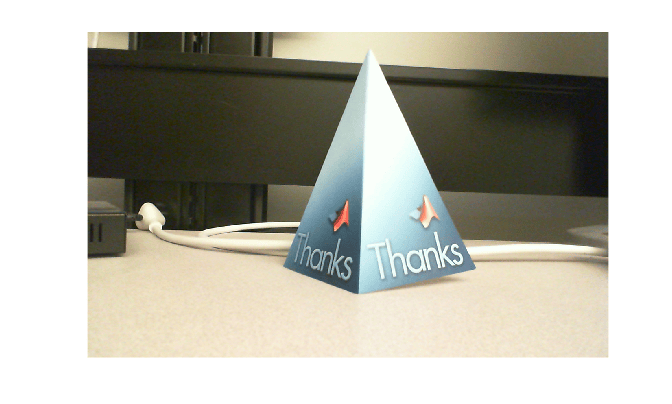
Use the camera object to take a snapshot on the camera. Display the snapshot.
snapImage = snapshot(camObj);
imshow(snapImage)
Examine the Sobel Edge Detection Algorithm
The Sobel edge detection algorithm sobelEdgeDetectionAlg.m performs a 2-D spatial gradient operation on a grayscale image. The algorithm emphasizes the high spatial frequency regions of the image, which correspond to edges. The algorithm calculates horizontal gradient and vertical gradient of the input image by using two orthogonal Sobel kernels, and stores them in variables h and v, respectively. The algorithm finds the gradient magnitude, e, and uses the magnitude and a threshold value, thresh, to find edges.
type sobelEdgeDetectionAlg.mfunction edgeImg = sobelEdgeDetectionAlg(img,thresh) %sobelEdgeDetection Example MATLAB function for edge detection. % Copyright 2018 The MathWorks, Inc. kern = half([1 2 1; 0 0 0; -1 -2 -1]); % Finding horizontal and vertical gradients. h = conv2(img(:,:,2),kern,'same'); v = conv2(img(:,:,2),kern','same'); % Finding magnitude of the gradients. e = sqrt(h.*h + v.*v); % Threshold the edges edgeImg = uint8((e > thresh) * 240); end
Before processing live image data from the camera, test the algorithm on a sample image, peppers.png. First, display the unedited image.
img = imread("peppers.png");
imshow(img);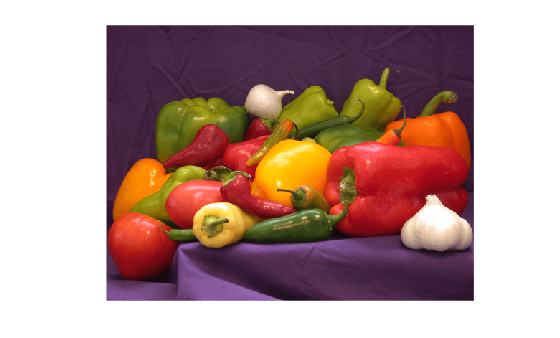
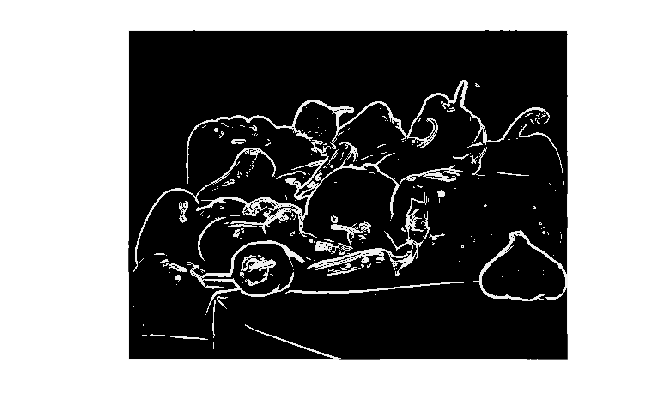
Run the algorithm on the image with a threshold value of 100. Display the edge-detected image.
edgeImg = sobelEdgeDetectionAlg(img,100);
imshow(edgeImg);
Create Algorithm That Uses Data from Jetson
Edit the sobelEdgeDetectionAlg.m function so that it processes a snapshot from a camera on the Jetson board. Create a new function named sobelEdgeDetection_init by replacing the function declaration. Make the camera name and resolution arguments to the function, and add code that connects to the Jetson board and camera. For example, this code declares sobelEdgeDetection_init and connects to the board and camera.
function sobelEdgeDetection_init(cameraName,resolution)
hwObj = jetson;
camObj = camera(hwObj,cameraName,resolution);
Insert a line of code that takes a snapshot by using the camera object, and assign the snapshot to the img variable.
img = snapshot(camObj);
Replace the thresh variable with a constant value of 100. Save the function as sobelEdgeDetection_init.m.
type sobelEdgeDetection_init.mfunction sobelEdgeDetection_init(cameraName,resolution) hwObj = jetson; camObj = camera(hwObj,cameraName,resolution); % Sobel kernel kern = [1 2 1; 0 0 0; -1 -2 -1]; % Capture the image from the camera on hardware. img = snapshot(camObj); % Finding horizontal and vertical gradients. h = conv2(img(:,:,2),kern,'same'); v = conv2(img(:,:,2),kern','same'); % Finding magnitude of the gradients. e = sqrt(h.*h + v.*v); % Threshold the edges edgeImg = uint8((e > 100) * 240); % Display image. imshow(edgeImg) end
Clear the hardware connection objects and webcam objects before running the sobelEdgeDetection_init function.
clear hwObj camObj;
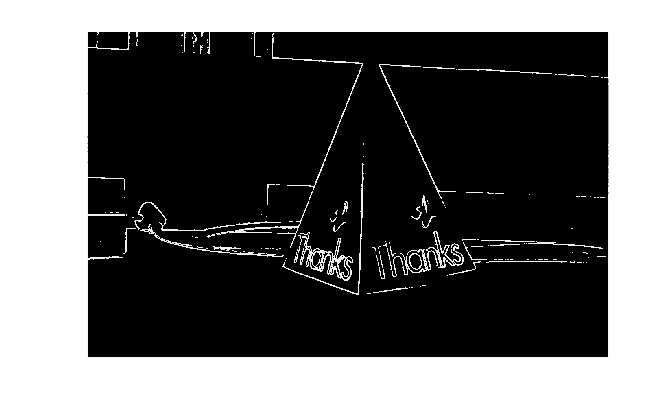
Run the sobelEdgeDetection_init function. The function creates a new connection to the hardware, takes a snapshot, and displays the edge-detected result.
sobelEdgeDetection_init(cameraName,camResolution);