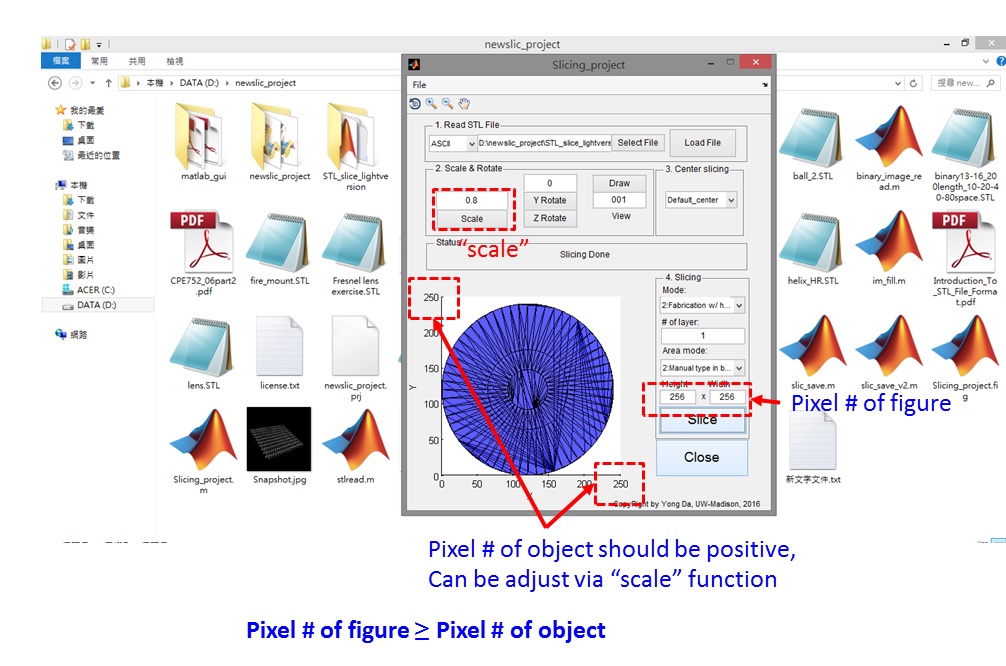
【Light Version 】Matlab STL GUI slice program

バージョン 3.0.0.0 (28.3 KB) 作成者: Yong Da
Transform 3D STL file (StereoLithography) into 2D series BMP files.
ダウンロード: 1.1K
更新 2017/11/16

ライセンスの表示

DIY 自製 Matlab STL GUI 轉檔slice程式
為了紀念母親節,第一次自行設計Matlab GUI程式,STL轉擋切圖,破天荒免費分享給有需要的人XD,主要跟3D列印有相關的人可能會使用。
https://www.youtube.com/watch?v=L-PJxcc50V8
【To commemorate Mother's Day 】
● This is my first time to build Matlab GUI and run stand alone program.
● Can use ImageJ to aid design of 3D structure.
●STL file can be produced via Solidworks etc.
==【Install】==============================
1. Read Slicing_project.m file w/ matlab.
2. Run it/F5.
Enjoy it.
========================================
GUI troubleshooting ========================
[step 1] Open GUIDE under ("new/App/GUIDE").
[step 2] Open 'Slicing_project.fig' file under GUIDE manager.
[step 3] Right click on the panel, select "send to back" button.
[step 4] fix all front panel.
※ following are step-by-step illustrations via figure.
[url] https://drive.google.com/open?id=17UydcjT_9Vo-Cu8xZLv6wOO4D96gjMfO

引用

Yong Da (2026). 【Light Version 】Matlab STL GUI slice program (https://jp.mathworks.com/matlabcentral/fileexchange/62926-light-version-matlab-stl-gui-slice-program), MATLAB Central File Exchange. に取得済み.

MATLAB リリースの互換性
作成: R2011a
すべてのリリースと互換性あり
プラットフォームの互換性
Windows macOS Linux
カテゴリ
Help Center および MATLAB AnswersSTL (STereoLithography) についてさらに検索
謝辞

ヒントを得たファイル: CAD2MATDEMO.M, stlread

バージョン 公開済み リリース ノート
3.0.0.0

Update cover
change cover
Add GUI troubleshooting illustration.
Change

update x-y-z- axial indicate