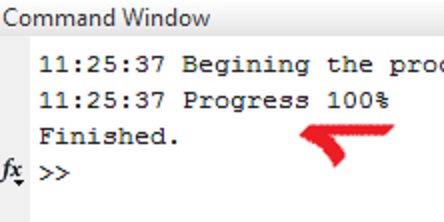
Overwritable message outputs to commandline window

Alternative for 'display' function which can overwrite the previous message if required.
ダウンロード: 3K
更新 2013/12/12

ライセンスの表示

When you use 'display' function it does not overwrite the previous message. With this file, you can overwrite or keep previous message on commandline window. Or you can choose current message to be persistent. You can also append time stamp to the beginning of the message Very simple to use. Check >help dispstat
Ex:
> dispstat('','init'); %one time only init
> dispstat('Begining the process...','keepthis','timespamp');
> for i = 1:100
> dispstat(sprintf('Processing %d%%',i),'timestamp');
> %doing some heavy stuff here
> end
> dispstat('Finished.','keepprev');

Output:

16:41:37 Begining the process...
16:41:37 Processing 100%
Finished.

引用

kasim tasdemir (2026). Overwritable message outputs to commandline window (https://jp.mathworks.com/matlabcentral/fileexchange/44673-overwritable-message-outputs-to-commandline-window), MATLAB Central File Exchange. 取得日: .

MATLAB リリースの互換性
作成: R2013b
すべてのリリースと互換性あり
プラットフォームの互換性
Windows macOS Linux
カテゴリ
Help Center および MATLAB AnswersEntering Commands についてさらに検索
謝辞

ヒントを与えたファイル: writeConsoleCont(text,varargin), PM Architectures Project

バージョン 公開済み リリース ノート
1.1.0.0

Screenshot and description are changed

1.0.0.0