現在この提出コンテンツをフォロー中です。
- フォローしているコンテンツ フィードに更新が表示されます。
- コミュニケーション基本設定に応じて電子メールを受け取ることができます
There are many interactive tools that have been provided by the community that can provide great features to users of deployed applications. However, many of these fine tools tend to conflict if used together.
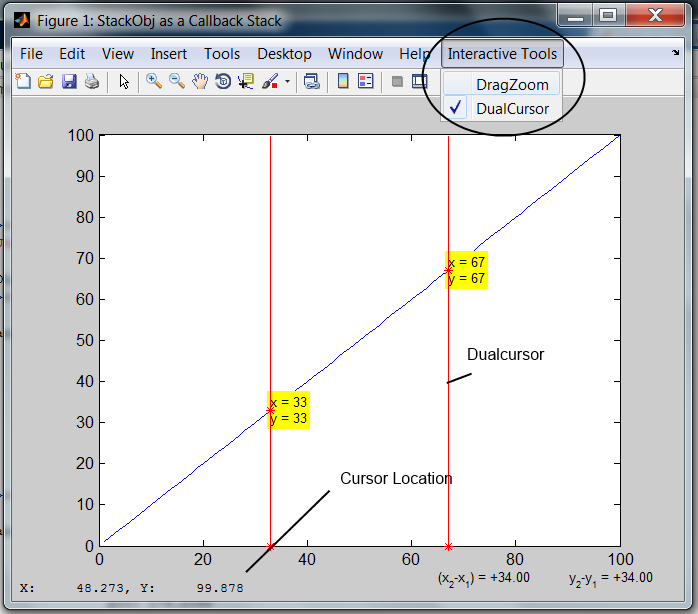
A good example of this is using dragzoom to zoom and/or pan interactively into an interesting data feature and then using dualcursor to inspect values. Dragzoom does a good job of restoring the callbacks that were in place prior to it's execution (it was a major inspiration for this class file), but it has no knowledge of what callbacks have been assigned afterward. Thus, turning dragzoom off in the middle of using dualcursor results in a loss of the callbacks required by the latter tool. The same is true if dualcursor is turned off. A developer may use stackobj to manage any multiple of such interactive tools and their callbacks.
The included file stackobj_demo.m is the best explanation of the utility of this submission.
This class may also be utilized to save and restore any set of properties of any object. One could also easily implement an undo feature with this object.
引用
Jonathan Lister (2026). stackobj (https://jp.mathworks.com/matlabcentral/fileexchange/42535-stackobj), MATLAB Central File Exchange. に取得済み.
謝辞
ヒントを得たファイル: dualcursor, Display Cursor Location, DRAGZOOM - Drag and zoom tool
| バージョン | 公開済み | リリース ノート | Action |
|---|---|---|---|
| 1.7.0.0 | Updated description. Added listener to watch the target properties to prevent a tool lower in the stack from changing the active callbacks. |
||
| 1.5.0.0 | added helper method, auto_wipe feature, and keyword shortcuts 'all' and 'callbacks', changed demo file |
||
| 1.3.0.0 | updating description and title |
||
| 1.0.0.0 |
