AdvancedColormap

Performs advaced colormap operations

現在この提出コンテンツをフォロー中です。

ADVANCEDCOLORMAP Performs advaced colormap operations

cmap = AdvancedColormap;
Returns current colormap, much like COLORMAP does,
but new figure is not created

cmaps = AdvancedColormap('GetSupportedColormaps')
Returns cell array of strings of all predefined colormaps.

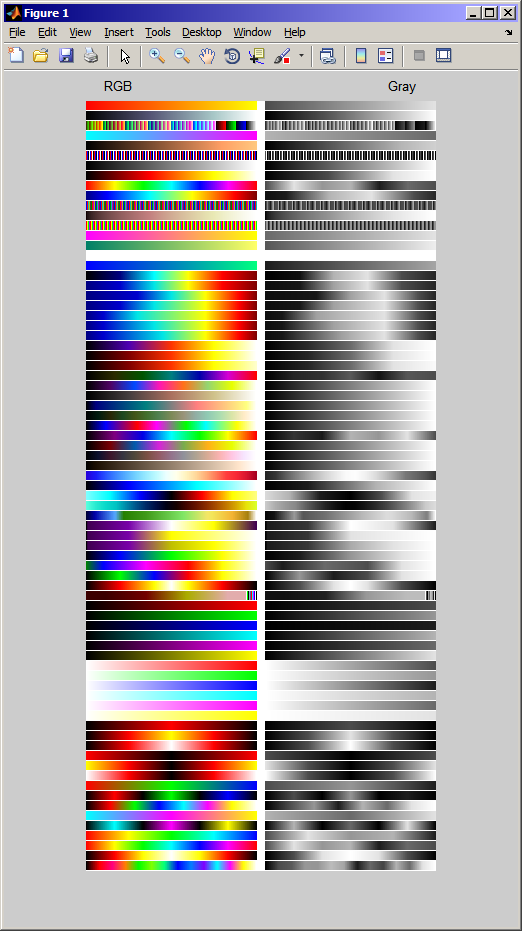
AdvancedColormap('ShowSupportedColormaps')
AdvancedColormap('ShowSupportedColormaps','OnBlack')
AdvancedColormap('ShowSupportedColormaps','OnWhite')
Displays all predefined colormaps as a color+grayscale image
or white (default) or black background.
img = AdvancedColormap('ShowSupportedColormaps',...)
The image is returned if output parameter is specified.

str = AdvancedColormap('GetCurrentColormapString')
Returns current colormap string.
May not work properly if colormap was modified with commands below.

AdvancedColormap('Reverse')
AdvancedColormap('Invert')
AdvancedColormap('ShiftUp')
AdvancedColormap('ShiftDown')
AdvancedColormap('RGB>RBG')
AdvancedColormap('RGB>BRG')
AdvancedColormap('RGB>GRB')
AdvancedColormap('RGB>BGR')
AdvancedColormap('RGB>GBR')
AdvancedColormap('Brighten')
AdvancedColormap('Brighten',Amount)
AdvancedColormap('Darken')
AdvancedColormap('Darken',Amount)
Performs advanced command on current colormap.

AdvancedColormap('MakeUniformByGrayValue')
Tries to adjust current colormap so its gray values grow linearly.

AdvancedColormap(MatLabColorMapName)
AdvancedColormap(MatLabColorMapName,Length)
This is equivalent to MatLab
colormap(cmap)
and
colormap(cmap,n)
respectively.

AdvancedColormap(ColorMapString)
AdvancedColormap(ColorMapString,Length)
AdvancedColormap(ColorMapString,Length,ColorPositions)
AdvancedColormap(ColorMapString,Length,ColorPositions,InterpolationMode)

ColorMapString String representation of colormap
Each character represents one color
and must belong to the following set

char color R- G- B- values
k black 0.0 0.0 0.0
r red 1.0 0.0 0.0
p pink 1.0 0.0 0.5
o orange 1.0 0.5 0.0
g green 0.0 1.0 0.0
l lime 0.5 1.0 0.0
a aquamarine 0.0 1.0 0.5
b blue 0.0 0.0 1.0
s sky blue 0.0 0.5 1.0
v violet 0.5 0.0 1.0
c cyan 0.0 1.0 1.0
m magenta 1.0 0.0 1.0
y yellow 1.0 1.0 0.0
w white 1.0 1.0 1.0

If the string does not contain spaces, each
character represents one color in colormap.
For example, 'kryw' defines black-red-yellow-white (hot-like) colormap
If string contains spaces then each group of space-delimited characters
define one color. RGB components of the color are formed
by averagin of RGB components of each color from the group.
For example, 'bw k rw' defines lightblue-black-lightred colormap

Colors in the generated colormap are evenly spaced
covering values from 0 to 1

Length Length of generated colormap

ColorPositions Vector of color positions
If colors from the ColorMapString should be
placed at custom data values, provide their positions in this vector.
Length of the ColorPositions should be equal
to length of the ColorMapString if ColorMapString does not contain spaces
or to number of color groups in ColorMapString

InterpolationMode 'nearest' {'linear'} 'spline' 'cubic'
Interpolation mode for colormap
See INTERP2 for details

cmap = AdvancedColormap(ColorMapString,...)
ADVANCEDCOLORMAP returns applied colormap to caller

ctable = AdvancedColormap(ColorMapString,0);
[ctable,cpos] = AdvancedColormap(ColorMapString,0);
When requested length of colormap is zero, ADVANCEDCOLORMAP returns
original table of colors used to generate the colormap in CTABLE.
This can be applied only for predefined or generated-on-the-fly colormaps.
ADVANCEDCOLORMAP also returns vector CPOS of positions of the colors returned in CTABLE

Examples
By inverting and reversing standard BONE colormap one can obtain nice sepia colormap

figure;
imagesc(peaks(256));
AdvancedColormap('bone');
AdvancedColormap('invert');
AdvancedColormap('reverse');

figure;
imagesc(peaks(256));
AdvancedColormap('kryw');

See ADVANCEDCOLORMAPDEMO scropt for more examples

See also colormap, brighten, FEX#23342, FEX#23865, FEX#24870, FEX#20848

引用

Andriy Nych (2026). AdvancedColormap (https://jp.mathworks.com/matlabcentral/fileexchange/41583-advancedcolormap), MATLAB Central File Exchange. に取得済み.

謝辞

ヒントを得たファイル: real2rgb & colormaps

ヒントを与えたファイル: Academic Figures, rgbmap color maps

カテゴリ

Help Center および MATLAB AnswersColor and Styling についてさらに検索

一般的な情報

MATLAB リリースの互換性

  • すべてのリリースと互換性あり

プラットフォームの互換性

  • Windows
  • macOS
  • Linux
バージョン 公開済み リリース ノート Action
1.0.0.0