establishMAPCAgreement
R2026bDescription
establishMAPCAgreement( establishes
coordinated time division multiple access (Co-TDMA) multi-access point coordination (MAPC)
agreements between every pair of access points (APs) in the AP list. Once established, all
APs in the list can function as both coordinating and coordinated APs. For more information
about Co-TDMA, see How Does Co-TDMA Work?apList)
establishMAPCAgreement(
specifies the MAPC scheme apList,MAPCScheme=mapcScheme)mapScheme. Currently, the function supports
only the Co-TDMA scheme.
Examples
Input Arguments
Algorithms
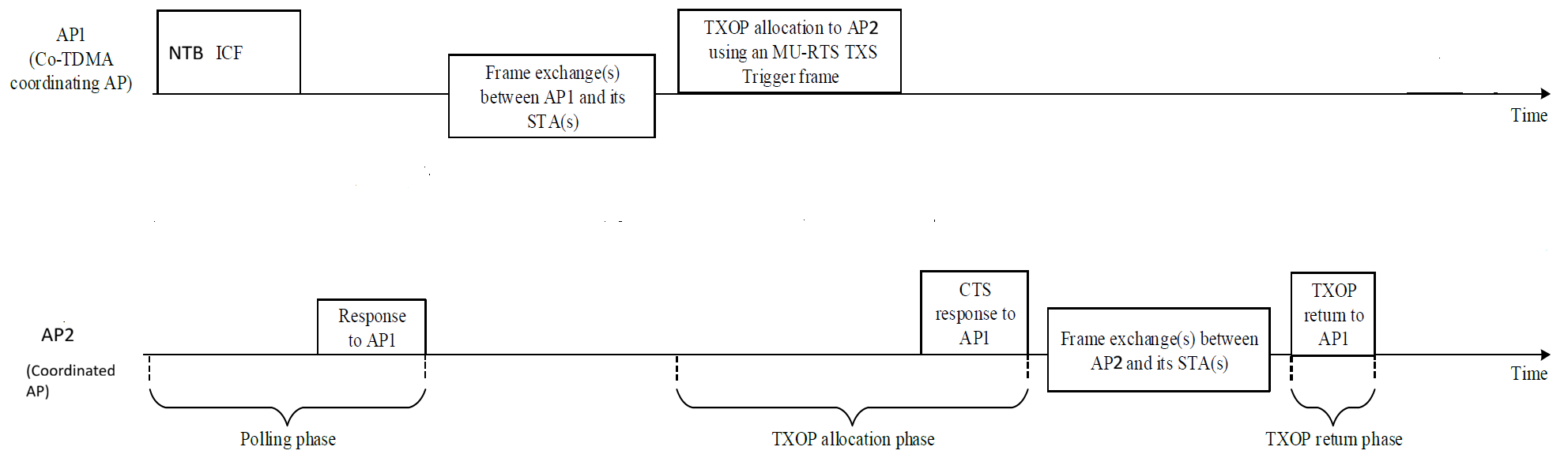
Co-TDMA operates in three phases.
Polling phase — The AP that currently owns the transmission opportunity (TXOP), known as the coordinating AP, initiates coordination by sending an initial control frame (ICF) to other APs. The intended APs that receive this ICF are coordinated APs. They respond with an initial control response (ICR) frame to indicate whether they wish to participate in TXOP sharing.
All APs participating in a MAPC agreement attempt Co-TDMA operation. An AP starts a TXOP with an ICF buffer status report poll (BSRP) non-trigger-based (NTB) for polling if all of these are true:
Beacon Reception — The AP has received at least one beacon with a received signal strength indicator (RSSI) ≥ –72 dBm from any AP participating in the MAPC agreement.
Beacon Configuration — All APs participating in the MAPC agreement enable beacons.
AC VI TXOP — AC VI has a nonzero TXOP.
Data Traffic TXOP — The AC that handles data traffic has a non-zero TXOP.
TXOP Duration — The configured TXOP limit values provide sufficient duration for the polling phase, the estimated data frame exchange, and the estimated minimum allocation phase. The equations for these phases are:
Tpolling = TBSRP + TMBA + (2×SIFS), where Tpolling represents the total time for the polling phase, TBSRP represents the time to transmit a Buffer Status Report Poll, TMBA represents the time to transmit a multi-STA block ack (MBA), and SIFS represents the short interframe space.
TDE = TFES × NFES, where TDE represents the estimated data frame exchange time with the associated STAs, TFES represents the time required for the next frame exchange sequence, and NFES is the ratio of the total number of MPDUs waiting in the queue to the number of MPDUs that can fit in the next frame exchange sequence.
Tallocation = TTimeMURTSCTS + TTimeData100B, where Tallocation represents the estimated allocation phase time, TTimeMURTSCTS represents the time required for multi-user request to send (MU-RTS) triggered TXOP sharing (TXS) and clear to send (CTS) exchange, and TTimeData100B represents time required for a 100-byte data frame exchange sequence (including RTS transmission and CTS response) using non-high throughput at 6 Mbps.
A coordinated AP evaluates the polling request and rejects the polling when either condition applies.
The AP has no frames to transmit.
The duration indicated in the Max TXOP allocation (under consideration) parameter of the ICF frame cannot accommodate at least one aggregated medium access control (MAC) protocol data unit (A-MPDU) containing one MPDU.
TXOP allocation phase — After collecting poll responses and completing frame exchanges with its own associated stations, the coordinating AP allocates the remaining time to a coordinated AP by sending an MU-RTS TXS trigger frame. The coordinated AP responds with a CTS, then utilizes the shared TXOP to perform frame exchanges with its associated stations.
To allocate a TXOP to a coordinated AP, a coordinating AP must satisfy all of the following conditions:
The coordinating AP has finished its own scheduled transmissions.
The coordinated AP has requested TXOP sharing during the polling phase.
The coordinating AP has used at least 33% of its TXOP limit.
The remaining TXOP time is enough to perform a frame exchange sequence for at least a 100-byte data frame (including RTS/ CTS exchange).
TXOP return phase — If a coordinated AP completes its transmission before using its entire allocated TXOP, it can return the unused portion of the TXOP to the coordinating AP.
When possible, a coordinated AP returns the TXOP to the user using these steps.
The coordinated AP sends a TXOP Return Action frame to the coordinating AP, provided sufficient time remains to complete the transmission.
If sufficient time remains, the coordinating AP then transmits a contention-free (CF) End frame to terminate the TXOP.
Note that all communication between APs uses a data rate of 24 Mbps, which is the highest mandatory basic rate for Non-HT modes. This applies to frames such as BSRP NTB, MU-RTS TXS, MAPC TXOP return, and their corresponding responses. The only exception is the CTS response to MU-RTS, which the standard restricts to 6 Mbps.
This diagram illustrates the Co-TDMA operation for two APs.
Version History
Introduced in R2026b

