Create and Simulate Wireless Network of Custom Nodes
R2026bModeling wireless nodes accurately is a fundamental aspect of network simulation. With Wireless Network Toolbox™, you can design custom nodes to meet your simulation needs. This example shows how to create custom nodes from the base class wnet.Node and simulate a simple scenario with one transmitter and one receiver, without implementing specific network protocols.
Implement Custom Wireless Node
To create a custom node using the wnet.Node base class of Wireless Network Toolbox, follow these steps:
Inherit from the
wnet.Nodebase class. The class definition must have this format, where hCustomNodeis the name of your custom node class.
classdef hCustomNode < wnet.Node
   ...
 end
Override any of the base class public methods.
Save the class definition in an
.mfile.In a simulation script, create an object of the
customNodeclass.
This example implements a custom node using the wnet.Node base class. The model is attached to this example as a supporting file. For more information on the implementation of the model, see Supporting File. The hCustomNode class enables you model a wireless node that acts as either a transmitter or a receiver. As a transmitter, the node probabilistically generates and buffers wireless packets with configurable radio parameters and random in-phase and quadrature (IQ) data. As a receiver, the node accepts, processes, and clears incoming packets. The class provides event-driven callbacks for both transmitting and receiving. It also enables you to create multiple nodes at once.
Simulate Network
Set the random number generator.
rng("default");Initialize the wireless network simulator
simulator = wirelessNetworkSimulator.init;
Create a transmitter node at position [10 30 0] using the hCustomNode helper object, attached to this example as a supporting file.
txNode = hCustomNode("Position",[10 30 0],IsTransmitter=true,Name="Transmitter");
Create a receiver nodes at position [300 0 0].
rxNode = hCustomNode(Position=[300 0 0],IsTransmitter=false,Name="Receiver1");Add the transmitter and receiver nodes to the simulator.
addNodes(simulator,txNode)
addNodes(simulator,rxNode)
Initialize the wireless network viewer.
visualizer = wirelessNetworkViewer;
Add the nodes to the wireless network viewer.
addNodes(visualizer,txNode)
addNodes(visualizer,rxNode)
Register a callback function to display information when the transmitter starts transmission.
registerEventCallback(txNode,"TransmissionStarted",@displayInfo)
registerEventCallback(rxNode,"ReceptionEnded",@displayReceptionInfo)
Install a random-walk mobility model on the receiver node, confining its movement within a circular boundary and setting its speed range from 5 to 10 meters per second.
addMobility(rxNode,MobilityModel="random-walk", ...
    BoundaryShape="circle",SpeedRange=[5 10]);
Run the simulation for 10 seconds.
run(simulator,10);
            NodeID: 1
          NodeName: "Transmitter"
    TechnologyType: 101
         EventName: "TransmissionStarted"
         Timestamp: 2
         EventData: [1×1 struct]

[Receiver1 @ t=2.0000 s] Received packet #1 from Node 1 (Power: -66.1 dBm, Duration: 1.000 ms)
            NodeID: 1
          NodeName: "Transmitter"
    TechnologyType: 101
         EventName: "TransmissionStarted"
         Timestamp: 4
         EventData: [1×1 struct]

[Receiver1 @ t=4.0000 s] Received packet #2 from Node 1 (Power: -66.2 dBm, Duration: 1.000 ms)
            NodeID: 1
          NodeName: "Transmitter"
    TechnologyType: 101
         EventName: "TransmissionStarted"
         Timestamp: 8
         EventData: [1×1 struct]

[Receiver1 @ t=8.0000 s] Received packet #3 from Node 1 (Power: -66.4 dBm, Duration: 1.000 ms)
            NodeID: 1
          NodeName: "Transmitter"
    TechnologyType: 101
         EventName: "TransmissionStarted"
         Timestamp: 10
         EventData: [1×1 struct]

[Receiver1 @ t=10.0000 s] Received packet #4 from Node 1 (Power: -66.6 dBm, Duration: 1.000 ms)
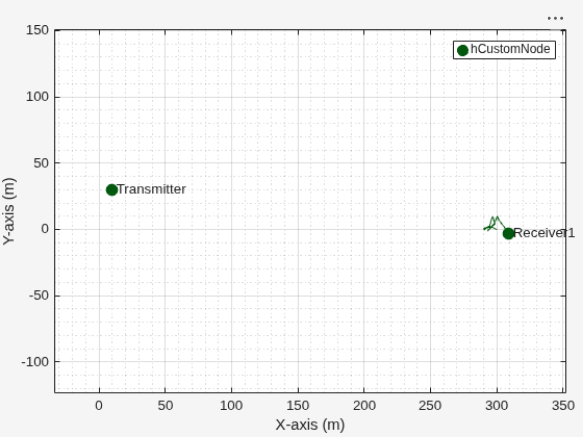
This figure shows the nodes in the network and the trajectory of the mobility pattern for the node with mobility enabled.
Use this callback function to display event information.
function displayInfo(event)
% Display transmitted packet information
disp(event)
end

function displayReceptionInfo(event)
% Display received packet information
eventData = event.EventData;
fprintf('[%s @ t=%.4f s] Received packet #%d from Node %d (Power: %.1f dBm, Duration: %.3f ms)\n', ...
    event.NodeName, event.Timestamp, eventData.PacketNumber, ...
    eventData.TransmitterID,eventData.ReceivedPower,eventData.Duration*1000);
end
Obtain the statistics for the transmitter and receiver nodes.
txStats = statistics(txNode)
txStats = struct with fields:
                       ID: 1
                     Name: "Transmitter"
            IsTransmitter: 1
    NumPacketsTransmitted: 4
       NumPacketsReceived: 0
rxStats = statistics(rxNode)
rxStats = struct with fields:
                       ID: 2
                     Name: "Receiver1"
            IsTransmitter: 0
    NumPacketsTransmitted: 0
       NumPacketsReceived: 4
Supporting File
hCustomNode.m— Implements a custom wireless node.
classdef hCustomNode < wnet.Node
    % hCustomNode Implements a custom wireless node for simulation
    %
    % This class extends the base wnet.Node class to add custom behavior for
    % transmitter and receiver nodes, including packet generation, reception
    % processing, and event callbacks.

    properties(SetAccess=private)
        % IsTransmitter - Specifies if the node operates as a transmitter (true) or receiver (false)
        IsTransmitter

        % CenterFrequency - Carrier frequency in Hz (default: 2.4 GHz)
        CenterFrequency

        % Bandwidth - Channel bandwidth in Hz (default: 20 MHz)
        Bandwidth

        % SampleRate - Sampling rate in Hz (default: 20 MHz)
        SampleRate

        % TransmitPower - Transmit power in dBm (default: 23 dBm)
        TransmitPower

        % NumTransmitAntennas - Number of transmit antennas (default: 1)
        NumTransmitAntennas

        % NumReceiveAntennas - Number of receive antennas (default: 1)
        NumReceiveAntennas

        % PacketDuration - Duration of each transmitted packet in seconds (default: 1 ms)
        PacketDuration

        % PDULength - Packet Data Unit length in bytes (default: 1000)
        PDULength

        % TransmissionProbability - Probability of transmitting in each run() invocation (default: 0.5)
        TransmissionProbability

        % TransmitterBuffer - Stores the most recently generated packet awaiting transmission
        TransmitterBuffer = [];

        % ReceptionBuffer - Array of received packets awaiting processing
        ReceptionBuffer = [];

        % NumPacketsTransmitted - Tracks the number of packets transmitted by this node
        NumPacketsTransmitted = 0;

        % NumPacketsReceived - Tracks the number of packets successfully received by this node
        NumPacketsReceived = 0;
    end

    properties(Access=private)
        % TransmissionStartedCallbacks - Cell array of function handles for TransmissionStarted event
        TransmissionStartedCallbacks = cell(1,0);

        % ReceptionCompleteCallbacks - Cell array of function handles for ReceptionComplete event
        ReceptionCompleteCallbacks = cell(1,0);
    end

    methods
        function obj = hCustomNode(args)
            % hCustomNode Constructor for hCustomNode
            %
            % Name-Value Arguments:
            %   Position (Nx3 double) - Node position(s) in 3D space [x, y, z] in meters
            %   Name (string) - Node name; empty = auto-generated by base class
            %   IsTransmitter (logical) - true for transmitter, false for receiver
            %   CenterFrequency (double) - Carrier frequency in Hz
            %   Bandwidth (double) - Channel bandwidth in Hz
            %   SampleRate (double) - Sampling rate in Hz
            %   TransmitPower (double) - Transmit power in dBm
            %   NumTransmitAntennas (integer) - Number of transmit antennas
            %   NumReceiveAntennas (integer) - Number of receive antennas
            %   PacketDuration (double) - Packet duration in seconds
            %   PDULength (integer) - Packet Data Unit length in bytes
            %   TransmissionProbability (double) - Probability of transmission [0,1]

            arguments
                args.Position (:,3) double = [0 0 0]
                args.Name string = ""
                args.IsTransmitter logical = false
                args.CenterFrequency (1,1) double {mustBePositive} = 2.4e9
                args.Bandwidth (1,1) double {mustBePositive} = 20e6
                args.SampleRate (1,1) double {mustBePositive} = 20e6
                args.TransmitPower (1,1) double = 23
                args.NumTransmitAntennas (1,1) double {mustBeInteger, mustBePositive} = 1
                args.NumReceiveAntennas (1,1) double {mustBeInteger, mustBePositive} = 1
                args.PacketDuration (1,1) double {mustBePositive} = 1e-3
                args.PDULength (1,1) double {mustBeInteger, mustBePositive} = 1000
                args.TransmissionProbability (1,1) double {mustBeGreaterThanOrEqual(args.TransmissionProbability,0), mustBeLessThanOrEqual(args.TransmissionProbability,1)} = 0.5
            end

            % Prepare base class constructor arguments
            baseClassArgs = {};
            baseClassArgs{end+1} = 'Position';
            baseClassArgs{end+1} = args.Position;
            if strlength(args.Name) > 0
                baseClassArgs{end+1} = 'Name';
                baseClassArgs{end+1} = args.Name;
            end

            % Call base class constructor unconditionally (MUST be first)
            obj@wnet.Node(baseClassArgs{:});

            % Initialize custom properties for all nodes
            obj.IsTransmitter = args.IsTransmitter;
            obj.CenterFrequency = args.CenterFrequency;
            obj.Bandwidth = args.Bandwidth;
            obj.SampleRate = args.SampleRate;
            obj.TransmitPower = args.TransmitPower;
            obj.NumTransmitAntennas = args.NumTransmitAntennas;
            obj.NumReceiveAntennas = args.NumReceiveAntennas;
            obj.PacketDuration = args.PacketDuration;
            obj.PDULength = args.PDULength;
            obj.TransmissionProbability = args.TransmissionProbability;
        end

        function nextInvokeTime = run(obj, currentTime)
            % run - Executes node logic at the current simulation time. This method is
            % called by wirelessNetworkSimulator.
            %
            % Inputs:
            %   currentTime - Current simulation time in seconds
            %
            % Outputs:
            %   nextInvokeTime - Time in seconds when run() should be invoked again

            nextInvokeTime = Inf;
            if obj.IsTransmitter
                % TRANSMITTER LOGIC
                if rand < obj.TransmissionProbability
                    % Create and configure wireless packet
                    packet = wirelessPacket();
                    packet.TransmitterID = obj.ID;
                    packet.TransmitterPosition = obj.Position;
                    packet.TechnologyType = wnet.TechnologyType.Custom1;
                    packet.Power = obj.TransmitPower;
                    packet.CenterFrequency = obj.CenterFrequency;
                    packet.Bandwidth = obj.Bandwidth;
                    packet.SampleRate = obj.SampleRate;
                    packet.Duration = obj.PacketDuration;
                    packet.NumTransmitAntennas = obj.NumTransmitAntennas;
                    packet.StartTime = currentTime;

                    % Generate random complex IQ data
                    numSamples = round(packet.Duration* packet.SampleRate);
                    packet.Data = complex( ...
                        rand(numSamples,obj.NumTransmitAntennas,"single"), ...
                        rand(numSamples,obj.NumTransmitAntennas,"single"));

                    % Store packet in transmitter buffer
                    obj.TransmitterBuffer = packet;

                    % Increment transmission counter
                    obj.NumPacketsTransmitted = obj.NumPacketsTransmitted + 1;

                    % Notify registered callbacks
                    if ~isempty(obj.TransmissionStartedCallbacks)
                        notificationData = obj.createNotificationData( ...
                            "TransmissionStarted",currentTime);

                        eventData = struct( ...
                            "CenterFrequency",packet.CenterFrequency, ...
                            "Bandwidth",packet.Bandwidth, ...
                            "Duration",packet.Duration, ...
                            "PDU",randi(255, [obj.PDULength 1],'uint8'), ...
                            "Length",obj.PDULength, ...
                            "TransmitPower",packet.Power, ...
                            "NumTransmitAntennas",packet.NumTransmitAntennas);
                        notificationData.EventData = eventData;

                        for idx = 1:numel(obj.TransmissionStartedCallbacks)
                            obj.TransmissionStartedCallbacks{idx}(notificationData);
                        end
                    end
                end
                % Schedule next invocation 1 second later. The node can be invoked earlier
                % than this nextInvokeTime by the simulator, if any reception is scheduled
                % before this nextInvokeTime.
                nextInvokeTime = currentTime + 1;
            else
                % RECEIVER LOGIC
                if ~isempty(obj.ReceptionBuffer)
                    numPackets = numel(obj.ReceptionBuffer);
                    for pktIdx = 1:numPackets
                        packet = obj.ReceptionBuffer(pktIdx);

                        % Increment reception counter
                        obj.NumPacketsReceived = obj.NumPacketsReceived + 1;

                        % Example processing: Display received packet information
                        fprintf('[%s @ t=%.4f s] Received packet #%d from Node %d (Power: %.1f dBm, Duration: %.3f ms)\n', ...
                            obj.Name, currentTime,obj.NumPacketsReceived, ...
                            packet.TransmitterID,packet.Power,packet.Duration*1000);

                        % Notify registered callbacks
                        if ~isempty(obj.ReceptionCompleteCallbacks)
                            notificationData = obj.createNotificationData( ...
                                "ReceptionEnded",currentTime);

                            eventData = struct( ...
                                "TransmitterID",packet.TransmitterID, ...
                                "TransmitterPosition",packet.TransmitterPosition, ...
                                "CenterFrequency",packet.CenterFrequency, ...
                                "Bandwidth",packet.Bandwidth, ...
                                "Duration",packet.Duration, ...
                                "ReceivedPower",packet.Power, ...
                                "NumReceiveAntennas",obj.NumReceiveAntennas, ...
                                "PacketNumber",obj.NumPacketsReceived);
                            notificationData.EventData = eventData;

                            for idx = 1:numel(obj.ReceptionCompleteCallbacks)
                                obj.ReceptionCompleteCallbacks{idx}(notificationData);
                            end
                        end
                    end
                    % Clear reception buffer after processing
                    obj.ReceptionBuffer = [];
                end
            end
        end

        function packet = pullTransmittedPacket(obj)
            % pullTransmittedPacket - Retrieves and clears the transmitter buffer. This
            % method is called by wirelessNetworkSimulator.
            %
            % Outputs:
            %   packet - wirelessPacket object (or empty if no packet buffered)

            packet = obj.TransmitterBuffer;
            obj.TransmitterBuffer = [];
        end

        function pushReceivedPacket(obj,packet)
            % pushReceivedPacket - Adds a received packet to the reception buffer. It
            % will queue the received packets for further processing. This method is
            % called by wirelessNetworkSimulator.
            %
            % Inputs:
            %   packet - wirelessPacket object containing received data

            obj.ReceptionBuffer = [obj.ReceptionBuffer packet];
        end

        function registerEventCallback(obj,eventName,callback)
            % registerEventCallback - Registers a callback function for a named event
            %
            % Inputs:
            %   eventName - "TransmissionStarted" or "ReceptionEnded"
            %   callback  - Function handle: function(notificationData)
            %
            % Examples:
            %   txNode.registerEventCallback("TransmissionStarted", ...
            %       @(data) fprintf('TX at t=%.3f s\n', data.Timestamp));
            %   rxNode.registerEventCallback("ReceptionEnded", ...
            %       @(data) fprintf('RX from Node %d\n', data.EventData.TransmitterID));

            arguments
                obj (1,:)
                eventName (1,:) string
                callback (1,1) function_handle
            end

            % Validate event name
            validEvents = ["TransmissionStarted","ReceptionEnded"];
            eventName = validatestring(eventName,validEvents, ...
                'registerEventCallback','eventName',2);

            % Add callback to appropriate list
            switch eventName
                case "TransmissionStarted"
                    obj.TransmissionStartedCallbacks{end+1} = callback;
                case "ReceptionEnded"
                    obj.ReceptionCompleteCallbacks{end+1} = callback;
            end
        end

        function stats = statistics(obj)
            % statistics - Returns a structure containing node statistics
            %
            % Outputs:
            %   stats - Struct with node statistics and configuration

            stats = struct();
            stats.ID = obj.ID;
            stats.Name = obj.Name;
            stats.IsTransmitter = obj.IsTransmitter;
            stats.NumPacketsTransmitted = obj.NumPacketsTransmitted;
            stats.NumPacketsReceived = obj.NumPacketsReceived;
        end
    end

    methods (Access=private)
        function notificationData = createNotificationData(obj,eventName,currentTime)
            % createNotificationData - Creates notification data structure
            %
            % Inputs:
            %   eventName - Name of the event
            %   currentTime - Current simulation time
            %
            % Outputs:
            %   notificationData - Structure with event information

            notificationData.NodeID = obj.ID;
            notificationData.NodeName = obj.Name;
            notificationData.TechnologyType = wnet.TechnologyType.Custom1;
            notificationData.EventName = eventName;
            notificationData.Timestamp = currentTime;
        end
    end
end
See Also
Objects
wirelessNetworkSimulator|nodeMobilityConstantVelocity|nodeMobilityRandomWaypoint|nodeMobilityRandomWalk|wirelessNetworkViewer

