exportView
R2026bDescription
exportView( opens a file dialog
to specify the file name and location, then exports the network visualization from the
wireless network viewer object networkViewer)viewer as an image file.
exportView(
sets additional options using name-value arguments. For example,
networkViewer,Name=Value)FileName="myNetwork.png" specifies to save the visualization as
myNetwork.png in the current working directory.
Examples
Generate and visualize the random placement of wireless nodes within a rectangular area. Using the nodePositionRandom function, you distribute ten nodes uniformly inside a 100-by-100 meter region. Then, a wirelessNetworkViewer object displays the resulting node positions.
Set the area dimensions and number of nodes.
areaLength = 100;           % Rectangle length (meters)
areaWidth = 100;            % Rectangle width (meters)
numNodes = 10;              % Number of random nodes
Generate random node positions in the rectangle.
[nodePositions,rectPoly] = nodePositionRandom( ...
    "rectangle",[areaLength areaWidth],NumNodes=numNodes);
View the positions using the wireless network viewer.
viewer = wirelessNetworkViewer(CanvasSize=[200 200]);
addNodes(viewer,nodePositions,Type="RandomNodePositions")
Show the rectangle boundary.
showBoundary(viewer, ...
    Position=[0 0 0], ...
    BoundaryShape="rectangle", ...
    Bounds=[areaLength areaWidth], ...
    Name="RectangleBoundary")
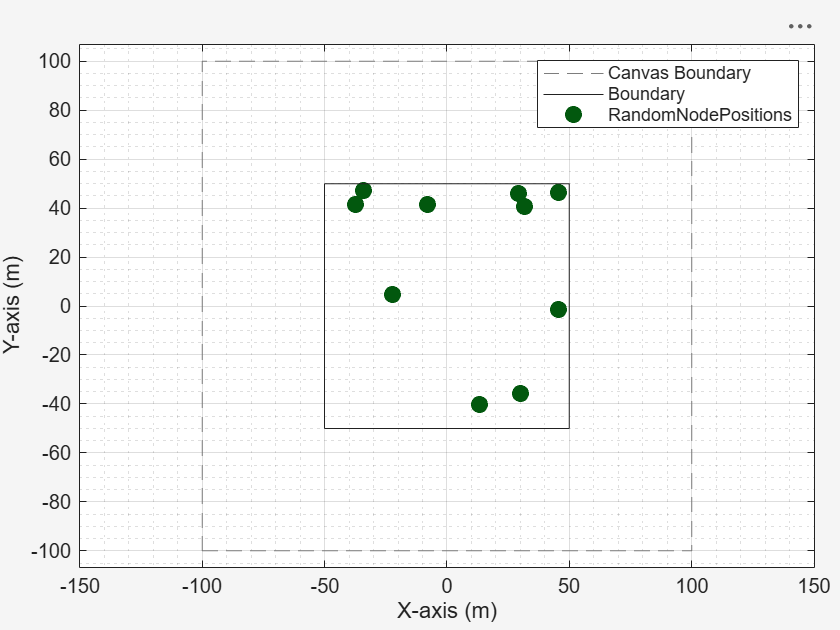
Export the visualization as an image file by uncommenting this line of code.
% exportView(viewer,FileName="myNetwork.png")Remove the node position by uncommenting this line of code.
% removeNodes(viewer)Hide the rectangle boundary by uncommenting this line of code.
% hideBoundary(viewer)Input Arguments
Name-Value Arguments
Version History
Introduced in R2026b

