このページは前リリースの情報です。該当の英語のページはこのリリースで削除されています。
MATLAB の値クラスのコード生成
この例では、MATLAB® の値クラスのコードを生成する方法について説明し、コード生成レポートで生成されたコードを示します。
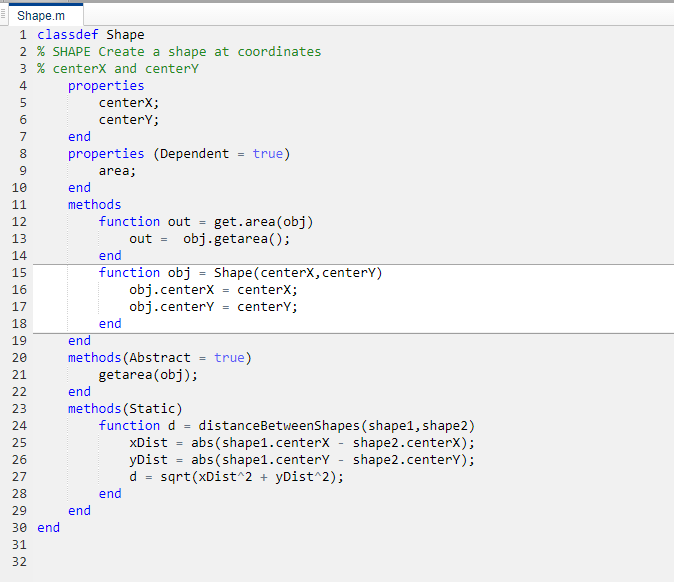
書き込み可能なフォルダーに、MATLAB 値クラス
Shapeを作成します。Shape.mとしてコードを保存します。classdef Shape % SHAPE Create a shape at coordinates % centerX and centerY properties centerX; centerY; end properties (Dependent = true) area; end methods function out = get.area(obj) out = obj.getarea(); end function obj = Shape(centerX,centerY) obj.centerX = centerX; obj.centerY = centerY; end end methods(Abstract = true) getarea(obj); end methods(Static) function d = distanceBetweenShapes(shape1,shape2) xDist = abs(shape1.centerX - shape2.centerX); yDist = abs(shape1.centerY - shape2.centerY); d = sqrt(xDist^2 + yDist^2); end end end
同じフォルダーに、
ShapeのサブクラスとなるSquareクラスを作成します。Square.mとしてコードを保存します。classdef Square < Shape % Create a Square at coordinates center X and center Y % with sides of length of side properties side; end methods function obj = Square(side,centerX,centerY) obj@Shape(centerX,centerY); obj.side = side; end function Area = getarea(obj) Area = obj.side^2; end end end
同じフォルダーに、
ShapeのサブクラスとなるRhombusクラスを作成します。Rhombus.mとしてコードを保存します。classdef Rhombus < Shape properties diag1; diag2; end methods function obj = Rhombus(diag1,diag2,centerX,centerY) obj@Shape(centerX,centerY); obj.diag1 = diag1; obj.diag2 = diag2; end function Area = getarea(obj) Area = 0.5*obj.diag1*obj.diag2; end end end
このクラスを使用する関数を書きます。
function [TotalArea, Distance] =   use_shape
%#codegen
s = Square(2,1,2);
r = Rhombus(3,4,7,10);
TotalArea  = s.area + r.area;
Distance = Shape.distanceBetweenShapes(s,r);
use_shapeのスタティック ライブラリを生成し、コード生成レポートを生成します。codegen -config:lib -report use_shape
codegenによって C のスタティック ライブラリが既定の名前use_shapeで生成され、既定のフォルダーcodegen/lib/use_shapeにサポート ファイルが生成されます。[レポートの表示] リンクをクリックします。
Rhombusクラス定義を確認するには、[MATLAB ソース] ペインの [Rhombus.m] の下にある [Rhombus] をクリックします。Rhombusクラス コンストラクターが強調表示されます。[変数] タブをクリックします。変数
objはRhombusクラスのオブジェクトであることがわかります。このプロパティを表示するには、objを展開します。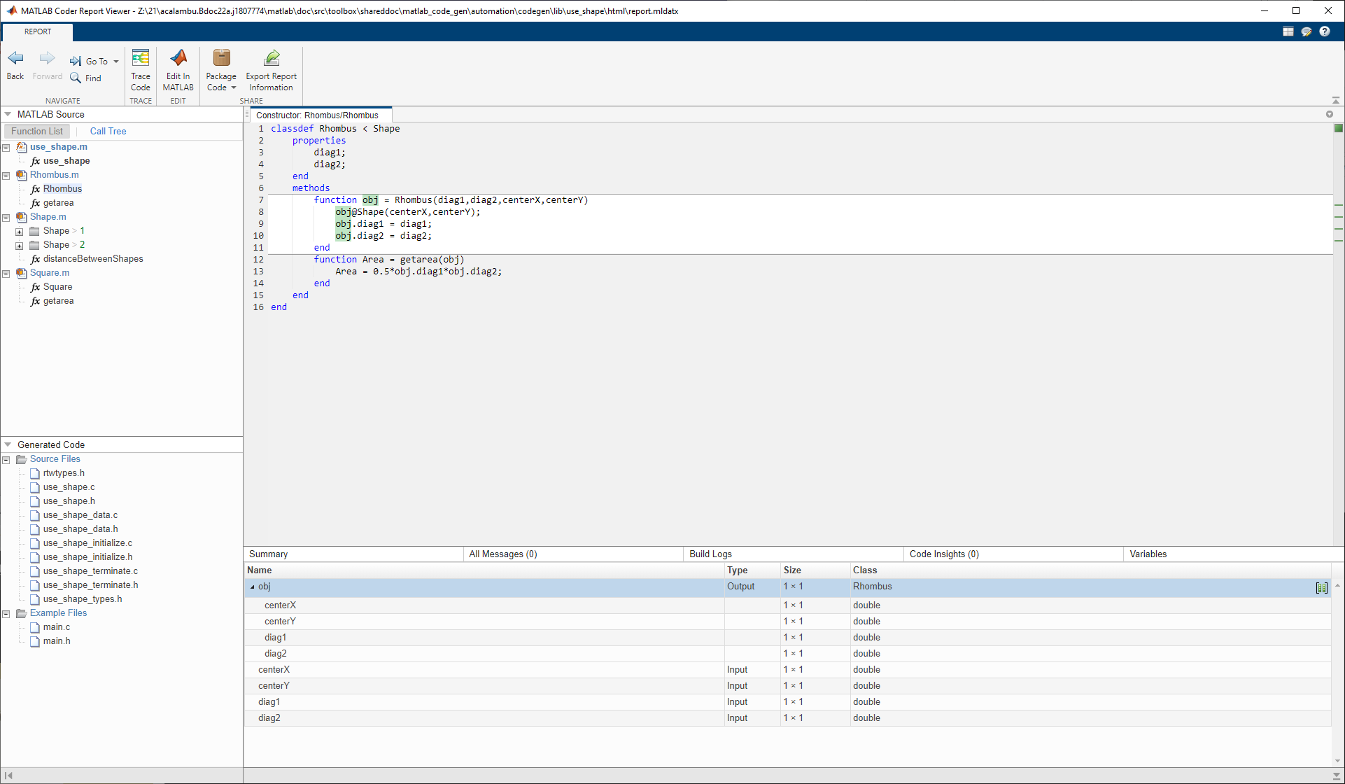
[MATLAB ソース] ペインでは、[呼び出しツリー] をクリックします。
[呼び出しツリー] ビューには、
use_shapeがRhombusコンストラクターを呼び出し、RhombusコンストラクターがShapeコンストラクターを呼び出していることが表示されます。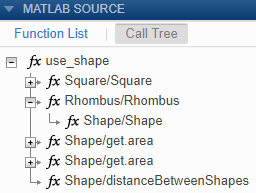
コード ペインの
Rhombusクラス コンストラクター内でポインターを次の行に移動します。obj@Shape(centerX,centerY)Rhombusクラスのコンストラクターが、基底ShapeクラスのShapeメソッドを呼び出します。Shapeクラス定義を表示するには、obj@ShapeでShapeをダブルクリックします。