Simulink Copilot を無効にする
R2026bライセンスをお持ちで、MathWorks® アカウントにサインインしている場合、Simulink® Copilot は既定で有効になっています。[Simulink Copilot を有効にする] 設定を変更すると、Copilot を無効にして、その機能を非表示にできます。ただし、Copilot を無効にしても、Simulink コンテキスト メニューの [Simulink Copilot で説明する] オプションは非表示になりません。
この設定を表示して変更するには、次のいずれかのオプションを使用します。
MATLAB® ツールストリップ: [ホーム] タブの [環境] セクションで
 [設定] をクリックします。次に、[設定] ウィンドウの左側のペインで、[Simulink Copilot] を選択します。
MATLAB コマンド プロンプト: 「
preferences 'Simulink Copilot'」と入力します。次に、[設定] ウィンドウの左側のペインで、[Simulink Copilot] を選択します。
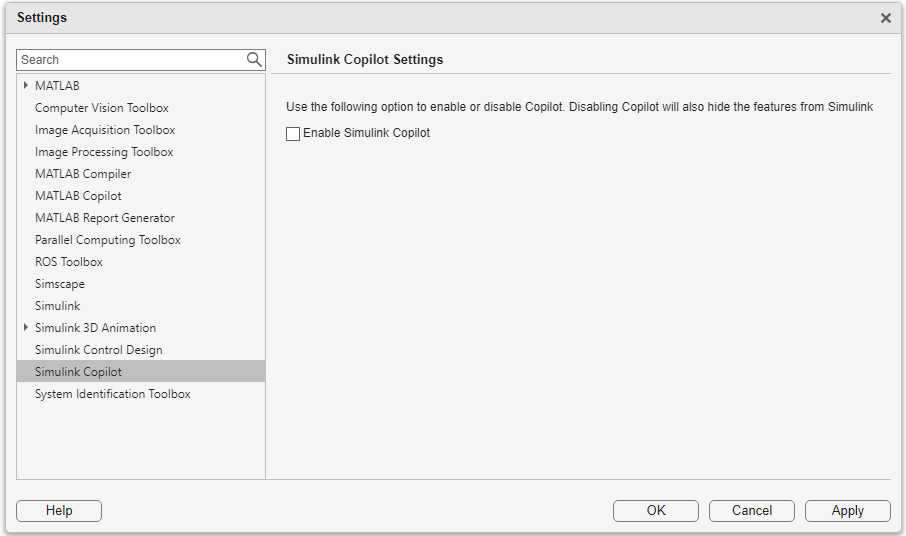
Simulink Copilot を無効にするには、[Simulink Copilot を有効にする] チェック ボックスをオフにして、[適用] をクリックします。Simulink Copilot を再度有効にするには、このチェック ボックスをオンにします。

