Reservoir (TL)
R2026bBoundary conditions for thermal liquid network at constant or time-varying pressure and temperature
Reservoir (TL) block

To add a block to a model, double-click the canvas and start typing the block name. Then, select the block from the list.
Libraries:
Simscape /
Foundation Library /
Thermal Liquid /
Elements
Description
The Reservoir (TL) block sets boundary conditions in a thermal liquid network. The volume of liquid inside the reservoir is assumed infinite. Port A, a thermal liquid conserving port, represents the reservoir inlet.
The inlet temperature depends on the direction of liquid flow. If liquid flows into the reservoir, the inlet temperature equals that of the upstream liquid and the reservoir acts as a heat sink. If liquid flows out of the reservoir, the inlet temperature equals that of the reservoir and the reservoir acts as a heat source. You specify the reservoir pressure and temperature with block parameter values or physical signals.
To ensure a smooth temperature change at the reservoir inlet during liquid flow reversal, the block includes heat conduction along a length equal to the effective diameter of the inlet pipe. This diameter is a function of the specified cross-sectional area of the inlet pipe.
Examples
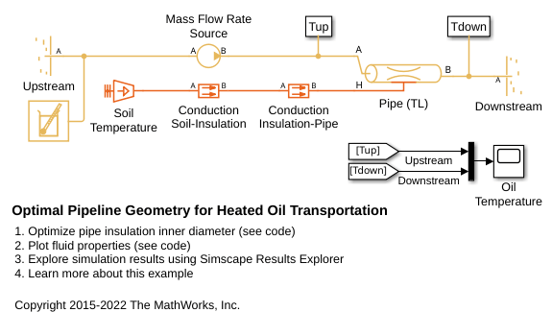
Optimal Pipeline Geometry for Heated Oil Transportation
Model shows the opposing effects of viscous warming and conductive cooling on the temperature of a buried pipeline segment for heated oil transportation. A requirement for these systems is for the crude oil to stay well above the pour point to provide a continuous steady flow. The system is modeled using the Thermal Liquid Foundation Library. Crude oil thermodynamic properties are stored in workspace matrices and are used to populate the Thermal Liquid Settings block mask parameters.
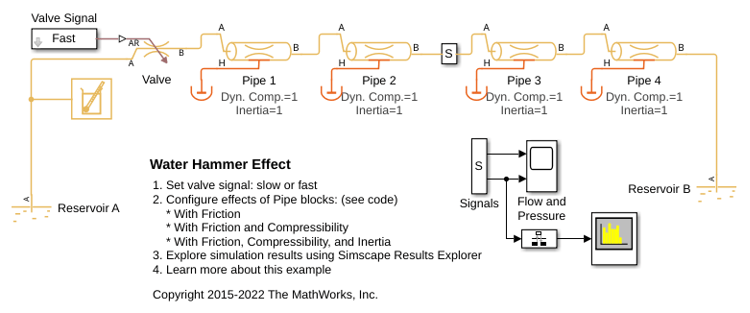
Water Hammer Effect
Model shows how the Thermal Liquid foundation library can be used to model water hammer in a long pipe. After slowly establishing a steady flow within the pipe by opening a valve accordingly, the same valve is shut within a few milliseconds. This triggers a water hammer effect. The valve is modeled using a Variable Local Restriction (TL) block and the pipe is divided into four segments using the Pipe (TL) block. Breaking the pipe into more segments increases fidelity at the expense of simulation performance.

