Specify Test Assessments in Polyspace Platform User Interface
R2026bA C/C++ unit test typically calls a function with some inputs and compares the function outputs against expected values. This comparison is called a test assessment.
Graphical tests, which you author in the Polyspace® Platform user interface or the Polyspace Python® API, can have one or more test steps. Each test step can have multiple assessments for the expected value of variables and function call counts, and one function call sequence assessment.
Assessments on variables and function call counts consist of two parts:
The result that you want to check, such as a function return value.
The check itself, which consists of a value and a comparator. Typically, the comparator is
==, which means that you are checking if the result is equal to a value. For call count assessments, the default check is to verify that a function is called at least once, in which case the comparator is>and the value to compare against is0u.
Call sequence assessments determine whether the code under test calls specific functions in a defined order. These assessments can also verify the expected inputs to each function call in the sequence. For more information, see Create Function Call Sequence Assessments.
Example Files
This tutorial uses the files in the folder
polyspaceroot\polyspace\examples\doc_pstest\global_static_varspolyspacerootC:\Program
Files\Polyspace\R2026b. To continue with this tutorial:
Create a new Polyspace Platform project and add the folder to the project.
Select Parse Code on the toolstrip to analyze the files in the folder.
Specifying Test Assessments
In this example, you write a test for the function addToOutliers() that returns a value and writes to a global variable numberOfOutliers:
bool addToOutliers(uint32_t val, uint32_t lim)
{
    if(val > lim)
        {
            numberOfOutliers++;
            return true;
        }
    else
        {
            return false;
        }
}
To write a test for addToOutliers() that assesses both the function return value and the global variable value after the function call:
On the Projects pane, right-click
addToOutliersand select Add Test Case.In the Inputs section of the test, add these values for the input variables:
val:101ulim:100unumberOfOutliers:1u
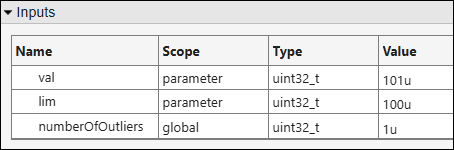
With these input values, the function
addToOutliersis expected to return a valuetrueand update the global variablenumberOfOutliersto 2u.In the Assessments section of the test, set the Value and Comparator columns for the assessment variables based on the above expectations:
pst_call_out: Set the comparator to==and value totrue.numberOfOutliers: Set the comparator to==and value to2u.

Note that if a test has multiple assessments, the failure of one assessment does not stop execution of the remaining test.
Build and run the test to see passing test results.
For more information on:
Building and running tests, see Build and Run Tests in Polyspace Platform User Interface.
Reviewing test results, see Review C/C++ Test Execution Results.
Types of Test Assessments
A graphical test in the Polyspace Platform user interface supports direct specification of assessment values for most common cases. The assessments that can be directly specified in the user interface fall into one of these categories:
Assessments on variables in the source code, which allow you to verify the expected behavior of a function.
Call count assessments, which allow you to verify whether or not a function is called, or compare the number of times a function is called to an expected value.
Call sequence assessments, which allow you to verify that the code under test calls specific functions in a defined order, and optionally check the expected input arguments for each function call.
Assessments on Variables with Simple Data Types
For variables with primitive data types, specify appropriate assessment values based on their data types. The data types are listed in the Type column.
For integer types such as
intandlong, specify a number.For character types such as
char, specify a single character.For floating-point types such as
floatanddouble, specify a number in the Value column and a tolerance in the Tolerance column. If the comparator in your assessment involves an equality operation, the assessment does not check for exact equality but rather checks for equality within the specified tolerance (the default tolerance is 0).
Assessments on Variables with Complex Data Types
You can perform assessments on variables of complex data types such as:
Structures — You can perform assessments on one or more data members of a structure. Specifying assessments on structured outputs is similar to specifying structured inputs. For more information on how to specify data of structured type, see Structures.
Unlike inputs, you can perform partial assessments on structures. You can disable the assessments for all the structure members that you are not interested in, and assess the remaining members only.
Enumerations — Specifying assessments on
enumoutputs is similar to specifyingenuminputs. For more information on how to specify data ofenumtype, see Enumerations.Unions — You can perform assessments on a specific member of a union. Specifying assessments on union outputs is similar to specifying union inputs. For more information on how to specify data of union type, see Unions.
Similar to inputs, if a union variable being assessed points to test data, you cannot change its member directly. Instead, you have to change the corresponding member of the test data that the variable points to.
Pointers — You can perform assessments on both a pointer and the pointed value. Specifying assessments on pointer outputs is similar to specifying pointer inputs.
You can assess if a pointer has the value
NULL.You can specify if the pointer points to a buffer with specific values.
For more details on how to specify pointer targets, see Specify Pointer Targets for C/C++ Test Authoring in Polyspace Platform User Interface.
Class objects (C++) — You can perform assessments on variables of class object types. By default, an assessment is generated for a class object only if the class defines the equality operator
operator==as a public member function with the parameter being aconstl-value reference to an object of the class type. You can explicitly add an assessment on a class object by using buttons in the Assessments section of a test, but make sure that the comparison in the assessment can actually be performed.For more information on how to specify data of class type, see Class Objects (C++).
Function Call Count Assessments
Function call count assessments allow you to verify whether or not a function is called, or compare the call count to an expected value. You can add call count assessments for callees of the code under test to the Assessments table in a tabular test step. To do so:
Open the test case in which you want to add a function call count assessment. Ensure you have parsed code and selected a code under test for the tabular step.
Click the Add assessment button
 next to the
Assessments table.
next to the
Assessments table.In the Select Test Assessment(s) dialog box, callees of the code under test appear with a scope of
fcn calland a type ofcall count. Select the function calls for which you want to add a call count assessment and click OK.The functions you select appear as new rows in the Assessments table. By default, the call count assessment verifies that the function is called (
call count > 0u). Change the comparator and value as needed. For example:To verify that a function is not called, set Comparator to
==and Value to0u.To verify that a function is called at least five times, set Comparator to
>=and Value to5u.
Limitations. To add a call count assessment for a function, the function must be supported for mocking. For more information, see Identify Why Function Is Not Supported for Mocking.
Function Call Sequence Assessments
Function call sequence assessments allow you to verify whether specific functions are called in a defined order during test execution. Unlike call count assessments, which check only how many times a function is called, call sequence assessments assess the order in which the functions are called, and can optionally check the input arguments to each function call against expected input values.
The call sequence is strict: when you include a function in the sequence, that function can only be called at the locations you specify. If the code under test makes any additional calls to that function outside of the defined sequence, the assessment fails.
For more information and a step-by-step tutorial on creating function call sequence assessments, see Create Function Call Sequence Assessments.
Limitations. To add a function to a call sequence, the function must be supported for mocking. For more information, see Identify Why Function Is Not Supported for Mocking.

