interpolateCurrentDensity
Interpolate current density in DC conduction result at arbitrary spatial locations
Since R2022b
Syntax
Description
Examples
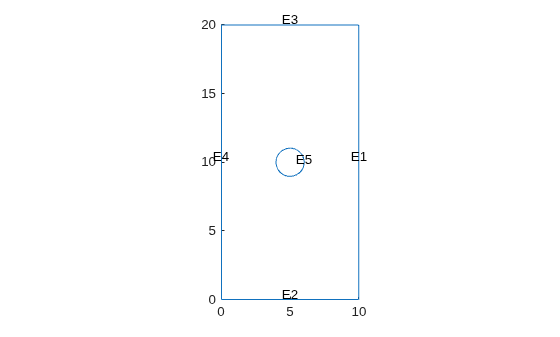
Create an femodel object for DC conduction analysis and include a 2-D geometry of a plate with a hole into the model.
model = femodel(AnalysisType="dcConduction", ... Geometry="PlateHolePlanar.stl");
Plot the geometry.
pdegplot(model.Geometry,EdgeLabels="on");
Specify the conductivity of the material.
model.MaterialProperties = ...
materialProperties(ElectricalConductivity=6e4);Apply the voltage boundary conditions on the top and bottom edges of the plate.
model.EdgeBC(3) = edgeBC(Voltage=100); model.EdgeBC(2) = edgeBC(Voltage=200);
Specify the surface current density on the edge representing the hole.
model.EdgeLoad(5) = edgeLoad(SurfaceCurrentDensity=200000);
Generate a mesh.
model = generateMesh(model);
Solve the problem.
R = solve(model);
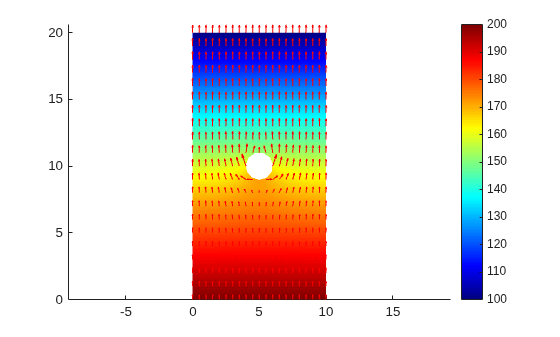
Plot the electric potential and current density.
figure pdeplot(R.Mesh,XYData=R.ElectricPotential,ColorMap="jet", ... FlowData=[R.CurrentDensity.Jx R.CurrentDensity.Jy]) axis equal
Interpolate the resulting current density to a grid covering the central portion of the geometry.
[X,Y] = meshgrid(2:0.25:8,8:0.25:12); Jintrp = interpolateCurrentDensity(R,X,Y)
Jintrp =
FEStruct with properties:
Jx: [425×1 double]
Jy: [425×1 double]
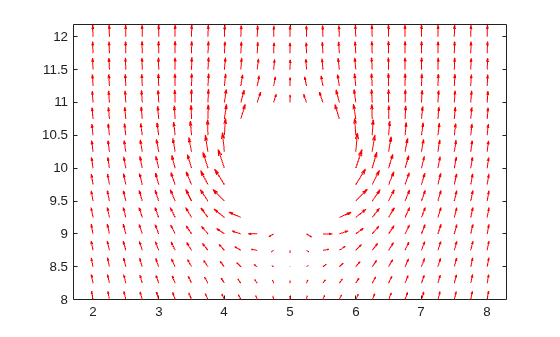
Reshape Jintrp.Jx and Jintrp.Jy, and plot the resulting current density.
JintrpX = reshape(Jintrp.Jx,size(X)); JintrpY = reshape(Jintrp.Jy,size(Y)); quiver(X,Y,JintrpX,JintrpY,Color="red") axis equal
Alternatively, you can specify the grid by using a matrix of query points.
querypoints = [X(:),Y(:)]'; Jintrp = interpolateCurrentDensity(R,querypoints);
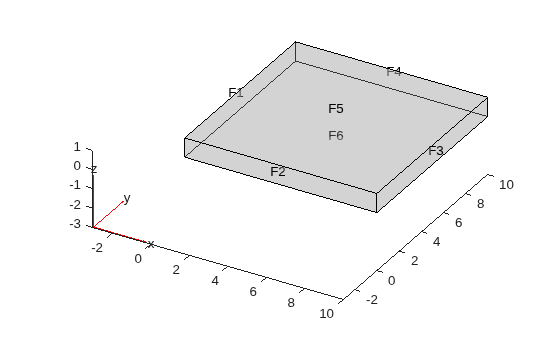
Create an femodel object for DC conduction analysis and include a geometry representing a 10-by-10-by-1 solid plate into the model.
model = femodel(AnalysisType="dcConduction", ... Geometry="Plate10x10x1.stl");
Plot the geometry.
pdegplot(model.Geometry,FaceLabels="on",FaceAlpha=0.3)
Specify the conductivity of the material.
model.MaterialProperties = ...
materialProperties(ElectricalConductivity=6e4);Apply the voltage boundary conditions on the two faces of the plate.
model.FaceBC([1 3]) = faceBC(Voltage=0);
Specify the surface current density on the top of the plate.
model.FaceLoad(5) = faceLoad(SurfaceCurrentDensity=100);
Generate a mesh.
model = generateMesh(model);
Solve the problem.
R = solve(model);
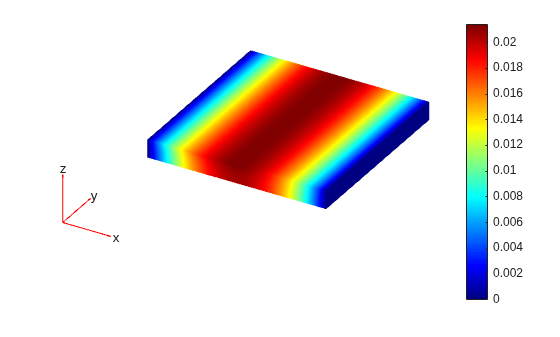
Plot the electric potential.
figure pdeplot3D(R.Mesh,ColorMapData=R.ElectricPotential)
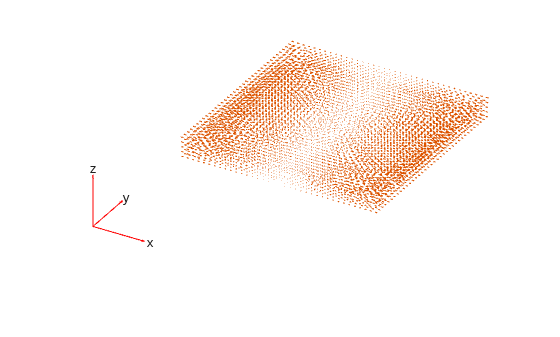
Plot the current density.
figure pdeplot3D(R.Mesh,FlowData=[R.CurrentDensity.Jx, ... R.CurrentDensity.Jy, ... R.CurrentDensity.Jz])
Interpolate the resulting current density to a coarser grid.
[X,Y,Z] = meshgrid(0:10,0:10,0:0.5:1); Jintrp = interpolateCurrentDensity(R,X,Y,Z)
Jintrp =
FEStruct with properties:
Jx: [363×1 double]
Jy: [363×1 double]
Jz: [363×1 double]
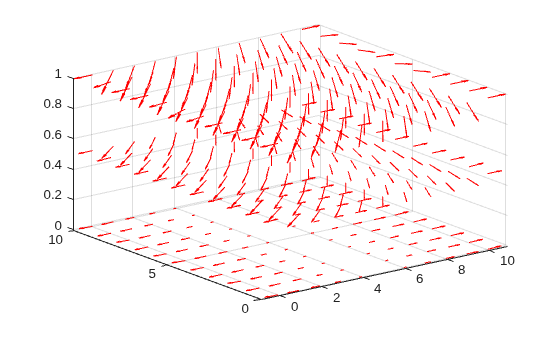
Reshape Jintrp.Jx, Jintrp.Jy, and Jintrp.Jz.
JintrpX = reshape(Jintrp.Jx,size(X)); JintrpY = reshape(Jintrp.Jy,size(Y)); JintrpZ = reshape(Jintrp.Jz,size(Z));
Plot the resulting current density.
figure
quiver3(X,Y,Z,JintrpX,JintrpY,JintrpZ,Color="red")
Input Arguments
Solution of a DC conduction problem, specified as a ConductionResults
object. Create results using the solve
function.
x-coordinate query points, specified as a real array.
interpolateCurrentDensity evaluates the current density at the 2-D
coordinate points [xq(i) yq(i)] or at the 3-D coordinate points
[xq(i) yq(i) zq(i)] for every i. Because of
this, xq, yq, and (if present)
zq must have the same number of entries.
interpolateCurrentDensity converts the query points to column
vectors xq(:), yq(:), and (if present)
zq(:). It returns current density values as a column vector of the
same size. To ensure that the dimensions of the returned solution are consistent with
the dimensions of the original query points, use reshape. For
example, use Jintrp = reshape(Jintrp,size(xq)).
Example: xq = [0.5 0.5 0.75 0.75]
Data Types: double
y-coordinate query points, specified as a real array.
interpolateCurrentDensity evaluates the current density at the 2-D
coordinate points [xq(i) yq(i)] or at the 3-D coordinate points
[xq(i) yq(i) zq(i)] for every i. Because of
this, xq, yq, and (if present)
zq must have the same number of entries.
interpolateCurrentDensity converts the query points to column
vectors xq(:), yq(:), and (if present)
zq(:). It returns current density values as a column vector of the
same size. To ensure that the dimensions of the returned solution are consistent with
the dimensions of the original query points, use reshape. For
example, use Jintrp = reshape(Jintrp,size(yq)).
Example: yq = [1 2 0 0.5]
Data Types: double
z-coordinate query points, specified as a real array.
interpolateCurrentDensity evaluates the current density at the 3-D
coordinate points [xq(i) yq(i) zq(i)]. Therefore,
xq, yq, and zq must have
the same number of entries.
interpolateCurrentDensity converts the query points to column
vectors xq(:), yq(:), and
zq(:). It returns current density values as a column vector of the
same size. To ensure that the dimensions of the returned solution are consistent with
the dimensions of the original query points, use reshape. For
example, use Jintrp = reshape(Jintrp,size(zq)).
Example: zq = [1 1 0 1.5]
Data Types: double
Query points, specified as a real matrix with either two rows for 2-D geometry or
three rows for 3-D geometry. interpolateCurrentDensity evaluates the
current density at the coordinate points querypoints(:,i) for every
i, so each column of querypoints contains
exactly one 2-D or 3-D query point.
Example: For a 2-D geometry, querypoints = [0.5 0.5 0.75 0.75; 1 2 0
0.5]
Data Types: double
Output Arguments
Current density at query points, returned as an FEStruct object
with the properties representing the spatial components of the current density at the
query points. For query points that are outside the geometry,
Jintrp.Jx(i), Jintrp.Jy(i), and
Jintrp.Jz(i) are NaN. Properties of an
FEStruct object are read-only.
Version History
Introduced in R2022b
See Also
Objects
Functions
MATLAB Command
You clicked a link that corresponds to this MATLAB command:
Run the command by entering it in the MATLAB Command Window. Web browsers do not support MATLAB commands.
Web サイトの選択
Web サイトを選択すると、翻訳されたコンテンツにアクセスし、地域のイベントやサービスを確認できます。現在の位置情報に基づき、次のサイトの選択を推奨します:
また、以下のリストから Web サイトを選択することもできます。
最適なサイトパフォーマンスの取得方法
中国のサイト (中国語または英語) を選択することで、最適なサイトパフォーマンスが得られます。その他の国の MathWorks のサイトは、お客様の地域からのアクセスが最適化されていません。
南北アメリカ
- América Latina (Español)
- Canada (English)
- United States (English)
ヨーロッパ
- Belgium (English)
- Denmark (English)
- Deutschland (Deutsch)
- España (Español)
- Finland (English)
- France (Français)
- Ireland (English)
- Italia (Italiano)
- Luxembourg (English)
- Netherlands (English)
- Norway (English)
- Österreich (Deutsch)
- Portugal (English)
- Sweden (English)
- Switzerland
- United Kingdom (English)