findBoundaryConditions
R2026bFind boundary condition assignment for a geometric region
Description
BCregion = findBoundaryConditions(BCs,RegionType=RegionID)BCregion assigned to the specified
region.
Examples
Create a PDE model and import a simple block geometry. Plot the geometry displaying the face labels.
model = createpde(3);
importGeometry(model,"Block.stl");
pdegplot(model,FaceLabels="on",FaceAlpha=0.5)
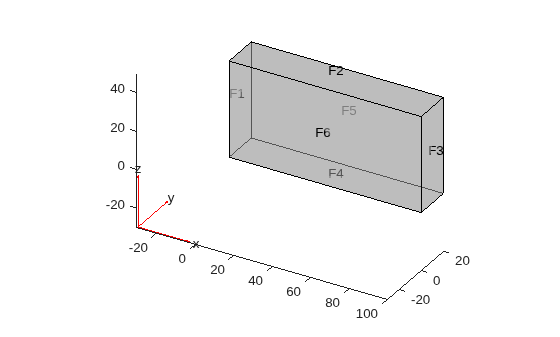
Set zero Dirichlet conditions on faces 1 and 2 for all equations.
applyBoundaryCondition(model,"dirichlet",Face=1:2,u=[0,0,0]);On face 3, set the Neumann boundary condition for equation 1 and Dirichlet boundary condition for equations 2 and 3.
applyBoundaryCondition(model,"mixed",Face=3, ...
    h=[0 0 0;0 1 0;0 0 1], ...
    r=[0;3;3], ...
    g=[10;0;0], ...
    q=[1 0 0;0 0 0;0 0 0]);
Set Neumann boundary conditions with opposite signs on faces 5 and 6 for all equations.
applyBoundaryCondition(model,"neumann",Face=4:5,g=[1;1;1]);
applyBoundaryCondition(model,"neumann",Face=6,g=[-1;-1;-1]);
Check the boundary condition specification on face 1.
findBoundaryConditions(model.BoundaryConditions,Face=1)
ans =
  BoundaryCondition with properties:

           BCType: 'dirichlet'
       RegionType: 'Face'
         RegionID: [1 2]
                r: []
                h: []
                g: []
                q: []
                u: [0 0 0]
    EquationIndex: []
       Vectorized: 'off'
       InternalBC: []
Check the boundary condition specification on face 3.
findBoundaryConditions(model.BoundaryConditions,Face=3)
ans =
  BoundaryCondition with properties:

           BCType: 'mixed'
       RegionType: 'Face'
         RegionID: 3
                r: [3×1 double]
                h: [3×3 double]
                g: [3×1 double]
                q: [3×3 double]
                u: []
    EquationIndex: []
       Vectorized: 'off'
       InternalBC: []
Check the boundary condition specification on face 5.
findBoundaryConditions(model.BoundaryConditions,Face=5)
ans =
  BoundaryCondition with properties:

           BCType: 'neumann'
       RegionType: 'Face'
         RegionID: [4 5]
                r: []
                h: []
                g: [3×1 double]
                q: []
                u: []
    EquationIndex: []
       Vectorized: 'off'
       InternalBC: []
Input Arguments
Output Arguments
Version History
Introduced in R2016b

