GPU での A\b のベンチマーク
R2026bこの例では、GPU における線形システムの求解についてベンチマークを実行する方法を示します。
MATLAB® の線形代数関数は、高速で数値的にロバストな行列計算を実行します。A*x = b の x を求めるためのコードは非常にシンプルです。行列の左除算 (mldivide またはバックスラッシュ演算子 (\) とも呼ばれる) を使用して、x (つまり、x = A\b) を計算します。この例では、さまざまな行列サイズについて、GPU および CPU での mldivide 関数の単精度および倍精度のパフォーマンスを比較します。
GPU の設定の確認
GPU が利用可能かどうかをチェックします。
gpu = gpuDevice;
disp(gpu.Name + " GPU detected and available.")
NVIDIA RTX A5000 GPU detected and available.
この例のコードの時間測定は、64 GB の RAM を搭載した Windows® 11、Intel® Xeon® W-2133 3.60 GHz テスト システムで行いました。
ベンチマーク パラメーターの定義
他の多くの並列アルゴリズムと同様に、並列での線形システムの求解のパフォーマンスは行列のサイズに大きく左右されるため、ベンチマークには適切な行列サイズを選択することが重要です。テスト パラメーターを定義するには次を行います。
倍精度数の格納に必要なバイト数を表す変数を作成する。
実行するテストの最大数を指定する。
利用可能な GPU メモリの 1/5 を最大サイズとするサイズのベクトルを作成する。ベンチマークでは、このベクトルをループ処理して、サイズが増加していく配列を作成します。対数的に等間隔な点のベクトルを作成するには、
logspace関数を使用します。MATLAB では要素数が を超える配列は GPU で使用できないため、作成される配列がこれよりも大きくなるサイズは削除してください。
sizeOfDouble = 8;
maxNumTests = 15;
maxSize = 0.2*gpu.AvailableMemory;
sizes = logspace(5,log10(maxSize),maxNumTests);
sizes(sizes/sizeOfDouble > intmax) = [];
ベンチマークの実行
プロセッサが 1 秒あたりに実行できる浮動小数点演算の回数は、パフォーマンスの有用な尺度です。1 秒あたりの浮動小数点演算の回数 (FLOPS) を求めるには、実行された浮動小数点演算の回数を、それらの演算を実行するのにかかった時間で除算します。
HPC チャレンジの浮動小数点演算数を使用すると、n 行 n 列の行列の場合、浮動小数点演算の回数は以下になります。
.
倍精度
MATLAB では倍精度または単精度で計算を実行できます。倍精度の代わりに単精度で計算を実行することにより、GPU で実行されるコードのパフォーマンスを改善できます。これは、ほとんどの GPU カードが、高い単精度のパフォーマンスを要求するグラフィックス表示用に設計されているためです。これに対し、CPU は汎用コンピューティング用に設計されているため、倍精度から単精度に切り替えてもこれほどの向上は見られません。データの単精度への変換と単精度データでの算術演算の実行の詳細については、浮動小数点数を参照してください。GPU での単精度計算に適する代表的なワークフローの例には、イメージ処理と機械学習があります。ただし、線形代数問題などの他の種類の計算には、一般に倍精度の処理が必要です。
単精度と倍精度を比較した GPU の相対的なパフォーマンスの近似測定を確認するには、デバイスの SingleDoubleRatio プロパティをクエリします。このプロパティは、デバイス上の倍精度浮動小数点演算装置 (FPU) に対する単精度 FPU の比率を示します。ほとんどのデスクトップ GPU は倍精度の 24 倍または 32 倍の単精度浮動小数点演算装置を備え、64 倍のものもあります。
gpu.SingleDoubleRatio
ans =
32
sizes の各配列サイズについて、倍精度での GPU およびホスト CPU のパフォーマンスについてベンチマークを実行するには、次のようにします。
numTests = numel(sizes);
NDouble = floor(sqrt(sizes/(sizeOfDouble)));
timeCPUDouble = inf(1,numTests);
timeGPUDouble = inf(1,numTests);

for idx=1:numTests
    disp("Test " + idx + " of " + numTests + ". Timing double-precision mldivide on GPU and CPU with " + NDouble(idx)^2 + " elements.")
    A = rand(NDouble(idx)) + 100*eye(NDouble(idx));
    b = rand(NDouble(idx),1);

    timeCPUDouble(idx) = timeit(@() A\b);

    A = gpuArray(A);
    b = gpuArray(b);
    timeGPUDouble(idx) = gputimeit(@() A\b);
end
Test 1 of 15. Timing double-precision mldivide on GPU and CPU with 12321 elements.
Test 2 of 15. Timing double-precision mldivide on GPU and CPU with 26896 elements.
Test 3 of 15. Timing double-precision mldivide on GPU and CPU with 58564 elements.
Test 4 of 15. Timing double-precision mldivide on GPU and CPU with 126736 elements.
Test 5 of 15. Timing double-precision mldivide on GPU and CPU with 275625 elements.
Test 6 of 15. Timing double-precision mldivide on GPU and CPU with 597529 elements.
Test 7 of 15. Timing double-precision mldivide on GPU and CPU with 1295044 elements.
Test 8 of 15. Timing double-precision mldivide on GPU and CPU with 2808976 elements.
Test 9 of 15. Timing double-precision mldivide on GPU and CPU with 6091024 elements.
Test 10 of 15. Timing double-precision mldivide on GPU and CPU with 13205956 elements.
Test 11 of 15. Timing double-precision mldivide on GPU and CPU with 28633201 elements.
Test 12 of 15. Timing double-precision mldivide on GPU and CPU with 62062884 elements.
Test 13 of 15. Timing double-precision mldivide on GPU and CPU with 134536801 elements.
Test 14 of 15. Timing double-precision mldivide on GPU and CPU with 291623929 elements.
Test 15 of 15. Timing double-precision mldivide on GPU and CPU with 632170449 elements.
GPU および CPU の倍精度の処理能力を FLOPS で求めます。
flopsCPUDouble = (2/3*NDouble.^3 + 3/2*NDouble.^2)./timeCPUDouble;
flopsGPUDouble = (2/3*NDouble.^3 + 3/2*NDouble.^2)./timeGPUDouble;
単精度
single関数を使用してデータを単精度に変換できます。また、zeros、ones、rand、eye などの作成関数で、データ型として single を指定することもできます。
GPU とホスト CPU の単精度のパフォーマンスについてベンチマークを実行します。
NSingle = floor(sqrt(sizes/(sizeOfDouble/2)));
timeCPUSingle = inf(1,numTests);
timeGPUSingle = inf(1,numTests);

for idx=1:numTests
    disp("Test " + idx + " of " + numTests + ". Timing single-precision mldivide on GPU and CPU with " + NSingle(idx)^2 + " elements.")
    A = rand(NSingle(idx),"single") + 100*eye(NSingle(idx),"single");
    b = rand(NSingle(idx),1,"single");

    timeCPUSingle(idx) = timeit(@() A\b);

    A = gpuArray(A);
    b = gpuArray(b);
    timeGPUSingle(idx) = gputimeit(@() A\b);
end
Test 1 of 15. Timing single-precision mldivide on GPU and CPU with 24964 elements.
Test 2 of 15. Timing single-precision mldivide on GPU and CPU with 53824 elements.
Test 3 of 15. Timing single-precision mldivide on GPU and CPU with 116964 elements.
Test 4 of 15. Timing single-precision mldivide on GPU and CPU with 254016 elements.
Test 5 of 15. Timing single-precision mldivide on GPU and CPU with 550564 elements.
Test 6 of 15. Timing single-precision mldivide on GPU and CPU with 1194649 elements.
Test 7 of 15. Timing single-precision mldivide on GPU and CPU with 2592100 elements.
Test 8 of 15. Timing single-precision mldivide on GPU and CPU with 5621641 elements.
Test 9 of 15. Timing single-precision mldivide on GPU and CPU with 12187081 elements.
Test 10 of 15. Timing single-precision mldivide on GPU and CPU with 26409321 elements.
Test 11 of 15. Timing single-precision mldivide on GPU and CPU with 57259489 elements.
Test 12 of 15. Timing single-precision mldivide on GPU and CPU with 124121881 elements.
Test 13 of 15. Timing single-precision mldivide on GPU and CPU with 269091216 elements.
Test 14 of 15. Timing single-precision mldivide on GPU and CPU with 583270801 elements.
Test 15 of 15. Timing single-precision mldivide on GPU and CPU with 1264371364 elements.
GPU および CPU の単精度の処理能力を FLOPS で求めます。
flopsCPUSingle = (2/3*NSingle.^3 + 3/2*NSingle.^2)./timeCPUSingle;
flopsGPUSingle = (2/3*NSingle.^3 + 3/2*NSingle.^2)./timeGPUSingle;
パフォーマンスのプロット
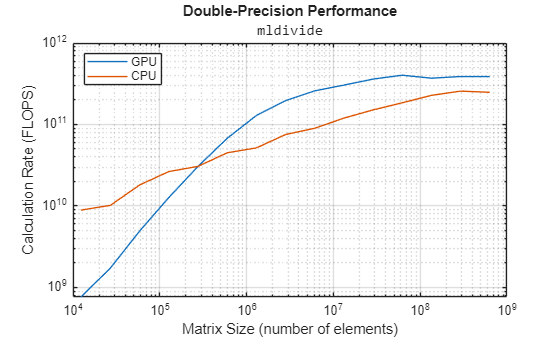
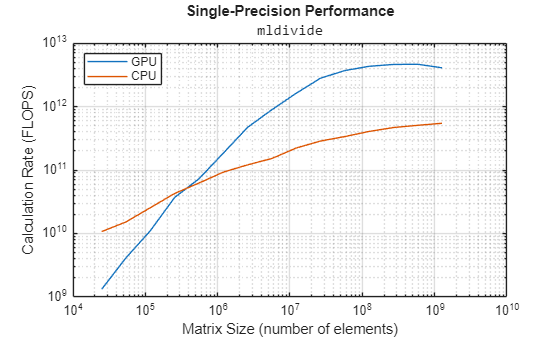
倍精度と単精度の処理能力を配列サイズに対してプロットします。CPU と GPU のパフォーマンスはどちらも、大きい行列サイズでは横ばいになります。
figure
loglog(NDouble.^2,flopsGPUDouble, ...
     NDouble.^2,flopsCPUDouble)
grid on
legend(["GPU" "CPU"],Location="NorthWest")
title("Double-Precision Performance","\fontname{monospace}mldivide")
ylabel("Calculation Rate (FLOPS)")
xlabel("Matrix Size (number of elements)")
figure
loglog(NSingle.^2,flopsGPUSingle, ...
     NSingle.^2,flopsCPUSingle)
grid on
legend(["GPU" "CPU"],Location="NorthWest")
title("Single-Precision Performance","\fontname{monospace}mldivide")
ylabel("Calculation Rate (FLOPS)")
xlabel("Matrix Size (number of elements)")
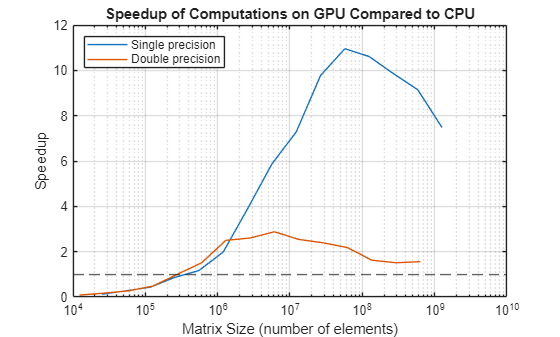
GPU の実行時間に対する CPU の実行時間の比率 (高速化) を計算し、結果をプロットします。高速化 1 を示すラインをプロットします。このラインより上にある点は、CPU よりも GPU 上において mldivide が高速である行列サイズを示しています。この例を公開するために使用した GPU は CPU よりもメモリが少ないため、より小さい行列サイズでは、CPU と比較して GPU でのパフォーマンスはメモリ レイテンシによって制限されるようになります。メモリ レイテンシとは、メモリから浮動小数点演算装置にデータを転送するのにかかる時間です。
speedupDouble = timeCPUDouble./timeGPUDouble;
speedupSingle = timeCPUSingle./timeGPUSingle;

figure
semilogx(NSingle.^2,speedupSingle, ...
     NDouble.^2,speedupDouble)
yline(1,"--")

grid on
legend(["Single precision" "Double precision"],Location="NorthWest")
title("Speedup of Computations on GPU Compared to CPU")
ylabel("Speedup")
xlabel("Matrix Size (number of elements)")
これらのベンチマークによって、以下が示されます。
データのサイズが十分大きい場合、GPU はホスト CPU よりも速く計算を実行できる。
GPU では倍精度よりも単精度の方が計算の実行が速く、多くの場合ははるかに速い。
これらのベンチマークの結果は、お使いのハードウェアによって異なります。
参考
gpuArray | gpuDevice | mldivide

