メインコンテンツ

Quadrature Oscillator

R2026b

Generate sine and cosine signals from angular frequency input

Since R2026b

Libraries:
Power Converter Control with Motor Control Blockset / Signal Management

Description

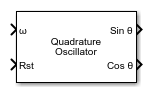
The Quadrature Oscillator block generates quadrature sine and cosine signals from an angular frequency input. Use this block to produce orthogonal reference signals for coordinate transformations, phase-locked loops, or modulation schemes in motor control and power electronics applications. You can reset the oscillator phase using the reset input port.

Examples

expand all

This example shows how to generate sine and cosine reference signals for use with a Park transformation.

Add the Quadrature Oscillator block to your model from the pcclib/Signal Management library.

Connect the angular frequency signal to the ω input port.

Use the Sin θ and Cos θ outputs as reference signals for the Park transformation.

Ports

Input

expand all

Angular frequency of the desired output signals, specified as a scalar in rad/s. The block uses this frequency to determine the rate of change of the oscillator phase angle.

Data Types: single | double

Phase reset trigger signal, specified as a scalar. A rising edge on this port resets the oscillator phase angle to zero.

Data Types: single | double | Boolean

Output

expand all

Sine of the oscillator phase angle, returned as a scalar.

Data Types: single | double

Cosine of the oscillator phase angle, returned as a scalar.

Data Types: single | double

Parameters

expand all

To edit block parameters interactively, use the Property Inspector. From the Simulink® Toolstrip, on the Simulation tab, in the Prepare gallery, select Property Inspector.

Sample time for the block discrete integration, specified as a positive scalar in seconds. This value determines how often the oscillator updates its phase angle. Set this to match your model's fixed-step solver step size. A smaller value improves the smoothness and accuracy of the generated sine and cosine signals.

Programmatic Use

To set the block parameter value programmatically, use the set_param function.

Parameter: BlkSampleTime
Values: "50e-6" (default) | positive scalar in quotes
Data Types: char | string

Example: set_param(gcb,"BlkSampleTime","100e-6")

Data type of the sine and cosine output signals. By default, the block inherits the data type using an internal rule. Specify single for embedded targets with limited floating-point support, or double when higher precision is needed.

Programmatic Use

To set the block parameter value programmatically, use the set_param function.

Parameter: DataTypeParameter
Values: "Inherit: Inherit via internal rule" (default)
Data Types: char | string

Example: set_param(gcb,"DataTypeParameter","single")

Extended Capabilities

expand all

C/C++ Code Generation
Generate C and C++ code using Simulink® Coder™.

HDL Code Generation
Generate VHDL, Verilog and SystemVerilog code for FPGA and ASIC designs using HDL Coder™.

Fixed-Point Conversion
Design and simulate fixed-point systems using Fixed-Point Designer™.

Version History

Introduced in R2026b