mbcrunner Class
R2026bDescription
The mbcrunner class is a handle class.
Use the mbcrunner class and methods to programmatically run
CAGE operations.
Creation
Description
obj = mbcrunnermbcrunner handle object to the current project in the CAGE
app.
obj = mbcrunner(projectFile)mbcrunner handle object to the CAGE project specified by
projectFile.
obj = mbcrunner(projectFile,inBrowser)inBrowser as true.
Input Arguments
Properties
Methods
Examples
Use the mbcrunner class and methods to perform these operations programmatically for a CAGE project:
Update project constraints.
Import new models and rerun optimizations and feature filling.
Retrieve the optimization results to calculate the sum objective and visualize the results.
Load Model Project
Use the mbcLoadProject method to load the gasolineOneStage.mat model project from the mbctraining folder.
proj = mbcLoadProject(fullfile( ...
    matlabroot,'toolbox', 'mbc', 'mbctraining', 'gasolineOneStage.mat'));
Create mbcrunner Object
Load the Gasoline_optimization.cag project from the mbctraining folder as the template for the mbcrunner object.
runner = mbcrunner(fullfile( ...
    matlabroot,"toolbox","mbc","mbctraining","Gasoline_optimization.cag"));
Update CAGE Project Constraints
Use the updateConstraints method to update the RESIDFRAC constraint to 24 in the BTQ_Optimization optimization.
updateConstraints(runner,"BTQ_Optimization","RESIDFRAC",24);
Update the RESIDFRAC constraint to 24 in the Sum_BTQ_Optimization optimization.
updateConstraints(runner,"Sum_BTQ_Optimization","RESIDFRAC",24);
Import Models and Rerun Optimizations
Use the importModels method to import the models from the model project to the CAGE project and rerun the optimizations and feature filling.
[models,updatedItems,updatedTables,msg] = importModels(runner,proj);
Retrieve Optimization Results
Use the optimizationResults method to retrieve the results of the Sum_BTQ_Optimization optimization.
results = optimizationResults(runner,"Sum_BTQ_Optimization");Calculate Sum Objective
To calculate the sum objective, multiply the weights by the model values and sum all the elements.
objectiveValue = sum(results.BTQ_weights.*results.BTQ);
Visualize Residual Fraction Constraint Results
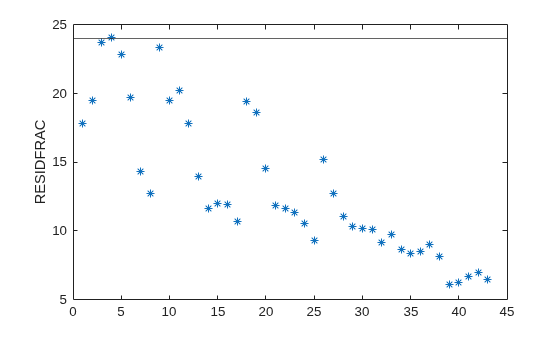
Plot the residual fraction results to review which operating points are near the limit of 24.
plot(results.RESIDFRAC, '*');
yline(24);
ylabel("RESIDFRAC");
Version History
Introduced in R2024b

