iddataPlotOptions
(Not recommended) Option set for plot when plotting data
contained in an iddata object
iddataPlotOptions is not recommended. Use dataPlotOptions instead to create option sets for idplot. For more information, see Version History.
Syntax
Description
creates
the default option set for plotting time-domain data. Use dot notation to customize
the option set, if needed.opt = iddataPlotOptions('time')
creates a default option set for plotting frequency-domain data. Use dot notation to
customize the option set, if needed.opt = iddataPlotOptions('frequency')
initializes the plot options with the System Identification Toolbox™
preferences. This syntax can include any of the input argument
combinations in the previous syntaxes. Use this syntax to change a few plot options
but otherwise use your toolbox settings.opt = iddataPlotOptions(___,'identpref')
Examples
Create an option set and use it for plotting data
% Create Option Set opt = iddataPlotOptions('time'); opt.TimeUnits = 'minutes'; % Turn grid on opt.Grid = 'on'; % Load input/output data and plot it. load iddata1 z1 h = plot(z1, opt);
Generate data with two inputs and one output, plot the data, and change the orientation of the plots.
% Generate the data set. z = iddata(randn(100,1),rand(100,2)); % Configure a time plot. opt = iddataPlotOptions('time'); % Plot the data. h = plot(z,opt); % Change the orientation of the % plots such that all inputs are plotted in one column, % and all outputs are in a second column. opt.Orientation = 'two-column'; h = plot(z,opt); % Alternatively, use setoptions. setoptions(h,'Orientation','two-column')
Create an option set with default options for frequency-domain data.
opt = iddataPlotOptions('frequency'); % Specify plot properties, such as phase visibility and frequency units. opt.PhaseVisible = 'off'; opt.FreqUnits = 'Hz'; % Create a plot with the specified options. load iddata7 z7 zf = fft(z7); h = plot(zf,opt);
Specify identpref for standard
preferences.
opt = iddataPlotOptions('time','identpref');
Output Arguments
Option set containing the specified options for idplot. The structure has
the following fields:
| Field | Description | ||||||||||||||||||||||||||||||
|---|---|---|---|---|---|---|---|---|---|---|---|---|---|---|---|---|---|---|---|---|---|---|---|---|---|---|---|---|---|---|---|
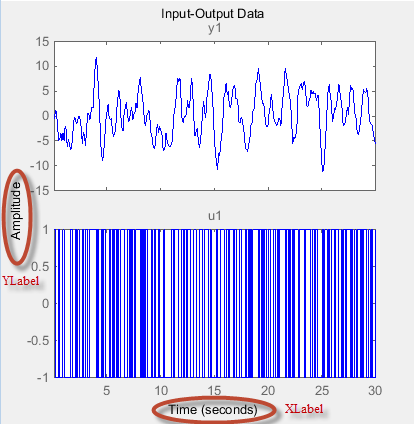
Title, XLabel,
YLabel
| Text and style for axes labels and plot title, specified as a structure array with the following fields:
| ||||||||||||||||||||||||||||||
TickLabel | Tick label style, specified as a structure array with the following fields:
| ||||||||||||||||||||||||||||||
Grid | Show or hide the grid, specified as one of the
following values: Default:
| ||||||||||||||||||||||||||||||
GridColor | Color of the grid lines, specified as one of the
following values: vector of RGB values in the range
Default:
| ||||||||||||||||||||||||||||||
XlimMode,
YlimMode | Axes limit modes, specified as one of the following values:
Default:
| ||||||||||||||||||||||||||||||
Xlim, Ylim
| Axes limits, specified as maximum and minimum values. Default: | ||||||||||||||||||||||||||||||
IOGrouping
| Grouping of input-output pairs, specified as one of
the following values: Default:
| ||||||||||||||||||||||||||||||
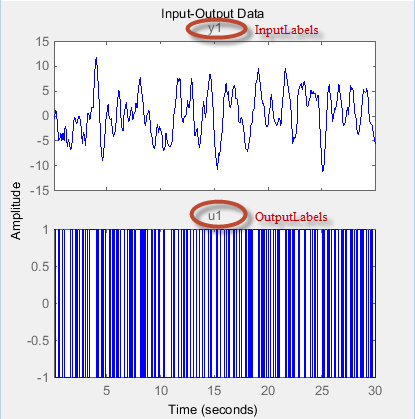
InputLabels,
OutputLabels
| Input and output label styles on individual plot axes, specified as a structure array with the following fields:
| ||||||||||||||||||||||||||||||
InputVisible,
OutputVisible | Visibility of input and output channels, specified
as one of the following values: Default:
| ||||||||||||||||||||||||||||||
Orientation | Orientation of the input and output data plots, specified as one of the following values:
Default:
| ||||||||||||||||||||||||||||||
For time-domain data plots only:
| |||||||||||||||||||||||||||||||
For frequency-domain data plots only:
| |||||||||||||||||||||||||||||||
Version History
Introduced in R2014aiddataPlotOptons is not recommended. Use dataPlotOptions instead to create option sets for idplot, which replaces plot.
iddataPlotOtions continues to work with
plot. There are no plans to remove
iddataPlotOptions at this time.
MATLAB Command
You clicked a link that corresponds to this MATLAB command:
Run the command by entering it in the MATLAB Command Window. Web browsers do not support MATLAB commands.
Web サイトの選択
Web サイトを選択すると、翻訳されたコンテンツにアクセスし、地域のイベントやサービスを確認できます。現在の位置情報に基づき、次のサイトの選択を推奨します:
また、以下のリストから Web サイトを選択することもできます。
最適なサイトパフォーマンスの取得方法
中国のサイト (中国語または英語) を選択することで、最適なサイトパフォーマンスが得られます。その他の国の MathWorks のサイトは、お客様の地域からのアクセスが最適化されていません。
南北アメリカ
- América Latina (Español)
- Canada (English)
- United States (English)
ヨーロッパ
- Belgium (English)
- Denmark (English)
- Deutschland (Deutsch)
- España (Español)
- Finland (English)
- France (Français)
- Ireland (English)
- Italia (Italiano)
- Luxembourg (English)
- Netherlands (English)
- Norway (English)
- Österreich (Deutsch)
- Portugal (English)
- Sweden (English)
- Switzerland
- United Kingdom (English)