Fixed-Point Type Conversion Using Derived Ranges
R2026bThis example shows how to convert floating-point MATLAB® code to fixed-point using derived ranges in the HDL Workflow Advisor.
MATLAB Design
This example uses a discrete time integrator filter design and a test bench that exercises the filter.
Design: mlhdlc_dti
Test bench: mlhdlc_dti_tb
Simulate the design with the test bench before code generation to ensure there are no runtime errors.
mlhdlc_dti_tb
Create a New HDL Coder™ Project
To create a new project, enter the following command:
coder -hdlcoder -new flt2fix_project_dmm
In the HDL Workflow Advisor, in the Fixed-Point Conversion list, select Convert to fixed-point at build time.
In the Tasks pane, select Define Input Types.
Click Browse. Select
mlhdlc_dti.mas the MATLAB function.Click the plus button. Select
mlhdlc_dti_tb.mas the MATLAB Test Bench.To automatically define inputs, click Run.
For more information about these steps, see Generate HDL Code from MATLAB Algorithms.
Determine Initial Fixed-Point Types
In the Tasks pane, select Fixed-Point Conversion.
To generate an instrumented MEX file that enables signal logging during simulation, click Analyze Design.
To execute the instrumented floating-point simulation, click Propose Types.
After instrumented floating-point simulation completes, the HDL Workflow Advisor proposes fixed-point types for each variable in the design based on the minimum and maximum values during simulation using the test bench.
The simulation range of the variable is_clipped in the function mlhdlc_dti is a constant value 0. However, the variable can take values from -1 to 1. Compute derived ranges to adjust the range used to propose types for this variable.
Compute Derived Ranges
Enable derived range analysis. In the Propose Types list, in the Analyze ranges using derived range analysis option, click the Enable checkbox. The tool prompts you to specify design ranges for the inputs variables in the Static Min and Static Max columns.
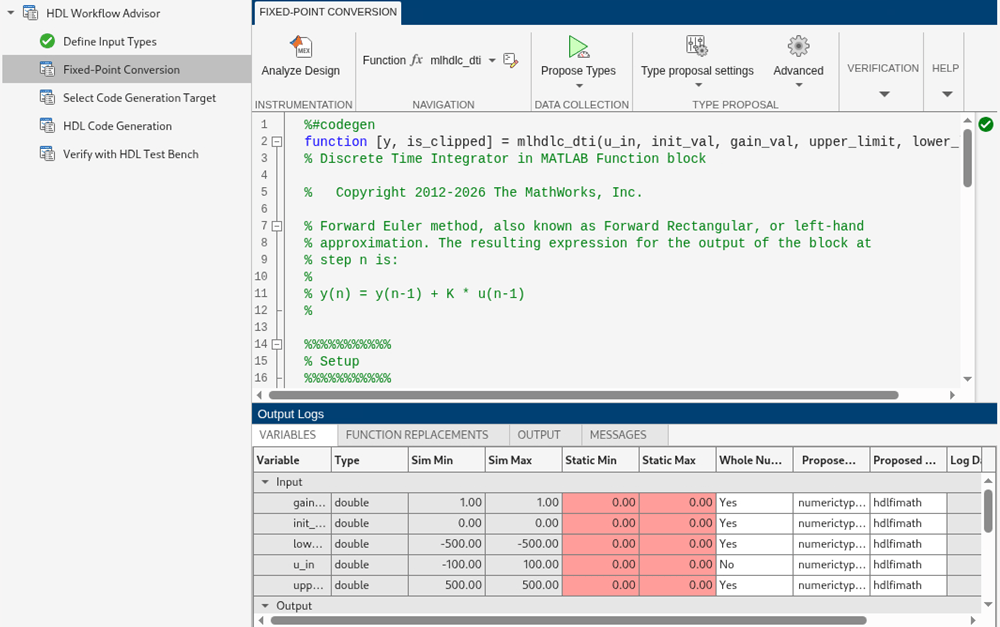
Manually edit the Static Min and Static Max entries in the table for the variable is_clipped to -1 and 1.
To propose types using derived range analysis, click the Analyze button.
The minimum and maximum values now include the complete design ranges.

