メインコンテンツ

Pow2 HDL Optimized

R2026b

Compute base-2 exponential of input

Since R2026b

  • Pow2 HDL Optimized block

Libraries:
Fixed-Point Designer HDL Support / Math Operations

Description

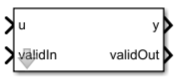
The Pow2 HDL Optimized block computes the base-2 exponential of an input. This block is optimized for efficient HDL code generation with HDL Coder™.

Ports

Input

expand all

Value to compute base-2 exponential of, specified as a real-valued scalar. Fixed-point inputs must use binary-point scaling.

Data Types: int8 | int16 | int32 | int64 | uint8 | uint16 | uint32 | uint64 | fixed point

Whether input is valid, specified as a Boolean scalar. This control signal indicates when the data from the u input port is valid. When this value is 1 (true), the block captures the value at the u input port. When this value is 0 (false), the block ignores the input samples.

Data Types: Boolean

Output

expand all

Base-2 exponential of input, returned as a scalar.

Dependencies

To set the data type of the output, use the Output Data Type parameter.

Data Types: int8 | int16 | int32 | int64 | uint8 | uint16 | uint32 | uint64 | fixed point

Whether output data is valid, returned as a Boolean scalar. When the value of this control signal is 1 (true), the block has successfully computed the output. When this value is 0 (false), the output data is not valid.

Data Types: Boolean

Parameters

expand all

To edit block parameters interactively, use the Property Inspector. From the Simulink® Toolstrip, on the Simulation tab, in the Prepare gallery, select Property Inspector.

Data type of the output y, specified as a Simulink.NumericType object, numerictype object, workspace variable, or MATLAB expression. Fixed-point data types must use binary-point scaling.

Programmatic Use

To set the block parameter value programmatically, use the set_param function.

To get the block parameter value programmatically, use the get_param function.

Parameter: OutDataType
Values: fixdt(0,16,12) (default) | Simulink.NumericType object | numerictype object | workspace variable | MATLAB expression

Programmatic Use: Add Block

To add the block programmatically, use the add_block function with one of these library block paths as the source.

"embeddedMatrixLib/Math Operations/Pow2 HDL Optimized"

Example: add_block("embeddedMatrixLib/Math Operations/Pow2 HDL Optimized","myModel/myBlock",MakeNameUnique="on")

For information about programmatic access to individual block parameters, see the Programmatic Use section of parameter descriptions on this page.

Algorithms

expand all

Extended Capabilities

expand all

HDL Code Generation
Generate VHDL, Verilog and SystemVerilog code for FPGA and ASIC designs using HDL Coder™.

Version History

Introduced in R2026b