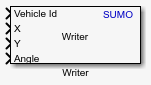
Writer
Libraries:
Automated Driving Toolbox Interface for Eclipse SUMO Traffic Simulator
Description
Add-On Required: This feature requires the Automated Driving Toolbox Interface for Eclipse SUMO Traffic Simulator add-on.
The Writer block writes vehicle or visualization information to a SUMO™ scenario. Use the Topic Category parameter to select which data to write to the scenario.
You can set the Topic Category parameter to
Vehicle or Visualization. For example,
when you select the Vehicle topic, the block writes data associated
with the vehicle, such as the actor ID, velocity, and angular velocity, to the SUMO scenario.
Examples
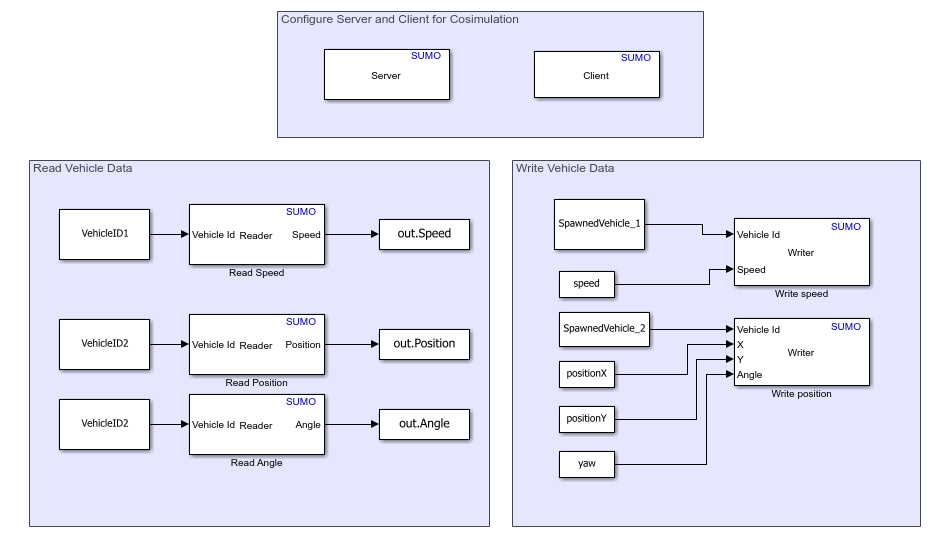
Read and Write Vehicle Data in SUMO Scenario Using Cosimulation with Simulink
Read and write vehicle data in Eclipse™ SUMO scenario.
Ports
Input
ID of the vehicle to write to or track in the SUMO scenario, specified as a string scalar.
Example: "Vehicle_1"
Dependencies
To enable this port, set Topic Category to
Vehicle or set Topic Category to
Visualization and then set Visualization
Topic to Track Vehicle.
Data Types: string
Position of the vehicle along the x-axis, in meters, specified as a real-valued scalar.
Dependencies
To enable this port:
Set Topic Category to
Vehicle.Set Vehicle Topic to
Position.
Data Types: double
Position of the vehicle along the y-axis, in meters, specified as a real-valued scalar.
Dependencies
To enable this port:
Set Topic Category to
Vehicle.Set Vehicle Topic to
Position.
Data Types: double
Yaw of the vehicle, in degrees, specified as a real-valued scalar.
Dependencies
To enable this port:
Set Topic Category to
Vehicle.Set Vehicle Topic to
Position.
Data Types: double
ID of the route edge on which to position the vehicle, specified as a string scalar.
Dependencies
To enable this port:
Set Topic Category to
Vehicle.Set Vehicle Topic to
Position.Select Use Route Flag parameter.
Data Types: string
Index of the lane of the route on which to position the vehicle, specified as a numeric scalar.
Dependencies
To enable this port:
Set Topic Category to
Vehicle.Set Vehicle Topic to
Position.Select Use Route Flag parameter.
Data Types: uint32
Route mapping of the vehicle position, specified as an integer in the range [0, 7]. Each bit of the binary equivalent of the specified integer represents whether the vehicle position maps to an available route, edge, or lane of the road network.
Dependencies
To enable this port:
Set Topic Category to
Vehicle.Set Vehicle Topic to
Position.Select Use Route Flag parameter.
Data Types: uint8
Distance offset relative to front the vehicle, in meters, specified as a real-valued scalar.
Dependencies
To enable this port:
Set Topic Category to
Vehicle.Set Vehicle Topic to
Min gap.
Data Types: double
Speed of the vehicle, in meters per second, specified as a real-valued scalar.
Dependencies
To enable this port:
Set Topic Category to
Vehicle.Set Vehicle Topic to
Speed.
Data Types: double
Speed mode of the vehicle, specified as an integer in the range [0, 127]. Each bit of the binary equivalent of the returned integer represents whether a specific speed mode is enabled. For example, if the block returns the value 73, this corresponds to the binary pattern 1001001, which indicates that speed modes 1, 4, and 7 are enabled.
Dependencies
To enable this port:
Set Topic Category to
Vehicle.Set Vehicle Topic to
Speed Mode.
Data Types: uint32
ID of the visualization in the SUMO interface in which you want to view the simulation, specified as a string scalar.
Dependencies
To enable this port, set Topic Category to
Visualization.
Data Types: string
Zoom factor of the simulation visualization in the SUMO interface, specified as a real-valued scalar.
Dependencies
To enable this port:
Set Topic Category to
Visualization.Set Visualization Topic to
Zoom factor.
Data Types: double
Schema of the simulation visualization in the SUMO interface, specified as a string scalar.
Dependencies
To enable this port:
Set Topic Category to
Visualization.Set Visualization Topic to
Schema.
Data Types: string
Parameters
Specify the topic category to which to write data as one of these options:
Vehicle— Writes vehicle data to the SUMO scenarioVisualization— Writes visualization data to the SUMO scenario
Specify the vehicle data to write to the SUMO scenario, specified as one of these options:
Position— Position of the vehicle in the scenario.Min gap— Distance offset relative to the front vehicle, in meters.Speed— Speed of the vehicle, in meters per second.Speed mode— Speed mode of the vehicle.
Dependencies
To enable this parameter, set Topic Category to
Vehicle.
Specify the visualization data to write to the SUMO scenario, specified as one of these options:
Zoom factor— Zoom factor of the visualization view.Track Vehicle— Specifies to track the vehicle during simulation.Schema— Schema of the simulation visualization view.
Dependencies
To enable this parameter, set Topic Category to
Visualization.
Select this parameter to enable the Edge ID, Lane and Keep Route input ports, which you can use to position a vehicle in the scenario by specifying the route information.
Dependencies
To enable this parameter:
Set Topic Category to
Vehicle.Set Vehicle Topic to
Position.
Specify the sample time of the simulation, in seconds, as a positive real scalar.
Version History
Introduced in R2026a
MATLAB Command
You clicked a link that corresponds to this MATLAB command:
Run the command by entering it in the MATLAB Command Window. Web browsers do not support MATLAB commands.
Web サイトの選択
Web サイトを選択すると、翻訳されたコンテンツにアクセスし、地域のイベントやサービスを確認できます。現在の位置情報に基づき、次のサイトの選択を推奨します:
また、以下のリストから Web サイトを選択することもできます。
最適なサイトパフォーマンスの取得方法
中国のサイト (中国語または英語) を選択することで、最適なサイトパフォーマンスが得られます。その他の国の MathWorks のサイトは、お客様の地域からのアクセスが最適化されていません。
南北アメリカ
- América Latina (Español)
- Canada (English)
- United States (English)
ヨーロッパ
- Belgium (English)
- Denmark (English)
- Deutschland (Deutsch)
- España (Español)
- Finland (English)
- France (Français)
- Ireland (English)
- Italia (Italiano)
- Luxembourg (English)
- Netherlands (English)
- Norway (English)
- Österreich (Deutsch)
- Portugal (English)
- Sweden (English)
- Switzerland
- United Kingdom (English)